
MANUAL
Document Version 1.0
Product Version 1.0
© by SONUSCORE
SYSTEM REQUIREMENTS
For latest system requirements, please visit www.sonuscore.com, or your trusted dealer's website.
Welcome to LUX Orchestral Brass
Thank you very much for choosing Sonuscore software.
Congratulations on your brand-new instrument LUX Orchestral Brass by Sonuscore. We hope you will enjoy this instrument as much as we do. This manual will help you to get started and explains the features and functions of your new software.
Welcome to LUX Orchestral Brass. This KONTAKT instrument is a deeply multi-sampled orchestral brass library, that aims to provide all basic articulations for every standard brass section as well as extended playing techniques and other unique features. As orchestral libraries have grown more and more complex, we approached this instrument with the goal to make it as easy as possible to create stunning brass arrangements whether by programming individual sections or using the ensemble instrument.
To gain a deeper understanding of all this instrument's possibilities, be sure to check out our tutorials and walkthroughs.
Best regards and enjoy,
Sonuscore
SETUP
Loading LUX Orchestral Brass via Kontakt
LUX Orchestral Brass is not an independent plug-in, so you will first need to open an instance of Native Instruments' free Kontakt Player before you can start playing.
- Make sure you have Native Access installed and set up.
- Download and install Native Instrument’s free Kontakt Player.
- Paste your serial number into Native Access and download LUX Orchestral Brass via the Native Access interface.
- Open Kontakt Player as a plug-in in your host software (DAW), or as a stand-alone application and load the LUX Orchestral Brass instrument from the Kontakt library tab.
For more information about the Kontakt Sampler, visit the Kontakt Manual. (For Kontakt 7 Users you might find an older manual here.)
LUX Engine
The LUX Engine is the main interface of LUX Orchestral Brass. It is designed to be as intuitive and easy to use as possible, while still providing a wide range of options for customization to meet the needs of different users.
Basic Functionality
Articulations
In Lux Orchestral Brass, articulations are composed of different playing techniques and styles (here called Subarticulations). The library provides a wide range of articulations to choose from, but it is also designed to be flexible and allow for custom combinations, which can then be saved as User Articulations.
Subarticulations
Subarticulations are the individual playing techniques that were recorded and that make up an articulation. Each Subarticulation has its own set of parameters that can be adjusted to achieve the desired sound. You can layer up to four Subarticulations together to create a unique articulation.
Dynamics
The term "Dynamics" refers to the timbre differences in the sound of an instrument at different volume levels. For long subarticulations, dynamics and volume are completely separated and can be adjusted independently via the Volume Curve or the Dynamic Range slider, whereas for short subarticulations the volume and dynamics are always together.
Modulation
Depending on your settings, the Modulation can control various different aspects of any preset. It is used as the input of the volume curve, as a range source, and as a modulation source for other long articulations.
Delay
The LUX Engine has been built with two use-cases in mind: Live Mode and Lookahead Mode. Live Mode is designed for real-time performance, while Lookahead Mode is optimized for programmed material. You can change between these modes as needed. The Lookahead Mode introduces a constant delay of 250ms across all articulations.
Here are some helpful values for working with the delay in LUX products:
| Mode | Delay in Keyswitch or Single | Delay in Auto Divisi or Ensemble |
|---|---|---|
| Live Mode | 0ms | 50ms |
| Adaptive Presets (in Live Mode) | 120ms | 170ms |
| Legatos (in Live Mode) | 100-150ms (depending on Transition Speed) | 150-200ms (depending on Transition Speed) |
| Lookahead Mode | 250ms | 300ms |
Most DAWs offer a negative track delay feature that can be used to compensate for the delay introduced by the Lookahead Mode. This way LUX will play on click in the DAW even in Lookahead Mode.
Instrument Types
LUX Orchestral Brass provides four different instrument types, each with their own use cases. Many features are shared between all these instrument types.
- Single Instruments: One single preloaded articulation to play. You can not change that articulation, but you save on processing power and memory. Use these if you plan to load many different instances on multiple tracks.
- Keyswitch Instruments: The most used instrument type. Here you have access to all articulations per instrument and can switch between them using keyswitches
- Auto Divisi Instruments: These instruments automatically divide the MIDI Input onto multiple voices and then play the corresponding samples.
- Ensemble Instrument: This instrument type is designed for playing the entire brass section at once. Choose between different ensemble configurations, voicings and articulation sets.
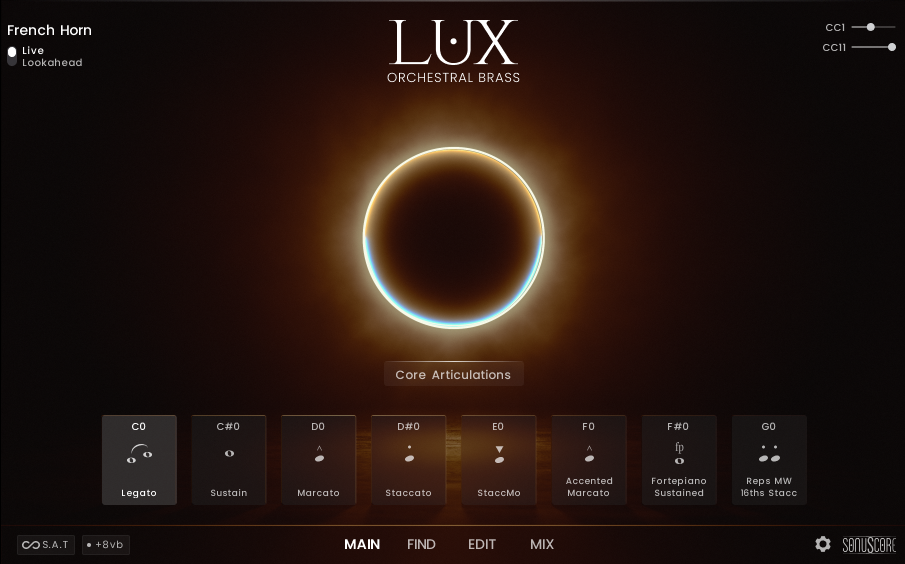
Main Page
 1
3.2.1 Modulation and Expression
2
3.2.2 Instrument
3
3.2.3 Live Mode and Lookahead Mode
4
3.2.4 Articulation Sets
5
3.2.5 Articulations
6
3.2.6 S.A.T. - Seamless Articulation Transitioning
7
3.2.7 Octave Layer
8
3.2.8 Navigation
1
3.2.1 Modulation and Expression
2
3.2.2 Instrument
3
3.2.3 Live Mode and Lookahead Mode
4
3.2.4 Articulation Sets
5
3.2.5 Articulations
6
3.2.6 S.A.T. - Seamless Articulation Transitioning
7
3.2.7 Octave Layer
8
3.2.8 Navigation
Modulation and Expression
Modulation and expression are essential for creating dynamic performances. They allow you to add nuance and emotion to your playing, making it more engaging and expressive. CC1 is your mod wheel. This will determine both the dynamics and the volume. The mod wheel is also used in various other places on the Edit Page. CC11 will add additional control to the volume of the instrument. You can deactivate Expression on the Settings Page
Instrument
In the top left corner you will always see which instrument you are currently using. This is especially useful in the Ensemble Instrument, because there you can see right here which instrument is currently selected. There you can even click it to select one of the other instrument slots.
Live Mode and Lookahead Mode
LUX Orchestral Brass has two playing modes: Live Mode and Lookahead.
In Live Mode, all articulations play as they are, with the initial note of the legato having no delay and the rest of the legato reacting to a delay of about -200 ms. Use this mode when finding melodies and playing live.
In the Lookahead Mode all sample starts are unified and optimized for a delay of -250ms. Set your track delay to this value and LUX will be perfectly in sync with your other instruments.
Note that the Ensemble Instrument and the Auto Divisi Instruments have an additional Note Selection delay of 50ms.
Articulation Sets
Select an Articulation Set from the dropdown menu. These contain various articulations bundled together to fit a specific scoring style.
When using multiple Articulation Pages, the Articulation Set menu will be deactivated on every page except the first one and when changing your Articulation Set the articulations on the other pages stay unchanged.
Articulations
Underneath the Articulation Set menu, you will find the keyswitches. The number of these depend on the Instrument Type. Keyswitch Instruments have eight articulations per default, but using Articulation Pages you can increase that number up to 24.
The Ensemble Instrument and the Auto Divisi Instruments only have four articulations, as for each of them the articulations are shared among the different instruments.
Hovering over a keyswitch gives you two buttons:
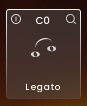
The On/Off button in the upper left corner turns the loaded articulation off and purges the samples. Turning it on again will reload the samples. Use Alt+Click anywhere on the panel as a shortcut for this action.
The inspector glass in the upper right corner will open the find page where you can exchange the current keyswitch with other keyswitches. Double-click on any keyswitch to quickly access the find page.
The icon represents the articulation type and can be chosen individually for each articulation. (see 3.4.1.1)
S.A.T. - Seamless Articulation Transitioning
Move between long articulations while holding a note. A keyswitch change with a lower velocity creates a gradual shift (4 seconds), a higher velocity will produce a quicker change (1.2 seconds). When using Keyswitch via CC the speed of the change is dependent on the CC Value. The lowest CC Value in the range of the desired keyswitch will result in the slowest change and the highest CC Value will result in the quickest change. The feature is not activated by default.
Octave Layer
The Add Octave feature adds an octave below the played note in any articulation. If this additional note is out of the instrument range it will not be played.
Navigation
Use the navigation controls to move between the different pages. In the bottom right you will also find the Settings Page and the Credits.
Other Main Pages
The Ensemble Main Page and the Auto Divisi Main Page display additional information. Make sure to check their documentation for more details.
Find Page
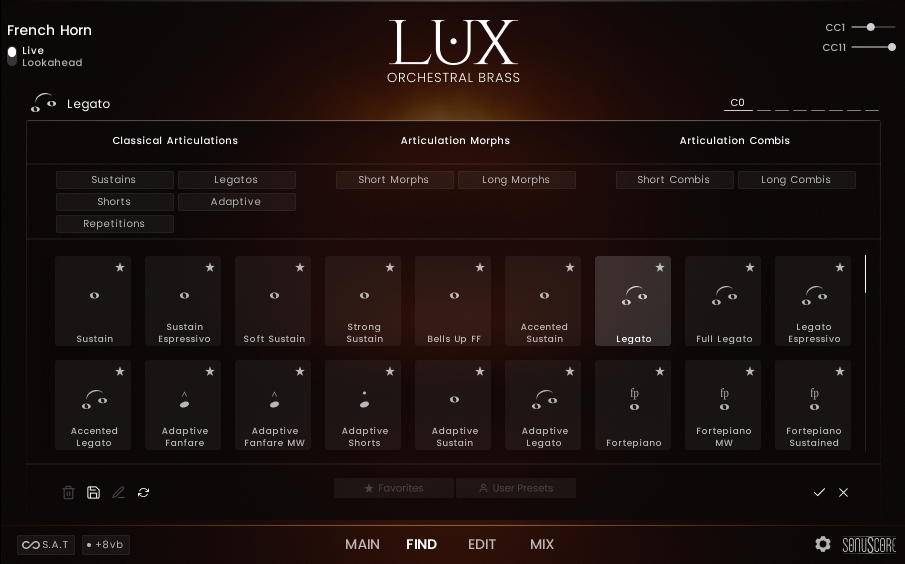
On the Find Page you can change the articulation for the currently selected keyswitch.
 1
3.3.1 Keyswitch Selector
2
3.3.2 Articulation Tags
3
3.3.3 Articulation List
4
3.3.4 User Articulation Controls
5
3.3.5 Confirmation
1
3.3.1 Keyswitch Selector
2
3.3.2 Articulation Tags
3
3.3.3 Articulation List
4
3.3.4 User Articulation Controls
5
3.3.5 Confirmation
Keyswitch Selector
Use the Keyswitch Selector to choose which keyswitch you want to change. The currently selected keyswitch is highlighted by being wider and displaying its key name.
Articulation Tags
Articulation Tags are used to filter the articulations in the Articulation List. You can select multiple tags at once, and the list will show only the articulations that match all selected tags.
The tags are divided into three broader categories:
- Classical Articulations - traditional articulations can be found here.
- Articulation Morphs - more than one articulation mapped across the mod wheel. Morph between both articulations by moving the mod wheel up or down.
- Articulation Combis - more than one articulation is played at the same time. Layered combinations of different articulations.
Articulation List
The Articulation List displays all available articulations filtered by the selected tags. You can click on any articulation to apply it to the keyswitch. Double click to immediately close the Find Page after loading.
User Articulation Controls
The User Articulation Controls allow you to modify your custom User Articulations.
- Delete: Delete the User Articulation.
- Resave: This will allow you to edit the tags for the selected User Articulation.
- Rename: Rename the User Articulation.
- Rescan: Rescan the User Articulations folder for any changes.
Confirmation
After selecting an articulation, you can either confirm the change by clicking the checkmark or cancel it by clicking the X. Canceling will reload the state of the Articulation slot just before the Find Page was opened.
Edit Page
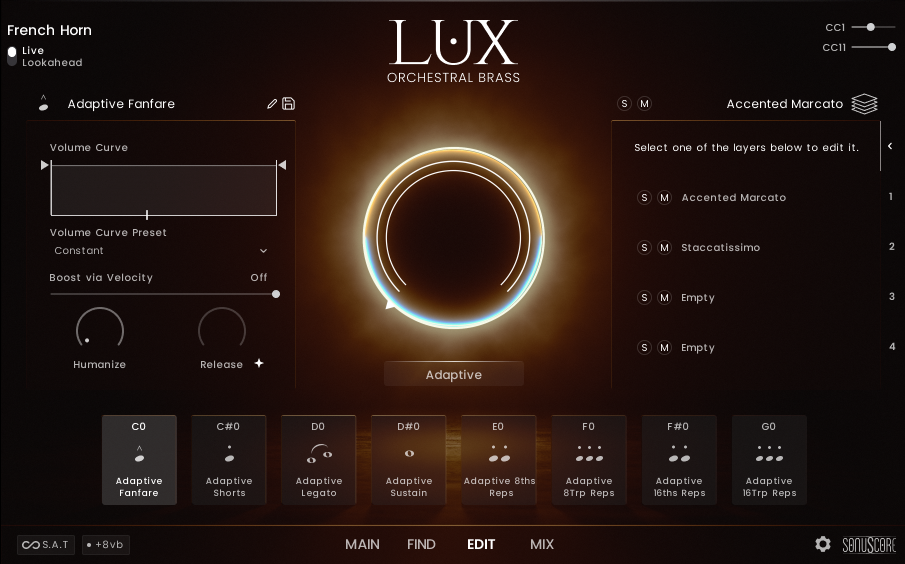 1.1
3.4.1.1 Articulation Name
1.2
3.4.1.2 Volume Curve
1.3
3.4.1.3 Boost via Velocity
1.4
3.4.1.4 Humanize
1.5
3.4.1.5 Release
2
3.4.2 Subarticulation Editor
1.1
3.4.1.1 Articulation Name
1.2
3.4.1.2 Volume Curve
1.3
3.4.1.3 Boost via Velocity
1.4
3.4.1.4 Humanize
1.5
3.4.1.5 Release
2
3.4.2 Subarticulation Editor
Once a new Subarticulation is loaded or other significant changes are made, the icon will automatically change to the "User" icon and the name will receive a star at the end, signifying that it is a user-defined articulation. You can then change the name and icon to your liking at save it as a User Articulation.
Articulation Editor
The Articulation Editor allows you to edit the properties of the selected articulation.
Articulation Name
Here you can edit how the articulation is displayed in the keyswitch slot.
- Icon: Click on the icon and a dropdown will appear. There you can select a new icon for the articulation.
- Edit: You can rename the articulation to your liking.
- Save: Save the Articulation as a new User Articulations.
Volume Curve
The Volume Curve allows you to adjust how the articulation volume is affected by the mod wheel. This should mostly be used for long articulations, as short articulations have their volume changes already defined by the input velocity. But it can be used to make shorts and longs fit together better inside the same articulation.
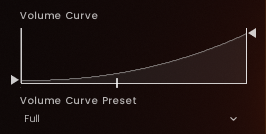
- Adjust the minimum volume, when the mod wheel is at its lowest position.
- Adjust the maximum volume, when the mod wheel is at its highest position.
- Adjust the slope of the Volume Curve by dragging up or down.
- Select one of the pre-designed Volume Curve Presets. Once you change a parameter, this will show the value "Custom" instead of the preset name.
Boost via Velocity
Set a threshold value from which the velocity will add a volume boost to the pressed note. From the given value on there will be a curve that adds up to 3dB of gain depending on the input velocity. This parameter is disabled by default except for the presets in the Auto Divisi Instrument.
Humanize
Add timing variations to the input MIDI. Especially useful for creating a more natural and less mechanical feel when using quantized MIDI files. The engine will add a random positive or negative delay up to the specified amount. Note that negative delay only affects the event if you are in lookahead mode.
Release
Adjust the release time of the articulation. With the + symbol activated, the release triggers the recorded release. For a manual release length deactivate the + symbol and adjust the length.
Subarticulation Editor
Subarticulation Overview
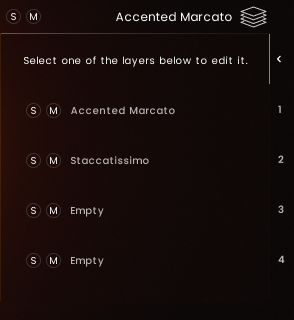
This is the Subarticulation Overview. It shows the four subarticulation slots of the currently selected articulation. On top of the editor you can see which subarticulation is currently selected. You can also use the mute and solo buttons here. But do not forget to deactivate solo and mute, as it can be hard to find later, which slot is active.
You can click on one of the four slots to select it and open its editor. If you click on an empty slot, you will open the Subarticulation Browser from where you can specify what sound you want to load into that slot.
You can also use one of the numbered tabs on the right to switch between the different subarticulation slots. Use the arrow tab on top to return to this overview.
Subarticulation Browser
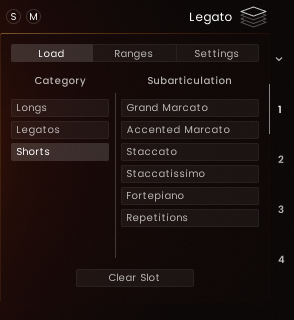
The Subarticulation Browser allows you to select a subarticulation for the currently selected slot. Choose a category from the list on the left and then select a subarticulation on the right. The contents of these lists may differ depending on the opened Instrument Type. In the Single Instruments, the browser is deactivated and it is not possible to load new subarticulations.
- Click this tab to open the Subarticulation Browser.
- Choose a category from the list on the left.
- If the list of subarticulations is longer than the vertical space allows for, you can use this slider in the middle to scroll through all the entries.
- Choose a subarticulation from the list on the right.
- Click this button to empty the selected slot.
Subarticulation Ranges
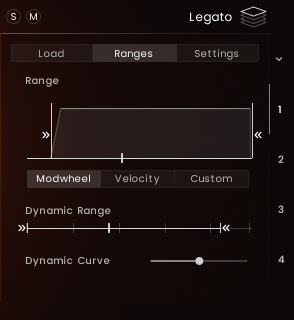
The Subarticulation Ranges Editor allows you to define the audible range of each subarticulation (use this for morphs or combis) as well as its dynamic range.
- Click this tab to open the Ranges tab.
- Adjust the starting value. Grab at the top corner and drag right to add a fade.
- Adjust the ending value. Grab at the top corner and drag left to add a fade.
- Choose which input is used to control the Subarticulation range. "Modwheel" will use the mod wheel input and, if it is enabled, the Polyphonic Aftertouch offset. "Velocity" uses the input velocity of the current note event (regardless of any changes in the dynamic range). "Custom" lets you assign any CC to control the current position.
- Set the lowest possible value for the Subarticulation dynamics.
- Set the highest possible value for the Subarticulation dynamics.
- Adjust how the dynamic layers of the Subarticulation are spread over the dynamic range. Shifting it to the right will give more room to the lower dynamics and shifting it to the left will give more room to the higher dynamics.
Changing the dynamic range has slightly different behavior depending on the type of subarticulation. For long subarticulations, the dynamic range affects only the timbre, whereas for short subarticulations, it affects both the timbre and the volume.
Subarticulation Settings
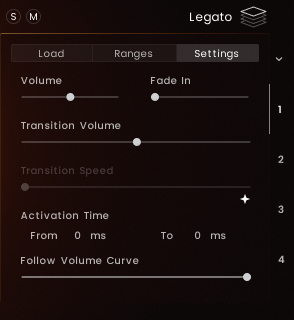
Click on the "Settings" tab to open the Subarticulation Settings. Depending on the type of Subarticulation, different settings may be available.
- Volume (available in all Subarticulation types) Change the volume of the Subarticulation in a range from -12dB to +12dB.
- Fade In (available in all Subarticulation types) Adjust the fade in time of the Subarticulation. For Legatos this only applied to the first notes of a phrase.
- Activation Time (available in all Subarticulation types) Adjust the activation time of the Subarticulation. "From": only play if note is held longer than this specified time. "To": only play if note is released before this specified time. Note that the highest value in any of these across all four Subarticulation slots will be used as the delay time for the entire articulation.
- Follow Volume Curve (available in all Subarticulation types) Specify how much the Subarticulation should follow the volume curve set in the articulation settings.
- Tightness (available in Shorts) Adjust the tightness of the Subarticulation. Bringing up the slider will shorten the fade out of previously pressed notes. This leads to a clearer sound when playing fast rhythms.
- Velocity Source (available in Shorts) Select the source of the velocity information for the Subarticulation. Make sure to disable "Follow Volume Curve" when using the mod wheel as the source, because the volume change will be put on top the natural volume differences.
- Round Robins (available in Shorts) Adjust the Round Robin order from ordered to random.
- Count (available in Repetitions) Set the number of times the Subarticulation should repeat.
- Tempo (available in Repetitions) Set the subdivision of the host tempo in which the Subarticulation should repeat.
- Transition Volume (available in Legatos) Adjust the volume of the transition between notes in a Legato Subarticulation.
- Transition Speed (available in Legatos) Adjust the speed of the transition between notes in a Legato Subarticulation. Clicking the + symbol will adapt the transitions speed to your playing.
Center Circles

The Center Circles display the subarticulations for the currently selected articulation.
- You can recognize the selected subarticulation by the round ends. You can also grab these ends to change the range of the subarticulation.
- The color of the circle indicates the Range Source. White circles indicate that the range is set to the default mod wheel source. Orange circles indicate that the range is set to react to the input velocity. Blue circles indicate that the range is set to react to the specified Custom CC.
- The indicator shows the input of the last note event. Depending on the selected Range Source, there can be multiple indicators visible. Their colors reflect the corresponding Range Source, as specified above.
Mix Page
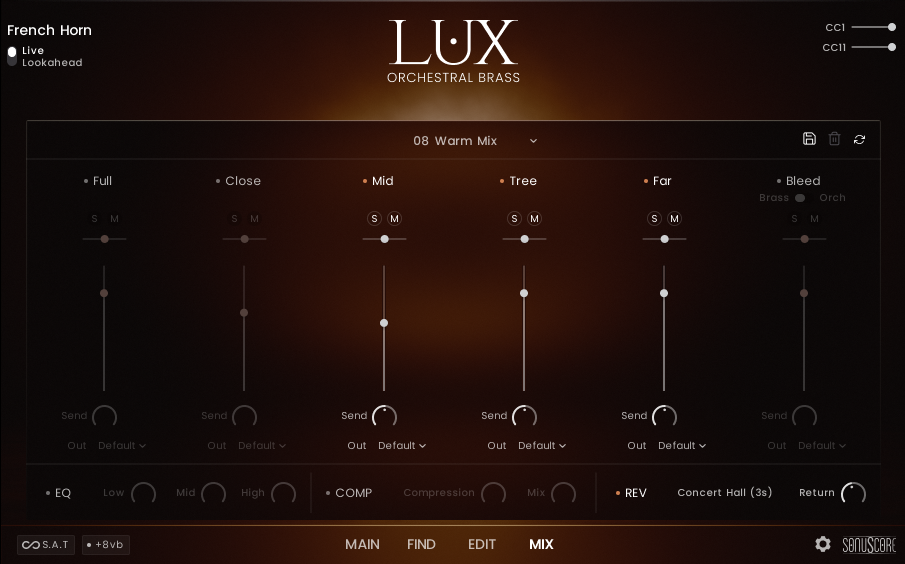 1
3.5.1 Mix Presets
2
3.5.2 User Mix Presets
3
3.5.3 Channel Strips
4
3.5.4 Equalizer
5
3.5.5 Compressor
6
3.5.6 Reverb
1
3.5.1 Mix Presets
2
3.5.2 User Mix Presets
3
3.5.3 Channel Strips
4
3.5.4 Equalizer
5
3.5.5 Compressor
6
3.5.6 Reverb
While having the same design and functionality, the Mix Page in the Ensemble Instrument does not mix between different mic positions, but between the five loaded instruments. There are different Ensemble Instruments for each mic position, so that you can recreate the mixes in your DAW.
Mix Presets
Use the dropdown menu to select a mix preset. Your User Mix Presets will be listed under the Factory Presets.
- Full Mix: Mixed by Peter Fuchs. (No use of the Bleed Mics).
- Sinfonic Mix: Full Mix + Bleed Orch Mics to give the Full Mix a wider image.
- Classic JW Mix: Classic wide Hollywood sound.
- Big Open Mix: Big Sound with a defined tail.
- Close Mix: Detailed sound with a bit of space through the Tree Mics.
- Tree Mix: Just the Tree Mics with a nuance of definition from the Mid Mics.
- Far Mix: Very lush and reverberant mix.
- Warm Mix: Just the Tree Mix with Far Mics.
- Wide Mix: Focus on a wide stereo image and a long defined reverb tail.
User Mix Presets
Use these buttons to manage your User Mix Presets.
- Save: Save the current mix settings as a new User Mix Preset. A dialog will appear where you can set the name and confirm the save.
- Delete: Delete the currently selected User Mix Preset.
- Rescan: Rescan the User Mix Presets folder for any changes.
Channel Strips
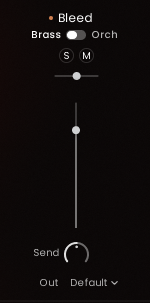
- Click the dot to enable or disable the channel. This option is not available on the Ensemble Mix Page.
- Use this switch on the bleed channel to toggle between the Bleed Microphones of only the brass section or the entire orchestra.
- Click the S or M to solo or mute the channel. Only one of these can be active at a time per channel. Click while holding Cmd/Ctrl to exclusively solo the selected one. Click while holding Alt to deactivate all at the same time.
- Use the slider to adjust the panning of the channel. This will move the sound left or right in the stereo field. Please note that in the mixes the stereo position is already set as it was recorded, so changing this setting can result in an unnatural sound.
- Adjust the volume of each channel.
- Adjust how much of the signal is sent to the reverb effect.
- Here you can select the Kontakt output channel this channel will be routed to. Find out more about Kontakt output channels in the Kontakt User Manual.
Equalizer
Use the Equalizer to change the timbre of the instrument. The three bands have the following frequencies:
- Low: 527Hz
- Mid: 2.5kHz
- High: 13kHz
Compressor
Use the Compressor to control the dynamic range of the instrument. This will load the Supercharger GT effect inside Kontakt.
- Compression: Determines the amount of compression applied to the input signal. The higher the value, the more compression is applied to the input signal.
- Mix: Controls the dry/wet mix of the compressor. This can be used to create a parallel compression style routing, which increases the quieter signals rather than reducing the louder ones. When the Mix control is set to 0%, only the uncompressed (dry) signal will be heard, and at 100%, only the compressed signal will be heard. Settings between the 0% and 100% are a mix of both signals.
Reverb
Use the Reverb to add more room to the instrument. This uses the Raum reverb. Choose between different presets for different room sizes and decay times. Adjust the return to control the amount of reverb added to the instrument.
You can use the reverb Configuration File to determine whether newly loaded instruments have a reverb effect applied.
Settings Page
Open the Settings Page by clicking on the cog wheel in the bottom right corner of the interface.
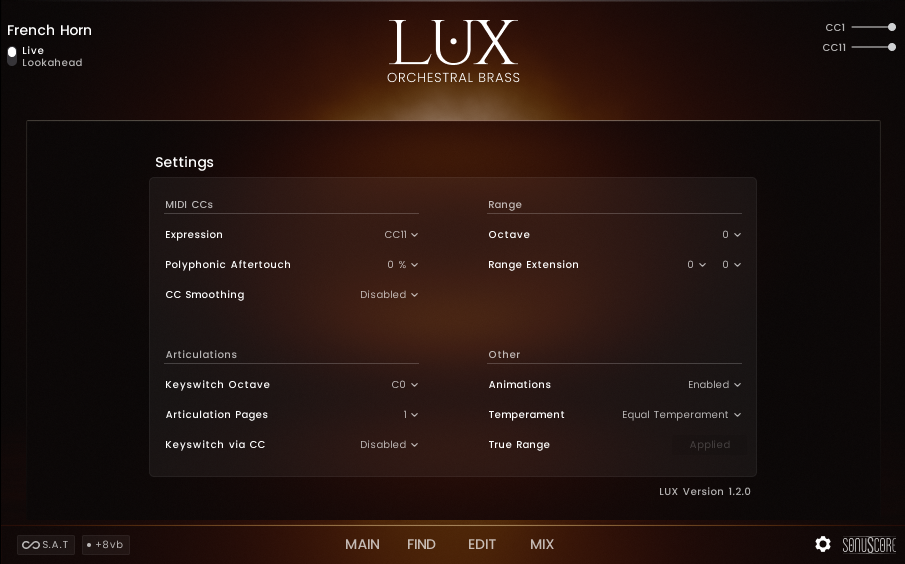 1
3.6.1 Expression
2
3.6.2 Polyphonic Aftertouch
3
3.6.3 CC Smoothing
4
3.6.4 Keyswitch Octave
5
3.6.5 Articulation Pages
6
3.6.6 Keyswitch via CC
7
3.6.7 Octave
8
3.6.8 Range Extension
9
3.6.9 Animations
10
3.6.10 Temperament
11
3.6.11 True Range
1
3.6.1 Expression
2
3.6.2 Polyphonic Aftertouch
3
3.6.3 CC Smoothing
4
3.6.4 Keyswitch Octave
5
3.6.5 Articulation Pages
6
3.6.6 Keyswitch via CC
7
3.6.7 Octave
8
3.6.8 Range Extension
9
3.6.9 Animations
10
3.6.10 Temperament
11
3.6.11 True Range
Expression
Use the dropdown menu to enable or disable the Expression feature.
If you want to use a different CC Number for the Expression feature, you can automate the Expression Slider on the Main Page by right-clicking on it, then selecting "Learn MIDI CC automation" and then moving the desired controller.
Polyphonic Aftertouch
Use the dropdown menu to determine how much the Polyphonic Aftertouch MIDI Input influences CC1 on specific notes.
CC Smoothing
Off per default. Can be set to Low and High. Influences the behavior of how the instrument handles sudden CC jumps. Note that this setting will affect how fast the instrument will react to CC Changes.
This can be helpful for tracks with very delicate melodies in the softer dynamic range. It smoothes out the velocity changes leading to a very even performance without sudden velocity drops.
It can also help with smoothing out the input when using Polyphonic Aftertouch.
Keyswitch Octave
Use the dropdown menu to determine the octave where the keyswitches are located. In the Ensemble NKI the Voicing Keyswitches are always located one octave below.
Articulation Pages
Use the dropdown menu to determine how many articulation pages are available on the Main Page. This setting is only available in the Keyswitch Instruments. These will always start out as empty slots which can then be filled via the Find Page. Decreasing the page count will purge all articulations on unused pages. Increasing the page count again, will restore the previous articulation selection.
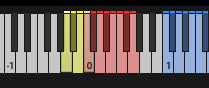
When activating articulation pages, additional keyswitches will appear in yellow directly under the existing eight keyswitches. From left to right these will open the articulation pages in that order. You can access any keyswitch by pressing both the page-keyswitch and the actual keyswitch at the same time.
For using LUX with Expression Maps/Sound Variations, we recommend using the Keyswitch via CC Feature.
Keyswitch via CC
Use the dropdown menu to select a CC Number which then can be used to switch between all available articulations.
| CC Values | Articulation Slot | CC Values | Articulation Slot | CC Values | Articulation Slot |
|---|---|---|---|---|---|
| 0-4 | Page 1, Slot 1 | 40-44 | Page 2, Slot 1 | 80-84 | Page 3, Slot 1 |
| 5-9 | Page 1, Slot 2 | 45-49 | Page 2, Slot 2 | 85-89 | Page 3, Slot 2 |
| 10-14 | Page 1, Slot 3 | 50-54 | Page 2, Slot 3 | 90-94 | Page 3, Slot 3 |
| 15-19 | Page 1, Slot 4 | 55-59 | Page 2, Slot 4 | 95-99 | Page 3, Slot 4 |
| 20-24 | Page 1, Slot 5 | 60-64 | Page 2, Slot 5 | 100-104 | Page 3, Slot 5 |
| 25-29 | Page 1, Slot 6 | 65-69 | Page 2, Slot 6 | 105-109 | Page 3, Slot 6 |
| 30-34 | Page 1, Slot 7 | 70-74 | Page 2, Slot 7 | 110-114 | Page 3, Slot 7 |
| 35-39 | Page 1, Slot 8 | 75-79 | Page 2, Slot 8 | 115-127 | Page 3, Slot 8 |
- Each slot has a range of 5 CC values. If S.A.T. is active the lowest CC value will trigger the articulation transition with the slowest speed, while the highest CC value will trigger the articulation transition with the fastest speed.
- If a CC value is sent that corresponds to an inactive page, the next lowest valid CC value will be used. For example, if only two pages are active and a CC value of 90 is sent, the articulation in page 2, slot 8 will be triggered with the fastest articulation transition speed.
Octave
Use the dropdown menu to shift the instrument range up or down in octave steps. The instrument range can be occluded by the keyswitches, which then will have to be moved to access all available notes.
To have consistent keyswitch positions across all instruments, the ranges of the Bass Trombone, the Tuba and the Cimbasso are all mapped to one octave higher than their actual playing range. You can adjust this manually using this setting or you can use the True Range setting to map them to their actual playing range.
Range Extension
Artificially extend the playable range of any instrument. With the left dropdown menu, you can extend the range below the lowest note, and with the right dropdown menu, you can extend the range above the highest note.
It sometimes happens that during a composition you face a situation where you only would need a semitone more range to finish your melody line. The Range Extension at the settings page lets you easily adjust this range. The nearest base sample is pitched in this case. This means extension beyond a whole tone might start to sound distorted and unauthentic.
Animations
Use the dropdown menu to enable or disable the animations in the interface. Disabling the animations can improve performance on slower systems, but the difference should be minimal.
Temperament
Use the dropdown menu to select a temperament for the instrument. Equal Temperament, the usual 12-tone system, is the default. Werckmeister III will shift the tuning of the instrument very slightly to get closer to perfect fifths between the notes.
| C | C# | D | D# | E | F | F# | G | G# | A | A# | B |
|---|---|---|---|---|---|---|---|---|---|---|---|
| - 0 cents | - 10 cents | - 8 cents | - 6 cents | - 10 cents | - 2 cents | - 12 cents | - 4 cents | - 8 cents | - 12 cents | - 4 cents | - 8 cents |
True Range
Click the button to automatically shift the instrument to its actual playing range. This will move the keyswitches and the range for the Bass Trombone, Tuba and Cimbasso down one octave by default. You can apply this setting automatically on startup using the Configuration Files.
Configuration Files
For professional users, who want specific settings turned on or off by default, we offer Configuration Files. Inside the folder where LUX Orchestral Brass is installed, you will find a subfolder called "Configuration". This is where you can change a few selected settings for the instrument which will be applied automatically whenever the patch is freshly loaded. Simply open the nka-file in any text editor and change the parameter in the second line. Once the file is resaved, the setting will be applied to any new patch.
This System only works on the factory nkis. You can perform batch resave routines. But if you manually resave an nki, this will never adapt to the new settings when loaded again. If you run into this issue please contact the Sonuscore support team.
Special Articulations
LUX Orchestral Brass offers a variety of special articulations that may behave differently than the instruments from other libraries.
Legatos
Legatos do not need any overlap to trigger a transition. It is enough to have the previous note release at the same time as the next note is played for the engine to play a legato transition.
When you are in the Live Mode, the legato delay will not be consistent. The first note will always have no delay at all and if the Transition Speed parameter is active (which is the default case), the speed you are playing the notes will also affect the delay.
Legatos have a "0-Transition", which means repeating the same note while holding the sustain pedal or having the notes perfectly aligned in your MIDI editor will play a re-trigger transition.
Adaptive Articulations
Adaptive Articulations are a special type of articulation that can change their behavior depending on the context of the performance. They introduce a delay of 120 ms before the articulation is triggered. This is used to choose between a shorter and a longer note based on the input. You can adjust the time inside the Subarticulation Settings and even use the Activation Time parameter for your own purposes.
If playing with a delay is not for you, consider using a different articulation (maybe a combi of the two subarticulations that the adaptive articulation offers) for the MIDI recording and then switching back to the adaptive patch for the playback.
Repetitions
The "Repetitions" subarticulations only allow for a fixed number of repetitions. To have more flexibility, the Repetition Articulations contain multiple subarticulations with different counts, which you can change via the mod wheel. Repetitions will always rely on the host tempo.
Repetitions sound best in a very fast context. For slower passages it is usually better to use the Staccatissimo.
Single Instruments
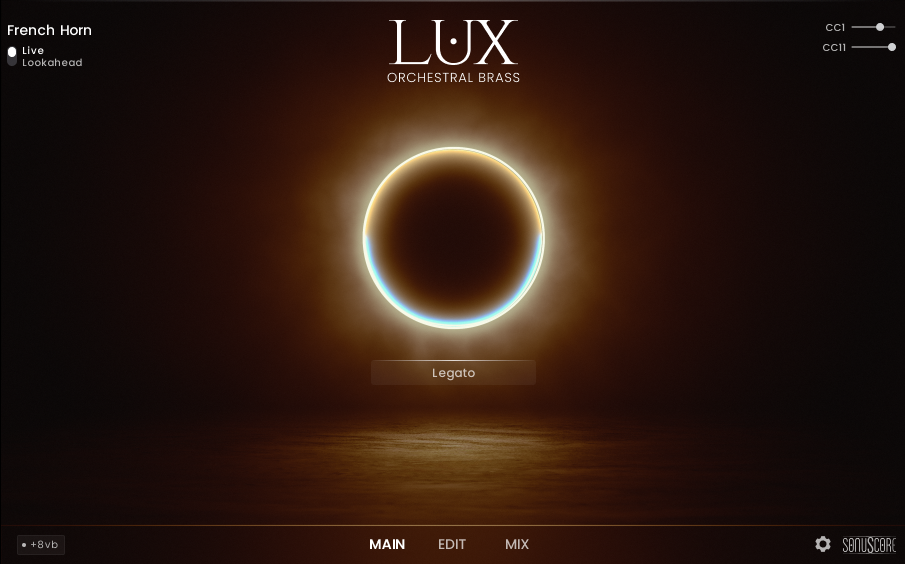
How to use Single Instruments
Single Instruments only contain a single preselected articulation. You cannot change the articulation or add any new subarticulations to it. But you can adjust the settings on the Edit Page and the Mix Page.
Single Instruments are designed to use the least amount of memory and also less CPU power. They are perfect for situations where you only need a single articulation and want to save resources for other instruments in your project.
Instead of the Articulation Set menu in the middle, you will find the loaded articulation displayed there.
Available Single Instruments
The Single Instruments are a subset of the available articulations. In the Articulations List you will find the the articulations also available as Single Instruments marked with a star.
Keyswitch Instruments
How to use Keyswitch Instruments
For most people, Keyswitch Instruments are the main way they interact with a sample library. Here you will find every available articulation per instrument. Use Articulation Sets to get a quick Overview of the available features. Dive deeper using the Find Page or build you own articulations on the Edit Page.
You can switch between the different articulations using the keyswitches. Tools like Expression Maps or Sound Variations can be very helpful when you try to create a realistic performance.
Available Articulation Sets
| KS | Core Articulations | Adaptive | Long Articulations | Short Articulations | Repetitions | MW Articulations | Morphs | Combis |
|---|---|---|---|---|---|---|---|---|
| C0 | Legato | Adaptive Fanfare | Legato | Staccato | Reps MW 8ths Stacc | Legato | Staccato - Grand Marc | Sustain + StaccMarc |
| C#0 | Sustain | Adaptive Shorts | Legato Espressivo | StaccMo | Reps MW 8Trp Stacc | Sustain | Staccato - Acc Marc | Sustain + StaccMo |
| D0 | Marcato | Adaptive Legato | Sustain | Marcato | Reps MW 16ths Stacc | Marcato MW | StaccMo - Staccato | StaccMo + Fortepiano |
| D#0 | Staccato | Adaptive Sustain | Sustain Espressivo | Accented Marcato | Reps MW 16Trp Stacc | Staccato MW | Staccato - Fortepiano | StaccMo + Acc Marc |
| E0 | StaccMo | Adaptive 8ths Reps | Marcato Sustained | Fortepiano | StaccMo | StaccMo MW | StaccMo - Acc Marc | StaccMo + Grand Marc |
| F0 | Accented Marcato | Adaptive 8Trp Reps | Acc Marc Sustained | Reps MW 8Trp Stacc | Staccato | Fortepiano MW | StaccMo - Grand Marc | Staccato + Fortepiano |
| F#0 | Fortepiano Sustained | Adaptive 16ths Reps | Fortepiano Sustained | Reps MW 16ths Stacc | Accented Marcato | Adaptive Fanfare MW | StaccMo - Fortepiano | Fortepiano + Grand Marc |
| G0 | Reps MW 16ths Stacc | Adaptive 16Trp Reps | Bells Up FF | Reps MW 16Trp Stacc | Fortepiano | Acc Marc MW | Sustain - Sus Espr | Staccato + StaccMo |
| KS | Core Articulations | Adaptive | Long Articulations | Short Articulations | Repetitions | MW Articulations | Morphs | Combis |
|---|---|---|---|---|---|---|---|---|
| C0 | Legato | Adaptive Fanfare | Legato | Staccato | Reps MW 8ths Stacc | Legato | Staccato - Grand Marc | Sustain + StaccMarc |
| C#0 | Sustain | Adaptive Shorts | Lyrical Legato | StaccMo | Reps MW 8Trp Stacc | Sustain | Staccato - Acc Marc | Sustain + StaccMo |
| D0 | Marcato | Adaptive Legato | Sustain | Marcato | Reps MW 16ths Stacc | Marcato MW | StaccMo - Staccato | StaccMo + Fortepiano |
| D#0 | Staccato | Adaptive Sustain | Soft Sustain | Accented Marcato | Reps MW 16Trp Stacc | Staccato MW | Staccato - Fortepiano | StaccMo + Acc Marc |
| E0 | StaccMo | Adaptive 8ths Reps | Marcato Sustained | Fortepiano | StaccMo | StaccMo MW | StaccMo - Acc Marc | StaccMo + Grand Marc |
| F0 | Accented Marcato | Adaptive 8Trp Reps | Acc Marc Sustained | Reps MW 8Trp Stacc | Staccato | Fortepiano MW | StaccMo - Grand Marc | Staccato + Fortepiano |
| F#0 | Fortepiano Sustained | Adaptive 16ths Reps | Fortepiano Sustained | Reps MW 16ths Stacc | Accented Marcato | Adaptive Fanfare MW | StaccMo - Fortepiano | Fortepiano + Grand Marc |
| G0 | Reps MW 16ths Stacc | Adaptive 16Trp Reps | Bells Up FF | Reps MW 16Trp Stacc | Fortepiano | Acc Marc MW | Empty | Staccato + StaccMo |
| KS | Core Articulations | Adaptive | Long Articulations | Short Articulations | Repetitions | MW Articulations | Morphs | Combis |
|---|---|---|---|---|---|---|---|---|
| C0 | Legato | Adaptive Fanfare | Legato | Staccato | Reps MW 8ths Stacc | Legato | Staccato - Grand Marc | Sustain + StaccMarc |
| C#0 | Sustain | Adaptive Shorts | Lyrical Legato | StaccMo | Reps MW 8Trp Stacc | Sustain | Staccato - Acc Marc | Sustain + StaccMo |
| D0 | Marcato | Adaptive Legato | Sustain | Marcato | Reps MW 16ths Stacc | Marcato MW | StaccMo - Staccato | StaccMo + Fortepiano |
| D#0 | Staccato | Adaptive Sustain | Soft Sustain | Accented Marcato | Reps MW 16Trp Stacc | Staccato MW | Staccato - Fortepiano | StaccMo + Acc Marc |
| E0 | StaccMo | Adaptive 8ths Reps | Marcato Sustained | Fortepiano | StaccMo | StaccMo MW | StaccMo - Acc Marc | StaccMo + Grand Marc |
| F0 | Accented Marcato | Adaptive 8Trp Reps | Acc Marc Sustained | Reps MW 8Trp Stacc | Staccato | Fortepiano MW | StaccMo - Grand Marc | Staccato + Fortepiano |
| F#0 | Fortepiano Sustained | Adaptive 16ths Reps | Fortepiano Sustained | Reps MW 16ths Stacc | Accented Marcato | Adaptive Fanfare MW | StaccMo - Fortepiano | Fortepiano + Grand Marc |
| G0 | Reps MW 16ths Stacc | Adaptive 16Trp Reps | Bells Up FF | Reps MW 16Trp Stacc | Fortepiano | Acc Marc MW | Empty | Staccato + StaccMo |
| KS | Core Articulations | Adaptive | Long Articulations | Short Articulations | Repetitions | MW Articulations | Morphs | Combis |
|---|---|---|---|---|---|---|---|---|
| C0 | Legato | Adaptive Fanfare | Legato | Staccato | Reps MW 8ths Stacc | Legato | Staccato - Grand Marc | Sustain + StaccMarc |
| C#0 | Sustain | Adaptive Shorts | Legato Espressivo | StaccMo | Reps MW 8Trp Stacc | Sustain | Staccato - Acc Marc | Sustain + StaccMo |
| D0 | Marcato | Adaptive Legato | Sustain | Marcato | Reps MW 16ths Stacc | Marcato MW | StaccMo - Staccato | StaccMo + Fortepiano |
| D#0 | Staccato | Adaptive Sustain | Sustain Espressivo | Accented Marcato | Reps MW 16Trp Stacc | Staccato MW | Staccato - Fortepiano | StaccMo + Acc Marc |
| E0 | StaccMo | Adaptive HT Falls | Marcato Sustained | Fortepiano | StaccMo | StaccMo MW | StaccMo - Acc Marc | StaccMo + Grand Marc |
| F0 | Accented Marcato | Adaptive 8Trp Reps | Acc Marc Sustained | Reps MW 8Trp Stacc | Staccato | Fortepiano MW | StaccMo - Grand Marc | Staccato + Fortepiano |
| F#0 | Fortepiano Sustained | Adaptive 16ths Reps | Fortepiano Sustained | Reps MW 16ths Stacc | Accented Marcato | Adaptive Fanfare MW | StaccMo - Fortepiano | Fortepiano + Grand Marc |
| G0 | Reps MW 16ths Stacc | Adaptive 16Trp Reps | Sustain FF | Half Tone Falls | Half Tone Falls | Acc Marc MW | Sustain - Sus Espr | Staccato + StaccMo |
| KS | Core Articulations | Adaptive | Long Articulations | Short Articulations | Repetitions | MW Articulations | Morphs | Combis |
|---|---|---|---|---|---|---|---|---|
| C0 | Legato | Adaptive Fanfare | Legato | Staccato | Reps MW 8ths Stacc | Legato | Staccato - Grand Marc | Sustain + StaccMarc |
| C#0 | Sustain | Adaptive Shorts | Lyrical Legato | StaccMo | Reps MW 8Trp Stacc | Sustain | Staccato - Acc Marc | Sustain + StaccMo |
| D0 | Marcato | Adaptive Legato | Sustain | Marcato | Reps MW 16ths Stacc | Marcato MW | StaccMo - Staccato | StaccMo + Fortepiano |
| D#0 | Staccato | Adaptive Sustain | Soft Sustain | Accented Marcato | Reps MW 16Trp Stacc | Staccato MW | Staccato - Fortepiano | StaccMo + Acc Marc |
| E0 | StaccMo | Adaptive 8ths Reps | Marcato Sustained | Fortepiano | StaccMo | StaccMo MW | StaccMo - Acc Marc | StaccMo + Grand Marc |
| F0 | Accented Marcato | Adaptive 8Trp Reps | Acc Marc Sustained | Reps MW 8Trp Stacc | Staccato | Fortepiano MW | StaccMo - Grand Marc | Staccato + Fortepiano |
| F#0 | Fortepiano Sustained | Adaptive 16ths Reps | Fortepiano Sustained | Reps MW 16ths Stacc | Accented Marcato | Adaptive Fanfare MW | StaccMo - Fortepiano | Fortepiano + Grand Marc |
| G0 | Reps MW 16ths Stacc | Adaptive 16Trp Reps | Sustain FF | Reps MW 16Trp Stacc | Fortepiano | Acc Marc MW | Empty | Staccato + StaccMo |
| KS | Core Articulations | Adaptive | Long Articulations | Short Articulations | Repetitions | MW Articulations | Morphs | Combis |
|---|---|---|---|---|---|---|---|---|
| C0 | Legato | Adaptive Fanfare | Legato | Staccato | Reps MW 8ths Stacc | Legato | Staccato - Grand Marc | Sustain + StaccMarc |
| C#0 | Sustain | Adaptive Shorts | Lyrical Legato | StaccMo | Reps MW 8Trp Stacc | Sustain | Staccato - Acc Marc | Sustain + StaccMo |
| D0 | Marcato | Adaptive Legato | Sustain | Marcato | Reps MW 16ths Stacc | Marcato MW | StaccMo - Staccato | StaccMo + Fortepiano |
| D#0 | Staccato | Adaptive Sustain | Soft Sustain | Accented Marcato | Reps MW 16Trp Stacc | Staccato MW | Staccato - Fortepiano | StaccMo + Acc Marc |
| E0 | StaccMo | Adaptive 8ths Reps | Marcato Sustained | Fortepiano | StaccMo | StaccMo MW | StaccMo - Acc Marc | StaccMo + Grand Marc |
| F0 | Accented Marcato | Adaptive 8Trp Reps | Acc Marc Sustained | Reps MW 8Trp Stacc | Staccato | Fortepiano MW | StaccMo - Grand Marc | Staccato + Fortepiano |
| F#0 | Fortepiano Sustained | Adaptive 16ths Reps | Fortepiano Sustained | Reps MW 16ths Stacc | Accented Marcato | Adaptive Fanfare MW | StaccMo - Fortepiano | Fortepiano + Grand Marc |
| G0 | Reps MW 16ths Stacc | Adaptive 16Trp Reps | Slow Bends | Reps MW 16Trp Stacc | Fortepiano | Acc Marc MW | Empty | Staccato + StaccMo |
| KS | Core Articulations | Adaptive | Long Articulations | Short Articulations | Repetitions | MW Articulations | Morphs | Combis |
|---|---|---|---|---|---|---|---|---|
| C0 | Legato | Adaptive Fanfare | Legato | Staccato | Reps MW 8ths Stacc | Legato | Staccato - Grand Marc | Sustain + StaccMarc |
| C#0 | Sustain | Adaptive Shorts | Lyrical Legato | StaccMo | Reps MW 8Trp Stacc | Sustain | Staccato - Acc Marc | Sustain + StaccMo |
| D0 | Marcato | Adaptive Legato | Sustain | Marcato | Reps MW 16ths Stacc | Marcato MW | StaccMo - Staccato | StaccMo + Fortepiano |
| D#0 | Staccato | Adaptive Sustain | Soft Sustain | Accented Marcato | Reps MW 16Trp Stacc | Staccato MW | Staccato - Fortepiano | StaccMo + Acc Marc |
| E0 | StaccMo | Adaptive 8ths Reps | Marcato Sustained | Fortepiano | StaccMo | StaccMo MW | StaccMo - Acc Marc | StaccMo + Grand Marc |
| F0 | Accented Marcato | Adaptive 8Trp Reps | Acc Marc Sustained | Reps MW 8Trp Stacc | Staccato | Fortepiano MW | StaccMo - Grand Marc | Staccato + Fortepiano |
| F#0 | Fortepiano Sustained | Adaptive 16ths Reps | Fortepiano Sustained | Reps MW 16ths Stacc | Accented Marcato | Adaptive Fanfare MW | StaccMo - Fortepiano | Fortepiano + Grand Marc |
| G0 | Reps MW 16ths Stacc | Adaptive 16Trp Reps | Slow Bends | Reps MW 16Trp Stacc | Fortepiano | Acc Marc MW | Empty | Staccato + StaccMo |
| KS | Core Articulations | Adaptive | Long Articulations | Short Articulations | MW Articulations | Morphs | Combis |
|---|---|---|---|---|---|---|---|
| C0 | Sustain | Adaptive Fanfare | Sustain | Staccato | Acc Marc Sustained | Staccato - Grand Marc | Sustain + StaccMarc |
| C#0 | Soft Sustain | Adaptive Shorts | Soft Sustain | StaccMo | Sustain | Staccato - Acc Marc | Sustain + StaccMo |
| D0 | Marcato | Adaptive Sustain | Marcato Sustained | Marcato | Marcato MW | StaccMo - Staccato | StaccMo + Acc Marc |
| D#0 | Staccato | Adaptive Fanfare MW | Acc Marc Sustained | Accented Marcato | Staccato MW | StaccMo - Acc Marc | StaccMo + Grand Marc |
| E0 | StaccMo | Empty | Empty | Empty | StaccMo MW | StaccMo - Grand Marc | Staccato + StaccMo |
| F0 | Accented Marcato | Empty | Empty | Empty | Adaptive Fanfare MW | Empty | Staccato + Acc Marc |
| F#0 | Sustain + StaccMarc | Empty | Empty | Empty | Acc Marc MW | Empty | Empty |
| G0 | StaccMo + Acc Marc | Empty | Empty | Empty | Empty | Empty | Empty |
| KS | Core Articulations | Adaptive | Long Articulations | Short Articulations | MW Articulations | Morphs | Combis |
|---|---|---|---|---|---|---|---|
| C0 | Legato | Adaptive Fanfare | Legato | Staccato | Legato | Staccato - Grand Marc | Sustain + StaccMarc |
| C#0 | Sustain | Adaptive Shorts | Lyrical Legato | StaccMo | Sustain | Staccato - Acc Marc | Sustain + StaccMo |
| D0 | Marcato | Adaptive Legato | Sustain | Marcato | Marcato MW | StaccMo - Staccato | StaccMo + Fortepiano |
| D#0 | Staccato | Adaptive Sustain | Soft Sustain | Accented Marcato | Staccato MW | Staccato - Fortepiano | StaccMo + Acc Marc |
| E0 | StaccMo | Empty | Marcato Sustained | Fortepiano | StaccMo MW | StaccMo - Acc Marc | StaccMo + Grand Marc |
| F0 | Accented Marcato | Empty | Acc Marc Sustained | Empty | Fortepiano MW | StaccMo - Grand Marc | Staccato + Fortepiano |
| F#0 | Fortepiano Sustained | Empty | Fortepiano Sustained | Empty | Adaptive Fanfare MW | StaccMo - Fortepiano | Fortepiano + Grand Marc |
| G0 | Sustain + StaccMarc | Empty | Sustain FF | Empty | Acc Marc MW | Empty | Staccato + StaccMo |
| KS | Core Articulations | Long Articulations | Short Articulations | MW Articulations | Morphs | Combis |
|---|---|---|---|---|---|---|
| C0 | Sustain | Sustain | Staccato | Sustain | Staccato - Grand Marc | Sustain + StaccMarc |
| C#0 | Soft Sustain | Soft Sustain | StaccMo | Marcato MW | Staccato - Acc Marc | Sustain + StaccMo |
| D0 | Marcato | Marcato Sustained | Marcato | Staccato MW | StaccMo - Staccato | StaccMo + Fortepiano |
| D#0 | Staccato | Acc Marc Sustained | Accented Marcato | StaccMo MW | Staccato - Fortepiano | StaccMo + Acc Marc |
| E0 | StaccMo | Fortepiano Sustained | Fortepiano | Fortepiano MW | StaccMo - Acc Marc | StaccMo + Grand Marc |
| F0 | Accented Marcato | Sustain FF | Empty | Adaptive Fanfare MW | StaccMo - Grand Marc | Staccato + Fortepiano |
| F#0 | Fortepiano Sustained | Empty | Empty | Acc Marc MW | StaccMo - Fortepiano | Fortepiano + Grand Marc |
| G0 | Sustain + StaccMarc | Empty | Empty | Acc Marc Sustained | Empty | Staccato + StaccMo |
Auto Divisi Instruments
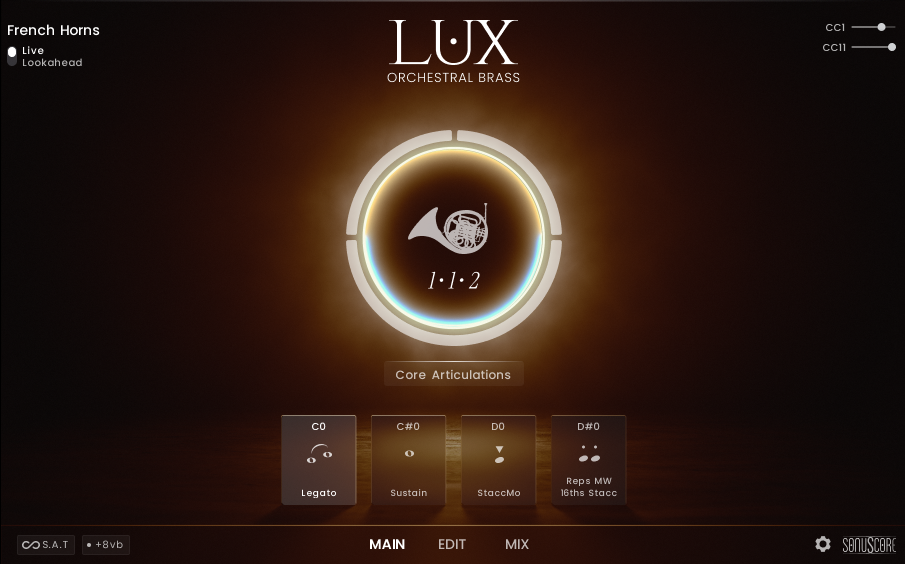
How to use Auto Divisi Instruments
Auto Divisi Instruments are designed to automatically split the voices of a chord into multiple instances of the same instrument.
In the French Horns Auto Divisi Instrument, you have four voices available. If you only play one note, all four voices will be playing that note, triggering only one "Horns a4" Sample. When you play two notes, the voices will be split into two pairs, triggering two "Horns a2" Samples. With three notes, the voices will be split into one pair for the highest and two single voices for the remaining notes, triggering one "Horns a2" Sample and two "Horn" Samples. Pressing four or more notes will trigger four single voices, each triggering one "Horn" Sample. You can not play more than four notes at the same time. The note selection when playing more than four notes will always choose the highest, the upper middle, the lower middle and the lowest note. You can find their definitions in the Note Selection explanation for the Ensemble Instrument.
For the Trumpet or Trombone Auto Divisi Instruments, the same principles apply. But there are only three voices available. When pressing two notes, only two single voices will be triggered, as "a2" versions for the Trumpets or Trombones were not recorded. The notes will be selected based on the same criteria as in the French Horns Auto Divisi Instrument with the middle voice just having the middle note selection.
Auto Divisi Instruments do not support loading custom articulations. You are limited to the selected presets from the available Articulation Sets. But just as with the Single NKI, you will be able to change the parameters in the Subarticulation Editor.
It is possible to play a full legato line using only the one voice playing the "Horns a4". But holding the overlap for too long can add a second voice. The easiest way to prevent this is to edit your MIDI so that the overlap is minimal or perfectly quantized.
Available Articulation Sets
For all Auto Divisi Instruments (French Horns, Trumpets, Trombones), the following Articulation Sets are available:
| KS | Core Articulations | Adaptive | Long Articulations | Short Articulations | Repetitions |
|---|---|---|---|---|---|
| C0 | Legato | Adaptive Fanfare | Sustain | Staccato | StaccMo |
| C#0 | Sustain | Adaptive Shorts | Marcato Sustained | StaccMo | Reps MW 8Trp Stacc |
| D0 | StaccMo | Adaptive 16ths Reps | Acc Marc Sustained | Marcato | Reps MW 16ths Stacc |
| D#0 | Reps MW 16ths Stacc | Adaptive 16Trp Reps | Fortepiano Sustained | Accented Marcato | Reps MW 16Trp Stacc |
The Ensemble Instrument
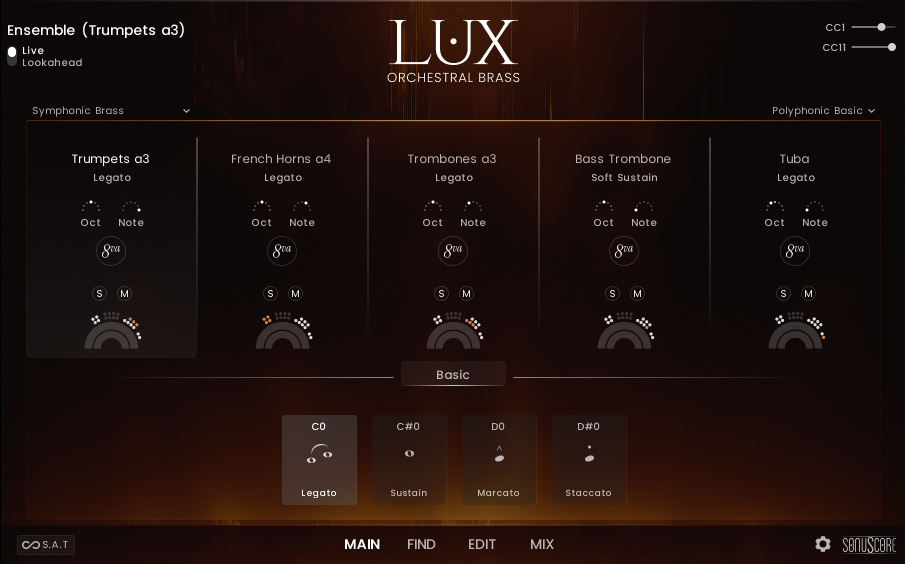
How to use the Ensemble Instrument
The Ensemble Instrument gives you access to playing multiple different instruments simultaneously. This can be very demanding on your system's resources, so make sure to only use the legato if you really need it and otherwise use the sustains.
The selection of which instruments are loaded is not freely accessible, you are limited to the preselected ensembles. But you are able to change any keyswitch and load a new articulation from the Find Page.
The Voicings are an essential part of the Ensemble Instrument. The same pressed chord can sound quite different depending on the selected voicing.
For Polyphonic Voicings and Chordal Divisi voicings, it is recommended to play close voicings with your right hand for the best results. The Ensemble will automatically distribute the notes across the brass instruments for a natural orchestral sound. Use the Mod Wheel to control dynamics and expression.
Use the Full Unisono Voicing to get a "Keyboard Brass Patch". Every note will sound exactly where you play it, giving you full control over your arrangement.
Make sure to experiment with voicings. Try different octave positions and Note Selection settings to explore different sounds and find the perfect voicing for your arrangement.
The Ensemble Main Page
1
8.1.1.1 Instrument Name
2
8.1.1.2 Ensemble Presets
3
8.1.1.3 Voicing Presets
4
8.1.1.4 Instrument Slot Name
5
8.1.1.5 Note Selection
6
8.1.1.6 Solo and Mute
7
8.1.1.7 Section Display
8
8.1.1.8 Articulation Sets
Instrument Name
This text displays, which of the five instrument slots is currently selected. All changes you make on the Find or Edit Page will only affect this instrument. The keyswitches displayed at the bottom are also only the ones for this instrument. But in the Articulation Sets, the selection of keyswitches is usually the same across all slots.
You can also left click to open a dropdown menu from where you can select a different instrument.
Ensemble Presets
Use the dropdown menu to select a different combination of instruments. Loading a new ensemble might take a few seconds. The following ensembles are available:
| All Horns + Trombones | French Horns a4 | French Horns a2 | French Horn | Trombone | Trombones a3 |
| All Trumpets + Horns | Trumpets a3 | Trumpet | French Horn | French Horns a2 | French Horns a4 |
| All Horns + Tuba | French Horns a4 | French Horns a2 | French Horn | Tuba | |
| All Trumpets + Trombones | Trumpets a3 | Trumpet | Trombones a3 | Trombone | Bass Trombone |
| Symphonic Brass | Trumpets a3 | French Horns a4 | Trombones a3 | Bass Trombone | Tuba |
| Heroic Brass | Trumpets a3 | Trumpet | Trombones a3 | Tuba | Bass Trombone |
| Chamber Brass | Trumpet | French Horn | Trombone | Bass Trombone | Tuba |
| Warm Brass | French Horn | French Horns a2 | Trombone | Tuba | |
| Bold Brass | Trumpets a3 | Trombone | Trombones a3 | Bass Trombone | Cimbasso |
| Low Brass | Trombones a3 | Trombone | Bass Trombone | Tuba | Cimbasso |
Voicing Presets
Voicing Presets will set the note selection parameters to instantly create a different sound. You can select these via the yellow keyswitches. Manual settings will be overwritten if keyswitches or the menu are used.
- Polyphonic Basic - A classic ensemble voicing with a traditional chord tone distribution across the sections. Suitable for all articulations.
- Polyphonic Close - A close ensemble voicing with minimal spacing between chord tones. Suitable for all articulations.
- Polyphonic Wide - A wide ensemble voicing for an especially broad and spacious sound. Suitable for all articulations.
- Polyphonic Dark - A modern ensemble voicing with a dark and rich tone. Suitable for all articulations.
- Polyphonic Narrow - A very tight voicing with an intriguing interlocking note distribution, creating an emotional and focused sound. Suitable for all articulations.
- Full Unisono - All sections play exactly the same chord tones in unison, resulting in a dense and powerful ensemble sound. Suitable for all articulations except legato.
- Melodic Unisono - A broad brush for single-line unison melodies. Suitable for all articulations — please play monophonically only.
- Melodic Octaves - A lush Hollywood-style octave unison for soaring single-line melodies with beautiful legato transitions. Suitable for all articulations — please play monophonically only.
- Chordal Divisi 1 - A finely spread ensemble voicing featuring divisi in some sections, ideal for dense, multi-voice chords. Due to the divisi note allocation, not suitable for legato.
- Chordal Divisi 2 - A finely spread ensemble voicing featuring divisi in some sections, ideal for dense, multi-voice chords. Due to the divisi note allocation, not suitable for legato.
- Chordal Divisi 3 - A finely spread ensemble voicing featuring divisi in some sections, ideal for dense, multi-voice chords. Due to the divisi note allocation, not suitable for legato.
Instrument Slot Name
Here you can see for each slot what instrument is assigned and below it you get a display of the currently selected articulation. Click the title or anywhere outside the controls on the slot to select it.
Note Selection
Octave Shift
Use the dropdown menu to shift the instrument range up or down in octave steps. The instrument range can be occluded by the keyswitches, which then will have to be moved to expose the desired range.
Note Selection
The note selection menu allows you to specify which of the played notes should be sent to the instrument.
- All: Every played note is sent to the instrument.
- Lowest: Only the lowest played note is sent to the instrument.
- Lowest 2: The two lowest played notes are sent to the instrument.
- Lowest & Lower Middle: The lowest and lower middle notes are sent to the instrument.
- Lowest & Upper Middle: The lowest and upper middle notes are sent to the instrument.
- Lowest & Highest: The lowest and highest notes are sent to the instrument.
- Middle: The middle note is sent to the instrument. For an even amount of notes, this will select the higher middle note.
- Middle 2: The two middle notes are sent to the instrument.
- Lower Middle: The lower middle note is sent to the instrument. For example with five pressed notes this will select the second to lowest note.
- Upper Middle: The upper middle note is sent to the instrument. For example with five pressed notes this will select the second to highest note.
- Highest: The highest note is sent to the instrument.
- Highest 2: The two highest notes are sent to the instrument.
- Highest & Lower Middle: The highest and lower middle notes are sent to the instrument.
- Highest & Upper Middle: The highest and upper middle notes are sent to the instrument.
Octave Layer
Activate the button to add a second note one octave above to every played note.
Solo and Mute
Use the Solo and Mute buttons to isolate or mute the selected instrument slot. You can also use the Solo and Mute buttons on the Mix Page to achieve the same effect.
Section Display
This is a display of the current section of the ensemble and where they were seated during the recording.
Articulation Sets
Use the dropdown menu to select different articulation sets for the entire ensemble. Each instrument has its own predefined articulations per articulation set, so different articulations will be loaded depending on your ensemble selection.
The Ensemble Mix Page
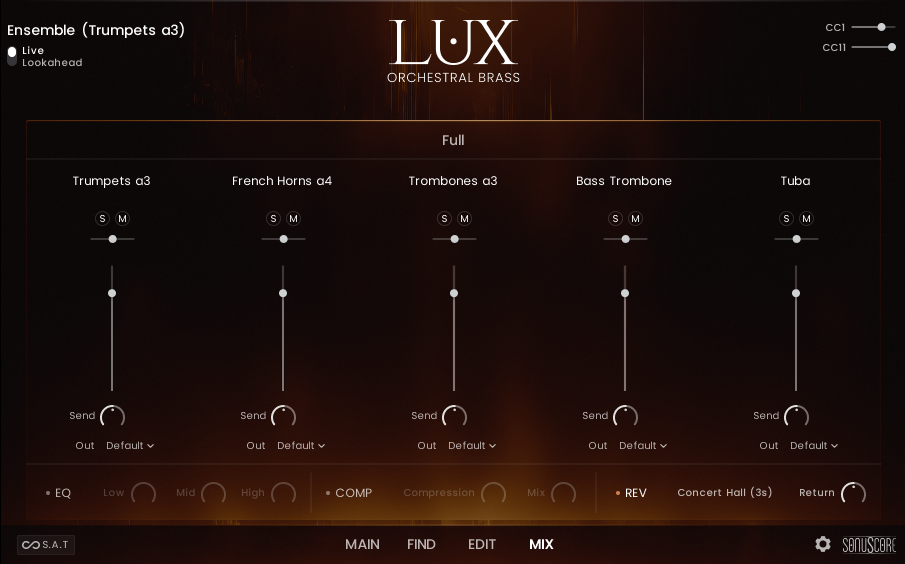
The Ensemble Mix Page is set up exactly like the other Mix Pages, but instead of mixing the different microphone positions, it allows you to mix the different instrument groups within the ensemble. The display on top (where you can usually find the mix presets) shows which microphone position the loaded ensemble instrument plays. You can use multiple instances of the ensemble with different microphone positions to create a mix in your DAW.
Ensemble Articulation Sets
Depending on which ensemble preset is selected, different articulations will be loaded from each set. This overview shows what articulations are loaded for each instrument from the articulation sets.
| KS | Basic | Adaptive | Longs | Shorts | Repetitions | Mod Wheel |
|---|---|---|---|---|---|---|
| C0 | Legato | Adaptive Fanfare | Legato | Staccato | Reps MW 8Trp Stacc | Staccato MW |
| C#0 | Sustain | Adaptive Shorts | Sustain | StaccMo | Reps MW 16ths Stacc | StaccMo MW |
| D0 | Marcato | Adaptive Legato | Acc Marc Sustained | Accented Marcato | Reps MW 16Trp Stacc | Marcato MW |
| D#0 | Staccato | Adaptive Sustain | Fortepiano Sustained | Fortepiano | Acc Marc Sustained | Adaptive Fanfare MW |
| KS | Basic | Adaptive | Longs | Shorts | Repetitions | Mod Wheel |
|---|---|---|---|---|---|---|
| C0 | Legato | Adaptive Fanfare | Legato | Staccato | Reps MW 8Trp Stacc | Staccato MW |
| C#0 | Sustain | Adaptive Shorts | Sustain | StaccMo | Reps MW 16ths Stacc | StaccMo MW |
| D0 | Marcato | Adaptive Legato | Acc Marc Sustained | Accented Marcato | Reps MW 16Trp Stacc | Marcato MW |
| D#0 | Staccato | Adaptive Sustain | Fortepiano Sustained | Fortepiano | Acc Marc Sustained | Adaptive Fanfare MW |
| KS | Basic | Adaptive | Longs | Shorts | Repetitions | Mod Wheel |
|---|---|---|---|---|---|---|
| C0 | Legato | Adaptive Fanfare | Legato | Staccato | Reps MW 8Trp Stacc | Staccato MW |
| C#0 | Sustain | Adaptive Shorts | Sustain | StaccMo | Reps MW 16ths Stacc | StaccMo MW |
| D0 | Marcato | Adaptive Legato | Acc Marc Sustained | Accented Marcato | Reps MW 16Trp Stacc | Marcato MW |
| D#0 | Staccato | Adaptive Sustain | Fortepiano Sustained | Fortepiano | Acc Marc Sustained | Adaptive Fanfare MW |
| KS | Basic | Adaptive | Longs | Shorts | Repetitions | Mod Wheel |
|---|---|---|---|---|---|---|
| C0 | Legato | Adaptive Fanfare | Legato | Staccato | Reps MW 8Trp Stacc | Staccato MW |
| C#0 | Sustain | Adaptive Shorts | Sustain | StaccMo | Reps MW 16ths Stacc | StaccMo MW |
| D0 | Marcato | Adaptive Legato | Acc Marc Sustained | Accented Marcato | Reps MW 16Trp Stacc | Marcato MW |
| D#0 | Staccato | Adaptive Sustain | Fortepiano Sustained | Fortepiano | Acc Marc Sustained | Adaptive Fanfare MW |
| KS | Basic | Adaptive | Longs | Shorts | Repetitions | Mod Wheel |
|---|---|---|---|---|---|---|
| C0 | Legato | Adaptive Fanfare | Legato | Staccato | Reps MW 8Trp Stacc | Staccato MW |
| C#0 | Sustain | Adaptive Shorts | Sustain | StaccMo | Reps MW 16ths Stacc | StaccMo MW |
| D0 | Marcato | Adaptive Legato | Acc Marc Sustained | Accented Marcato | Reps MW 16Trp Stacc | Marcato MW |
| D#0 | Staccato | Adaptive Sustain | Fortepiano Sustained | Fortepiano | Acc Marc Sustained | Adaptive Fanfare MW |
| KS | Basic | Adaptive | Longs | Shorts | Repetitions | Mod Wheel |
|---|---|---|---|---|---|---|
| C0 | Legato | Adaptive Fanfare | Legato | Staccato | Reps MW 8Trp Stacc | Staccato MW |
| C#0 | Sustain | Adaptive Shorts | Sustain | StaccMo | Reps MW 16ths Stacc | StaccMo MW |
| D0 | Marcato | Adaptive Legato | Acc Marc Sustained | Accented Marcato | Reps MW 16Trp Stacc | Marcato MW |
| D#0 | Staccato | Adaptive Sustain | Fortepiano Sustained | Fortepiano | Acc Marc Sustained | Adaptive Fanfare MW |
| KS | Basic | Adaptive | Longs | Shorts | Repetitions | Mod Wheel |
|---|---|---|---|---|---|---|
| C0 | Legato | Adaptive Fanfare | Legato | Staccato | Reps MW 8Trp Stacc | Staccato MW |
| C#0 | Sustain | Adaptive Shorts | Sustain | StaccMo | Reps MW 16ths Stacc | StaccMo MW |
| D0 | Marcato | Adaptive Legato | Acc Marc Sustained | Accented Marcato | Reps MW 16Trp Stacc | Marcato MW |
| D#0 | Staccato | Adaptive Sustain | Fortepiano Sustained | Fortepiano | Acc Marc Sustained | Adaptive Fanfare MW |
| KS | Basic | Adaptive | Longs | Shorts | Repetitions | Mod Wheel |
|---|---|---|---|---|---|---|
| C0 | Soft Sustain | Adaptive Fanfare | Sustain | Staccato | StaccMo | Staccato MW |
| C#0 | Sustain | Adaptive Shorts | Sustain | StaccMo | StaccMo | StaccMo MW |
| D0 | Marcato | Adaptive Legato | Acc Marc Sustained | Accented Marcato | StaccMo | Marcato MW |
| D#0 | Staccato | Adaptive Sustain | StaccMo | StaccMo | Acc Marc Sustained | Adaptive Fanfare MW |
| KS | Basic | Adaptive | Longs | Shorts | Repetitions | Mod Wheel |
|---|---|---|---|---|---|---|
| C0 | Legato | Adaptive Fanfare | Sustain | Staccato | StaccMo | Staccato MW |
| C#0 | Sustain | Adaptive Shorts | Sustain | StaccMo | StaccMo | StaccMo MW |
| D0 | Marcato | Adaptive Legato | Acc Marc Sustained | Accented Marcato | StaccMo | Marcato MW |
| D#0 | Staccato | Adaptive Sustain | Fortepiano Sustained | Fortepiano | Acc Marc Sustained | Adaptive Fanfare MW |
| KS | Basic | Adaptive | Longs | Shorts | Repetitions | Mod Wheel |
|---|---|---|---|---|---|---|
| C0 | Soft Sustain | Adaptive Fanfare | Sustain | Staccato | StaccMo | Staccato MW |
| C#0 | Sustain | Adaptive Shorts | Sustain | StaccMo | StaccMo | StaccMo MW |
| D0 | Marcato | Adaptive Sustain | Acc Marc Sustained | Accented Marcato | StaccMo | Marcato MW |
| D#0 | Staccato | Adaptive Sustain | Fortepiano Sustained | Fortepiano | Acc Marc Sustained | Adaptive Fanfare MW |
Articulations
Here you can find the list of all available articulations in LUX Orchestral Brass. Articulations marked with a star are available as single instruments.
| Legato | Sustains | Shorts | Adaptive | Repetitions | Short Morphs | Long Morphs | Short Combis | Long Combis |
|---|---|---|---|---|---|---|---|---|
| Legato * | Sustain * | Adaptive Fanfare * | Adaptive Fanfare * | Reps MW 8ths Stacc * | StaccMo - Staccato | Sustain - Sus Espr | Staccato + StaccMo | Sustain + Staccato |
| Full Legato | Sustain Espressivo | Adaptive Fanfare MW | Adaptive Fanfare MW | Reps MW 8Trp Stacc * | Staccato - Grand Marc | Staccato + Grand Marc | Sustain + StaccMo | |
| Legato Espressivo * | Soft Sustain | Adaptive Shorts * | Adaptive Shorts * | Reps MW 16ths Stacc * | Staccato - Acc Marc | Staccato + Acc Marc | Sustain + StaccMarc | |
| Accented Legato | Strong Sustain | Fortepiano | Adaptive Sustain * | Reps MW 16Trp Stacc * | Staccato - Fortepiano | Staccato + Fortepiano | Sustain + Sus Espr | |
| Adaptive Legato * | Bells Up FF | Fortepiano MW | Adaptive Legato * | Reps MW 8ths Marc | StaccMo - Grand Marc | StaccMo + Grand Marc | ||
| Accented Sustain | Marcato * | Adaptive 8ths Reps | Reps MW 8Trp Marc | StaccMo - Acc Marc | StaccMo + Acc Marc | |||
| Adaptive Sustain * | Marcato MW | Adaptive 8Trp Reps | Reps MW 16ths Marc | StaccMo - Fortepiano | StaccMo + Fortepiano | |||
| Fortepiano Sustained * | Accented Marcato * | Adaptive 16ths Reps | Reps MW 16Trp Marc | Fortepiano + Grand Marc | ||||
| Marcato Sustained | Acc Marc MW | Adaptive 16Trp Reps | Reps MW 8ths Fp | Fortepiano + Acc Marc | ||||
| Acc Marc Sustained | Staccato * | Reps MW 8Trp Fp | ||||||
| Staccato MW | Reps MW 16ths Fp | |||||||
| StaccMo * | Reps MW 16Trp Fp | |||||||
| StaccMo MW | Adaptive 8ths Reps | |||||||
| Soft Staccato | Adaptive 8Trp Reps | |||||||
| Soft Staccato MW | Adaptive 16ths Reps | |||||||
| Soft StaccMo | Adaptive 16Trp Reps | |||||||
| Soft StaccMo MW | Reps 2 8ths | |||||||
| Reps 3 8ths | ||||||||
| Reps 4 8ths | ||||||||
| Reps 2 8Trp | ||||||||
| Reps 3 8Trp | ||||||||
| Reps 4 8Trp | ||||||||
| Reps 2 16ths | ||||||||
| Reps 3 16ths | ||||||||
| Reps 4 16ths | ||||||||
| Reps 2 16Trp | ||||||||
| Reps 3 16Trp | ||||||||
| Reps 4 16Trp |
| Legato | Sustains | Shorts | Adaptive | Repetitions | Short Morphs | Short Combis | Long Combis |
|---|---|---|---|---|---|---|---|
| Legato * | Sustain * | Adaptive Fanfare * | Adaptive Fanfare * | Reps MW 8ths Stacc * | StaccMo - Staccato | Staccato + StaccMo | Sustain + Staccato |
| Full Legato | Soft Sustain | Adaptive Fanfare MW | Adaptive Fanfare MW | Reps MW 8Trp Stacc * | Staccato -StaccMo | Staccato + Grand Marc | Sustain + StaccMo |
| Lyrical Legato | Strong Sustain | Adaptive Shorts * | Adaptive Shorts * | Reps MW 16ths Stacc * | Staccato - Grand Marc | Staccato + Acc Marc | Sustain + StaccMarc |
| Accented Legato | Bells Up FF | Fortepiano | Adaptive Sustain * | Reps MW 16Trp Stacc * | Staccato - Acc Marc | Staccato + Fortepiano | |
| Adaptive Legato * | Accented Sustain | Fortepiano MW | Adaptive Legato * | Reps MW 8ths Marc | Staccato - Fortepiano | StaccMo + Grand Marc | |
| Adaptive Sustain * | Marcato * | Adaptive 8ths Reps | Reps MW 8Trp Marc | StaccMo - Grand Marc | StaccMo + Acc Marc | ||
| Fortepiano Sustained * | Marcato MW | Adaptive 8Trp Reps | Reps MW 16ths Marc | StaccMo - Acc Marc | StaccMo + Fortepiano | ||
| Marcato Sustained | Accented Marcato * | Adaptive 16ths Reps | Reps MW 16Trp Marc | StaccMo - Fortepiano | Fortepiano + Grand Marc | ||
| Acc Marc Sustained | Acc Marc MW | Adaptive 16Trp Reps | Reps MW 8ths Fp | Fortepiano + Acc Marc | |||
| Staccato * | Reps MW 8Trp Fp | ||||||
| Staccato MW | Reps MW 16ths Fp | ||||||
| StaccMo * | Reps MW 16Trp Fp | ||||||
| StaccMo MW | Adaptive 8ths Reps | ||||||
| Soft Staccato | Adaptive 8Trp Reps | ||||||
| Soft Staccato MW | Adaptive 16ths Reps | ||||||
| Soft StaccMo | Adaptive 16Trp Reps | ||||||
| Soft StaccMo MW | Reps 2 8ths | ||||||
| Reps 3 8ths | |||||||
| Reps 4 8ths | |||||||
| Reps 2 8Trp | |||||||
| Reps 3 8Trp | |||||||
| Reps 4 8Trp | |||||||
| Reps 2 16ths | |||||||
| Reps 3 16ths | |||||||
| Reps 4 16ths | |||||||
| Reps 2 16Trp | |||||||
| Reps 3 16Trp | |||||||
| Reps 4 16Trp |
| Legato | Sustains | Shorts | Adaptive | Repetitions | Short Morphs | Short Combis | Long Combis |
|---|---|---|---|---|---|---|---|
| Legato * | Sustain * | Adaptive Fanfare * | Adaptive Fanfare * | Reps MW 8ths Stacc * | StaccMo - Staccato | Staccato + StaccMo | Sustain + Staccato |
| Full Legato | Soft Sustain | Adaptive Fanfare MW | Adaptive Fanfare MW | Reps MW 8Trp Stacc * | Staccato - Grand Marc | Staccato + Grand Marc | Sustain + StaccMo |
| Lyrical Legato | Strong Sustain | Adaptive Shorts * | Adaptive Shorts * | Reps MW 16ths Stacc * | Staccato - Acc Marc | Staccato + Acc Marc | Sustain + StaccMarc |
| Accented Legato | Bells Up FF | Fortepiano | Adaptive Sustain * | Reps MW 16Trp Stacc * | Staccato - Fortepiano | Staccato + Fortepiano | |
| Adaptive Legato * | Accented Sustain | Fortepiano MW | Adaptive Legato * | Reps MW 8ths Marc | StaccMo - Grand Marc | StaccMo + Grand Marc | |
| Adaptive Sustain * | Marcato * | Adaptive 8ths Reps | Reps MW 8Trp Marc | StaccMo - Acc Marc | StaccMo + Acc Marc | ||
| Fortepiano Sustained * | Marcato MW | Adaptive 8Trp Reps | Reps MW 16ths Marc | StaccMo - Fortepiano | StaccMo + Fortepiano | ||
| Marcato Sustained | Accented Marcato * | Adaptive 16ths Reps | Reps MW 16Trp Marc | Fortepiano + Grand Marc | |||
| Acc Marc Sustained | Acc Marc MW | Adaptive 16Trp Reps | Reps MW 8ths Fp | Fortepiano + Acc Marc | |||
| Staccato * | Reps MW 8Trp Fp | ||||||
| Staccato MW | Reps MW 16ths Fp | ||||||
| StaccMo * | Reps MW 16Trp Fp | ||||||
| StaccMo MW | Adaptive 8ths Reps | ||||||
| Soft Staccato | Adaptive 8Trp Reps | ||||||
| Soft Staccato MW | Adaptive 16ths Reps | ||||||
| Soft StaccMo | Adaptive 16Trp Reps | ||||||
| Soft StaccMo MW | Reps 2 8ths | ||||||
| Reps 3 8ths | |||||||
| Reps 4 8ths | |||||||
| Reps 2 8Trp | |||||||
| Reps 3 8Trp | |||||||
| Reps 4 8Trp | |||||||
| Reps 2 16ths | |||||||
| Reps 3 16ths | |||||||
| Reps 4 16ths | |||||||
| Reps 2 16Trp | |||||||
| Reps 3 16Trp | |||||||
| Reps 4 16Trp |
| Legato | Sustains | Shorts | Adaptive | Repetitions | Short Morphs | Long Morphs | Short Combis | Long Combis |
|---|---|---|---|---|---|---|---|---|
| Legato * | Sustain * | Adaptive Fanfare * | Adaptive Fanfare * | Reps MW 8ths Stacc * | StaccMo - Staccato | Sustain - Sus Espr | Staccato + StaccMo | Sustain + Staccato |
| Full Legato | Sustain Espressivo | Adaptive Fanfare MW | Adaptive Fanfare MW | Reps MW 8Trp Stacc * | Staccato - Grand Marc | Staccato + Grand Marc | Sustain + StaccMo | |
| Legato Espressivo * | Soft Sustain | Adaptive Shorts * | Adaptive Shorts * | Reps MW 16ths Stacc * | Staccato - Acc Marc | Staccato + Acc Marc | Sustain + StaccMarc | |
| Accented Legato | Strong Sustain | Adaptive HT Falls | Adaptive Sustain * | Reps MW 16Trp Stacc * | Staccato - Fortepiano | Staccato + Fortepiano | Sustain + Sus Espr | |
| Adaptive Legato * | Sustain FF | Fortepiano | Adaptive Legato * | Reps MW 8ths Marc | StaccMo - Grand Marc | StaccMo + Grand Marc | ||
| Accented Sustain | Fortepiano MW | Adaptive HT Falls | Reps MW 8Trp Marc | StaccMo - Acc Marc | StaccMo + Acc Marc | |||
| Adaptive Sustain * | Marcato * | Adaptive 8ths Reps | Reps MW 16ths Marc | StaccMo - Fortepiano | StaccMo + Fortepiano | |||
| Fortepiano Sustained * | Marcato MW | Adaptive 8Trp Reps | Reps MW 16Trp Marc | Fortepiano + Grand Marc | ||||
| Marcato Sustained | Accented Marcato * | Adaptive 16ths Reps | Reps MW 8ths HT Fall | Fortepiano + Acc Marc | ||||
| Acc Marc Sustained | Acc Marc MW | Adaptive 16Trp Reps | Reps MW 8Trp HT Fall | |||||
| Staccato * | Reps MW 16ths HT Fall | |||||||
| Staccato MW | Reps MW 16Trp HT Fall | |||||||
| StaccMo * | Adaptive 8ths Reps | |||||||
| StaccMo MW | Adaptive 8Trp Reps | |||||||
| Soft Staccato | Adaptive 16ths Reps | |||||||
| Soft Staccato MW | Adaptive 16Trp Reps | |||||||
| Soft StaccMo | Reps 2 8ths | |||||||
| Soft StaccMo MW | Reps 3 8ths | |||||||
| Half Tone Falls * | Reps 4 8ths | |||||||
| Reps 2 8Trp | ||||||||
| Reps 3 8Trp | ||||||||
| Reps 4 8Trp | ||||||||
| Reps 2 16ths | ||||||||
| Reps 3 16ths | ||||||||
| Reps 4 16ths | ||||||||
| Reps 2 16Trp | ||||||||
| Reps 3 16Trp | ||||||||
| Reps 4 16Trp |
| Legato | Sustains | Shorts | Adaptive | Repetitions | Short Morphs | Short Combis | Long Combis |
|---|---|---|---|---|---|---|---|
| Legato * | Sustain * | Adaptive Fanfare * | Adaptive Fanfare * | Reps MW 8ths Stacc * | StaccMo - Staccato | Staccato + StaccMo | Sustain + Staccato |
| Full Legato | Soft Sustain | Adaptive Fanfare MW | Adaptive Fanfare MW | Reps MW 8Trp Stacc * | Staccato - Grand Marc | Staccato + Grand Marc | Sustain + StaccMo |
| Lyrical Legato | Strong Sustain | Adaptive Shorts * | Adaptive Shorts * | Reps MW 16ths Stacc * | Staccato - Acc Marc | Staccato + Acc Marc | Sustain + StaccMarc |
| Accented Legato | Sustain FF | Fortepiano | Adaptive Sustain * | Reps MW 16Trp Stacc * | Staccato - Fortepiano | Staccato + Fortepiano | |
| Adaptive Legato * | Accented Sustain | Fortepiano MW | Adaptive Legato * | Reps MW 8ths Marc | StaccMo - Grand Marc | StaccMo + Grand Marc | |
| Adaptive Sustain * | Marcato * | Adaptive 8ths Reps | Reps MW 8Trp Marc | StaccMo - Acc Marc | StaccMo + Acc Marc | ||
| Fortepiano Sustained * | Marcato MW | Adaptive 8Trp Reps | Reps MW 16ths Marc | StaccMo - Fortepiano | StaccMo + Fortepiano | ||
| Marcato Sustained | Accented Marcato * | Adaptive 16ths Reps | Reps MW 16Trp Marc | Fortepiano + Grand Marc | |||
| Acc Marc Sustained | Acc Marc MW | Adaptive 16Trp Reps | Reps MW 8ths Fp | Fortepiano + Acc Marc | |||
| Staccato * | Reps MW 8Trp Fp | ||||||
| Staccato MW | Reps MW 16ths Fp | ||||||
| StaccMo * | Reps MW 16Trp Fp | ||||||
| StaccMo MW | Adaptive 8ths Reps | ||||||
| Soft Staccato | Adaptive 8Trp Reps | ||||||
| Soft Staccato MW | Adaptive 16ths Reps | ||||||
| Soft StaccMo | Adaptive 16Trp Reps | ||||||
| Soft StaccMo MW | Reps 2 8ths | ||||||
| Reps 3 8ths | |||||||
| Reps 4 8ths | |||||||
| Reps 2 8Trp | |||||||
| Reps 3 8Trp | |||||||
| Reps 4 8Trp | |||||||
| Reps 2 16ths | |||||||
| Reps 3 16ths | |||||||
| Reps 4 16ths | |||||||
| Reps 2 16Trp | |||||||
| Reps 3 16Trp | |||||||
| Reps 4 16Trp |
| Legato | Sustains | Shorts | Adaptive | Repetitions | Short Morphs | Short Combis | Long Combis |
|---|---|---|---|---|---|---|---|
| Legato * | Sustain * | Adaptive Fanfare * | Adaptive Fanfare * | Reps MW 8ths Stacc * | StaccMo - Staccato | Staccato + StaccMo | Sustain + Staccato |
| Full Legato | Soft Sustain | Adaptive Fanfare MW | Adaptive Fanfare MW | Reps MW 8Trp Stacc * | Staccato - Grand Marc | Staccato + Grand Marc | Sustain + StaccMo |
| Lyrical Legato | Strong Sustain | Adaptive Shorts * | Adaptive Shorts * | Reps MW 16ths Stacc * | Staccato - Fortepiano | Staccato + Acc Marc | Sustain + StaccMarc |
| Accented Legato | Sustain FF | Fortepiano | Adaptive Sustain * | Reps MW 16Trp Stacc * | StaccMo - Grand Marc | Staccato + Fortepiano | |
| Adaptive Legato * | Accented Sustain | Fortepiano MW | Adaptive Legato * | Reps MW 8ths Marc | StaccMo - Acc Marc | StaccMo + Grand Marc | |
| Slow Bends * | Marcato * | Adaptive 8ths Reps | Reps MW 8Trp Marc | StaccMo - Fortepiano | StaccMo + Acc Marc | ||
| Adaptive Sustain * | Marcato MW | Adaptive 8Trp Reps | Reps MW 16ths Marc | StaccMo + Fortepiano | |||
| Fortepiano Sustained * | Accented Marcato * | Adaptive 16ths Reps | Reps MW 16Trp Marc | Fortepiano + Grand Marc | |||
| Marcato Sustained | Acc Marc MW | Adaptive 16Trp Reps | Reps MW 8ths Fp | Fortepiano + Acc Marc | |||
| Acc Marc Sustained | Staccato * | Reps MW 8Trp Fp | |||||
| Staccato MW | Reps MW 16ths Fp | ||||||
| StaccMo * | Reps MW 16Trp Fp | ||||||
| StaccMo MW | Adaptive 8ths Reps | ||||||
| Soft Staccato | Adaptive 8Trp Reps | ||||||
| Soft Staccato MW | Adaptive 16ths Reps | ||||||
| Soft StaccMo | Adaptive 16Trp Reps | ||||||
| Soft StaccMo MW | Reps 2 8ths | ||||||
| Reps 3 8ths | |||||||
| Reps 4 8ths | |||||||
| Reps 2 8Trp | |||||||
| Reps 3 8Trp | |||||||
| Reps 4 8Trp | |||||||
| Reps 2 16ths | |||||||
| Reps 3 16ths | |||||||
| Reps 4 16ths | |||||||
| Reps 2 16Trp | |||||||
| Reps 3 16Trp | |||||||
| Reps 4 16Trp |
| Legato | Sustains | Shorts | Adaptive | Repetitions | Short Morphs | Short Combis | Long Combis |
|---|---|---|---|---|---|---|---|
| Legato * | Sustain * | Adaptive Fanfare * | Adaptive Fanfare * | Reps MW 8ths Stacc * | StaccMo - Staccato | Staccato + StaccMo | Sustain + Staccato |
| Full Legato | Soft Sustain | Adaptive Fanfare MW | Adaptive Fanfare MW | Reps MW 8Trp Stacc * | Staccato - Grand Marc | Staccato + Grand Marc | Sustain + StaccMo |
| Lyrical Legato | Strong Sustain | Adaptive Shorts * | Adaptive Shorts * | Reps MW 16ths Stacc * | Staccato - Acc Marc | Staccato + Acc Marc | Sustain + StaccMarc |
| Accented Legato | Sustain FF | Fortepiano | Adaptive Sustain * | Reps MW 16Trp Stacc * | Staccato - Fortepiano | Staccato + Fortepiano | |
| Adaptive Legato * | Accented Sustain | Fortepiano MW | Adaptive Legato * | Reps MW 8ths Marc | StaccMo - Grand Marc | StaccMo + Grand Marc | |
| Slow Bends * | Marcato * | Adaptive 8ths Reps | Reps MW 8Trp Marc | StaccMo - Acc Marc | StaccMo + Acc Marc | ||
| Adaptive Sustain * | Marcato MW | Adaptive 8Trp Reps | Reps MW 16ths Marc | StaccMo - Fortepiano | StaccMo + Fortepiano | ||
| Fortepiano Sustained * | Accented Marcato * | Adaptive 16ths Reps | Reps MW 16Trp Marc | Fortepiano + Grand Marc | |||
| Marcato Sustained | Acc Marc MW | Adaptive 16Trp Reps | Reps MW 8ths Fp | Fortepiano + Acc Marc | |||
| Acc Marc Sustained | Staccato * | Reps MW 8Trp Fp | |||||
| Staccato MW | Reps MW 16ths Fp | ||||||
| StaccMo * | Reps MW 16Trp Fp | ||||||
| StaccMo MW | Adaptive 8ths Reps | ||||||
| Soft Staccato | Adaptive 8Trp Reps | ||||||
| Soft Staccato MW | Adaptive 16ths Reps | ||||||
| Soft StaccMo | Adaptive 16Trp Reps | ||||||
| Soft StaccMo MW | Reps 2 8ths | ||||||
| Reps 3 8ths | |||||||
| Reps 4 8ths | |||||||
| Reps 2 8Trp | |||||||
| Reps 3 8Trp | |||||||
| Reps 4 8Trp | |||||||
| Reps 2 16ths | |||||||
| Reps 3 16ths | |||||||
| Reps 4 16ths | |||||||
| Reps 2 16Trp | |||||||
| Reps 3 16Trp | |||||||
| Reps 4 16Trp |
| Sustains | Shorts | Adaptive | Short Morphs | Short Combis | Long Combis |
|---|---|---|---|---|---|
| Sustain * | Adaptive Fanfare * | Adaptive Fanfare * | StaccMo - Staccato | Staccato + StaccMo | Sustain + Staccato |
| Soft Sustain | Adaptive Fanfare MW | Adaptive Fanfare MW | Staccato - Grand Marc | Staccato + Grand Marc | Sustain + StaccMo |
| Strong Sustain | Adaptive Shorts * | Adaptive Shorts * | Staccato - Acc Marc | Staccato + Acc Marc | Sustain + StaccMarc |
| Sustain FF | Marcato * | Adaptive Sustain * | StaccMo - Grand Marc | StaccMo + Grand Marc | |
| Accented Sustain | Marcato MW | StaccMo - Acc Marc | StaccMo + Acc Marc | ||
| Adaptive Sustain * | Accented Marcato * | ||||
| Marcato Sustained | Acc Marc MW | ||||
| Acc Marc Sustained | Staccato * | ||||
| Staccato MW | |||||
| StaccMo * | |||||
| StaccMo MW | |||||
| Soft Staccato | |||||
| Soft Staccato MW | |||||
| Soft StaccMo | |||||
| Soft StaccMo MW |
| Legato | Sustains | Shorts | Adaptive | Short Morphs | Short Combis | Long Combis |
|---|---|---|---|---|---|---|
| Legato * | Sustain * | Adaptive Fanfare * | Adaptive Fanfare * | StaccMo - Staccato | Staccato + StaccMo | Sustain + Staccato |
| Lyrical Legato | Soft Sustain | Adaptive Fanfare MW | Adaptive Fanfare MW | Staccato - Grand Marc | Staccato + Grand Marc | Sustain + StaccMo |
| Accented Legato | Strong Sustain | Adaptive Shorts * | Adaptive Shorts * | Staccato - Acc Marc | Staccato + Acc Marc | Sustain + StaccMarc |
| Adaptive Legato * | Sustain FF | Fortepiano | Adaptive Sustain * | Staccato - Fortepiano | Staccato + Fortepiano | |
| Accented Sustain | Fortepiano MW | Adaptive Legato * | StaccMo - Grand Marc | StaccMo + Grand Marc | ||
| Adaptive Sustain * | Marcato * | StaccMo - Acc Marc | StaccMo + Acc Marc | |||
| Fortepiano Sustained * | Marcato MW | StaccMo - Fortepiano | StaccMo + Fortepiano | |||
| Marcato Sustained | Accented Marcato * | Fortepiano + Grand Marc | ||||
| Acc Marc Sustained | Acc Marc MW | Fortepiano + Acc Marc | ||||
| Staccato * | ||||||
| Staccato MW | ||||||
| StaccMo * | ||||||
| StaccMo MW | ||||||
| Soft Staccato | ||||||
| Soft Staccato MW | ||||||
| Soft StaccMo | ||||||
| Soft StaccMo MW |
| Sustains | Shorts | Adaptive | Short Morphs | Short Combis | Long Combis |
|---|---|---|---|---|---|
| Sustain * | Adaptive Fanfare * | Adaptive Fanfare * | StaccMo - Staccato | Staccato + StaccMo | Sustain + Staccato |
| Soft Sustain | Adaptive Fanfare MW | Adaptive Fanfare MW | Staccato - Grand Marc | Staccato + Grand Marc | Sustain + StaccMo |
| Strong Sustain | Adaptive Shorts * | Adaptive Shorts * | Staccato - Acc Marc | Staccato + Acc Marc | Sustain + StaccMarc |
| Sustain FF | Fortepiano | Adaptive Sustain * | Staccato - Fortepiano | Staccato + Fortepiano | |
| Accented Sustain | Fortepiano MW | StaccMo - Grand Marc | StaccMo + Grand Marc | ||
| Adaptive Sustain * | Marcato * | StaccMo - Acc Marc | StaccMo + Acc Marc | ||
| Fortepiano Sustained * | Marcato MW | StaccMo - Fortepiano | StaccMo + Fortepiano | ||
| Marcato Sustained | Accented Marcato * | Fortepiano + Grand Marc | |||
| Acc Marc Sustained | Acc Marc MW | Fortepiano + Acc Marc | |||
| Staccato * | |||||
| Staccato MW | |||||
| StaccMo * | |||||
| StaccMo MW | |||||
| Soft Staccato | |||||
| Soft Staccato MW | |||||
| Soft StaccMo | |||||
| Soft StaccMo MW |
Available Subarticulations
| French Horn | French Horns a2 | French Horns a4 | Trumpet | Trumpets a3 | Trombones | Trombones a3 | Bass Trombone | Tuba | Cimbasso |
|---|---|---|---|---|---|---|---|---|---|
| Sustain | Sustain | Sustain | Sustain | Sustain | Sustain | Sustain | Sustain | Sustain | Sustain |
| Sustain Espressivo | Sustain Espressivo | ||||||||
| Legato | Legato | Legato | Legato | Legato | Legato | Legato | Legato | ||
| Legato Espressivo | Legato Espressivo | ||||||||
| Grand Marcato | Grand Marcato | Grand Marcato | Grand Marcato | Grand Marcato | Grand Marcato | Grand Marcato | Grand Marcato | Grand Marcato | Grand Marcato |
| Accented Marcato | Accented Marcato | Accented Marcato | Accented Marcato | Accented Marcato | Accented Marcato | Accented Marcato | Accented Marcato | Accented Marcato | Accented Marcato |
| Staccato | Staccato | Staccato | Staccato | Staccato | Staccato | Staccato | Staccato | Staccato | Staccato |
| Staccatissimo | Staccatissimo | Staccatissimo | Staccatissimo | Staccatissimo | Staccatissimo | Staccatissimo | Staccatissimo | Staccatissimo | Staccatissimo |
| Fortepiano | Fortepiano | Fortepiano | Fortepiano | Fortepiano | Fortepiano | Fortepiano | Fortepiano | Fortepiano | |
| Repetitions | Repetitions | Repetitions | Repetitions | Repetitions | Repetitions | Repetitions | |||
| Half Tone Falls | Slow Bends Down | Slow Bends Down |
Tutorials
How to save a User Articulation Preset
You can save your custom Articulations as User Articulation Presets. They will then appear on the Find Page.
-
Set up the Articulation the way you want it. For example here we take the Sustain Articulation as a base and add the Staccato Subarticulation on the second layer.
Then we use the Range Feature to only fade it in on higher velocities. On the Subarticulation Settings panel we also deaktivate "Follow Volume Curve" and set the Velocity Source to "Mod Wheel".
Once you have loaded a new subarticulation or changed enough other parameters, you notice that the icon jumps to the "User" icon and the articulation name receives a star at the end, signaling, that this factory preset has been changed.
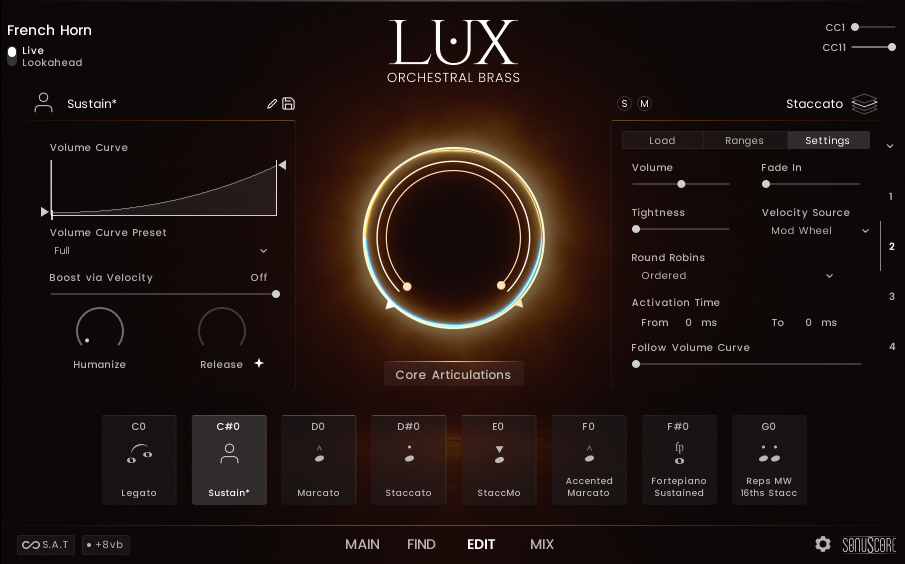
-
Click on the "User" icon and a dropdown menu will open where you can select any available icon. You can also just keep it as the user icon, so you can easily distinguish between your own and the factory articulations.
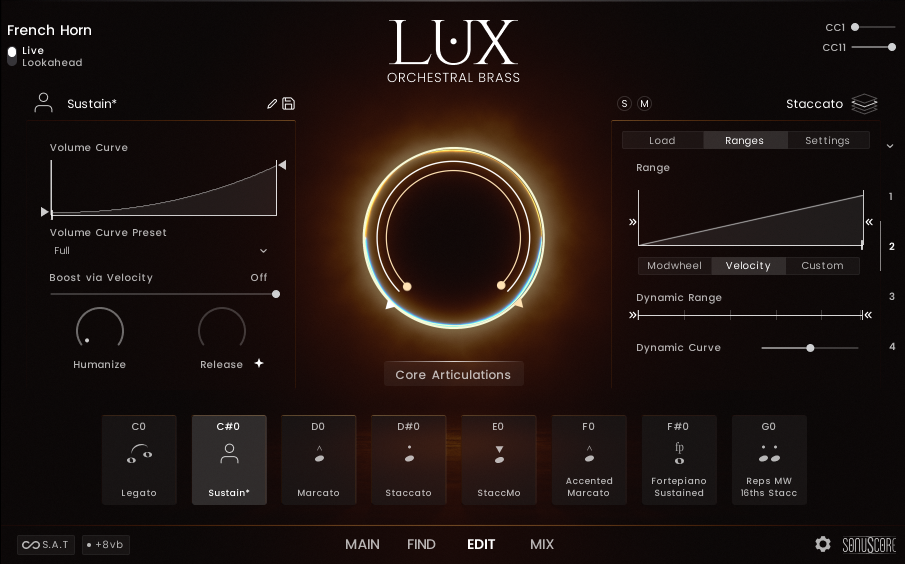 Here
Click to change the icon.
Here
Click to change the icon.
-
Next click on the pen next to the articulation name to edit it. Enter the new name and klick the checkmark to save the changes.
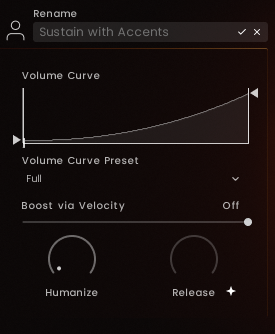
-
Now click the save button next to the pen to save the articulation. A new view will open where you can select any tags you want to add to your articulation.
Once you have selected all the tags you want, click on the checkmark next to the name again (note that you can adjust the name here again if you want) and the preset will appear on your Find Page.
Make sure to NOT click the checkmark in the bottom right corner of the screen. This will close the Find Page without saving the preset.
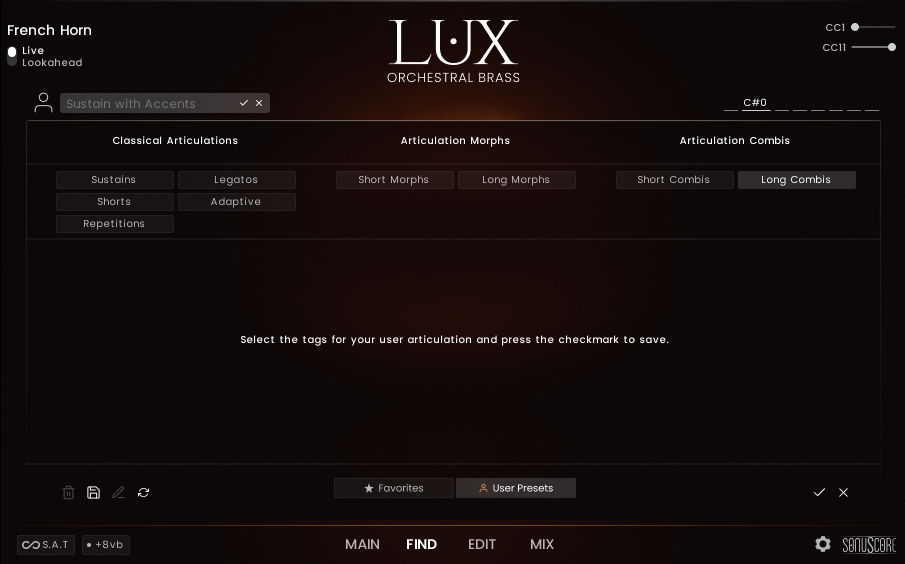
How to save a User Mix Preset
You can save your own mixes and then load them in other LUX Orchestral Brass instances.
-
Set the mix to your desired configuration.
-
Click the "Save" button to start saving the mix.
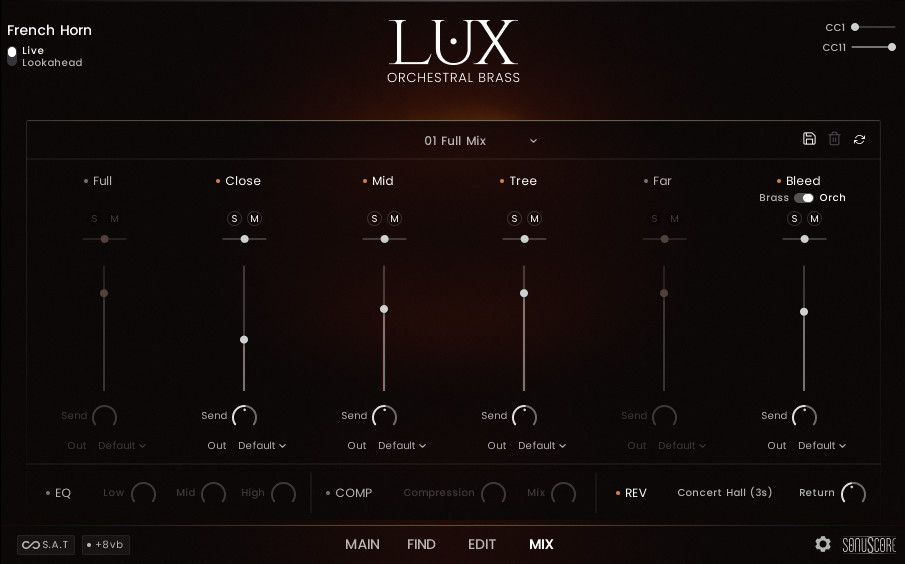
-
Enter your desired mix name and click the checkmark to save it.
The mix will be then appended to the list of available mixes and can be loaded in any other LUX Orchestral Brass instance.
If the instance you want to load the preset in has already been opened, just click the Reload button and the mix should appear in the list.
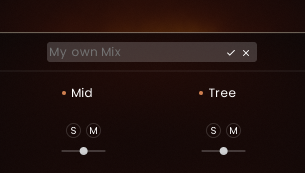
User Mix Presets only save the state of the channel strips. Any effect settings must be transferred manually.
How to share or transfer User Presets
To access your user presets, you first need to open the file location where you opened the library.
-
The easiest way to do this is to right click onto one instrument of the library and select "Show in Explorer".
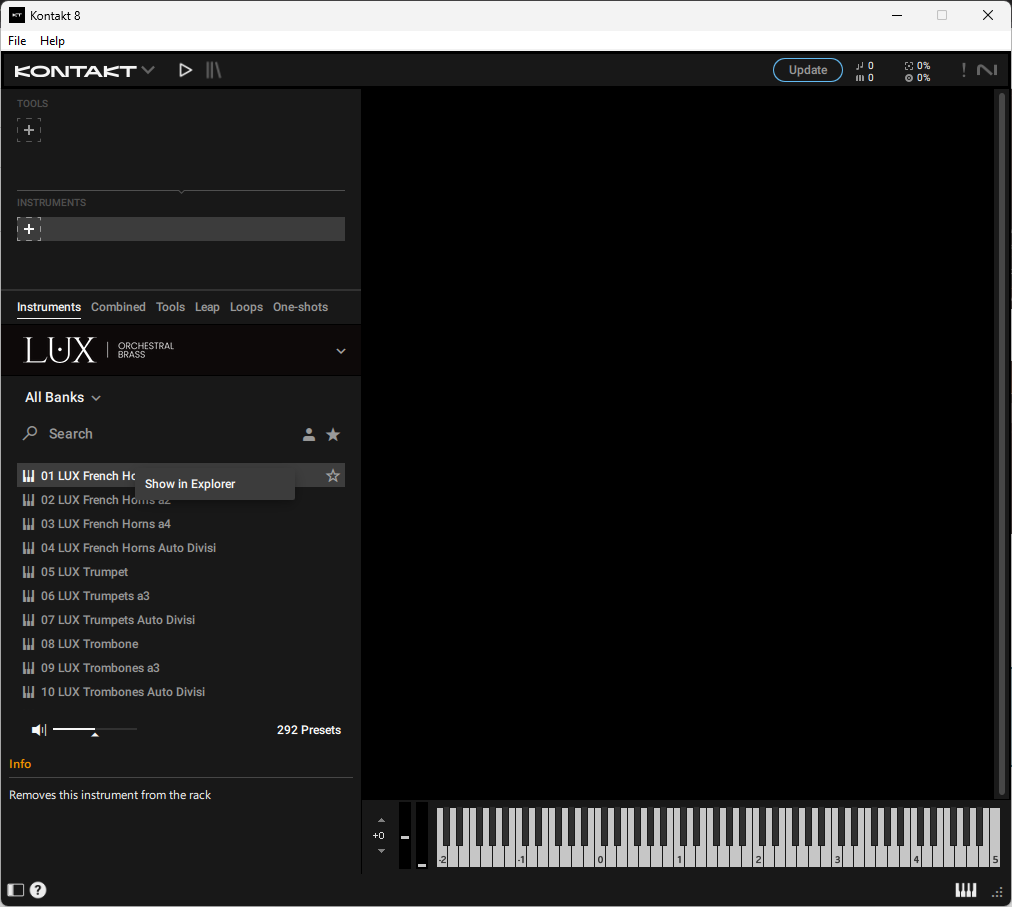
-
Then navigate to the root library folder and find the "User Data" folder.
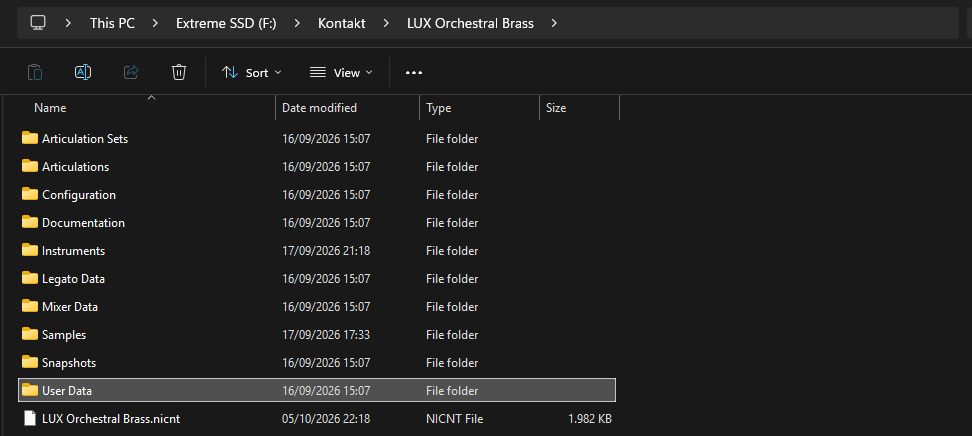
Inside that folder you will find all your user presets for both articulations and mixes as .nka files. Copy these and paste them in the same relative path on your target machine and the presets should appear after a reload.
CREDITS
Product Concept and Design: SONUSCORE: Tilman Sillescu, Jonas Meyer, Simon Schrenk, Luka Swoboda
Project Lead: Tilman Sillescu, Jonas Meyer
Orchestra: Czech Stellar Ensemble
Recording: StarRecordings Production in Brno Besední dům
Orchestrator, Session Manager, Production: David Christiansen
Recording Manager, Post-Production: Christian Wirtz, Matthias Meeh, Luka Swoboda
Mixing: Peter Fuchs
Sample Editing: Matthias Meeh, Luka Swoboda, Jonas Hausotter, Steffen Lütke, Marit Schmitt, Nicolai Patricio
Reaper Scripting: Joshua Hank
Kontakt Scripting: Jonas Meyer, Mathias Vatter (Built with cksp)
NKS Implementation: Stefan Kemler
User Interface Design: Benedikt Huster, Jannic Böhme, Jonas Hausotter, Luka Swoboda (Figma's Simple Design System UI Kit)
Artwork: Jannic Böhme, Benedikt Huster
Marketing: Benedikt Huster, Russ Hughes, Felix Möbius, Tobias Kunz, Nadja Demmler, Zoé Friedbacher, Louisa Wolf
Videos: Russ Hughes, Nadja Demmler,Benedikt Huster, Tilman Sillescu
Web Programming: Lukas Ruschitzka, Benedikt Huster
Quality Assurance: Jonas Meyer, Tilman Sillescu, Simon Schrenk, Luka Swoboda
Manual: Jonas Meyer, Simon Schrenk, Stefan Kemler
Special Thanks
Bleed Mic Idea: Russ Hughes
Consulting, Sourcing: Robin Hoffmann, Steffen Brinkmann, Peter Fuchs, Paul Rabiger
Changelog
Version 1.0.0 (Oct 2026)
LUX Version 1.2.0
Initial Public Release