
MANUAL
Document Version 1.1.0
Product Version 1.1.0
© by SONUSCORE
SYSTEM REQUIREMENTS
For latest system requirements, please visit www.sonuscore.com, or your trusted dealer's website.
Welcome to LUX Orchestral Strings
Thank you very much for choosing Sonuscore software.
Congratulations on your brand-new instrument LUX Orchestral Strings by Sonuscore. We hope you will enjoy this instrument as much as we do. This manual will help you to get started and explains the features and functions of your new software.
Welcome to LUX Orchestral Strings. This KONTAKT instrument is a deeply multi-sampled string library, that aims to provide all basic articulations for every standard string section as well as extended playing techniques and other unique features. As orchestral libraries have grown more and more complex, we approached this instrument with the goal to make it as easy as possible to create stunning string arrangements whether by programming individual sections or using the ensemble instrument.
To gain a deeper understanding of all this instrument's possibilities, be sure to check out our turtorials and walkthroughs.
Best regards and enjoy,
Sonuscore
SETUP
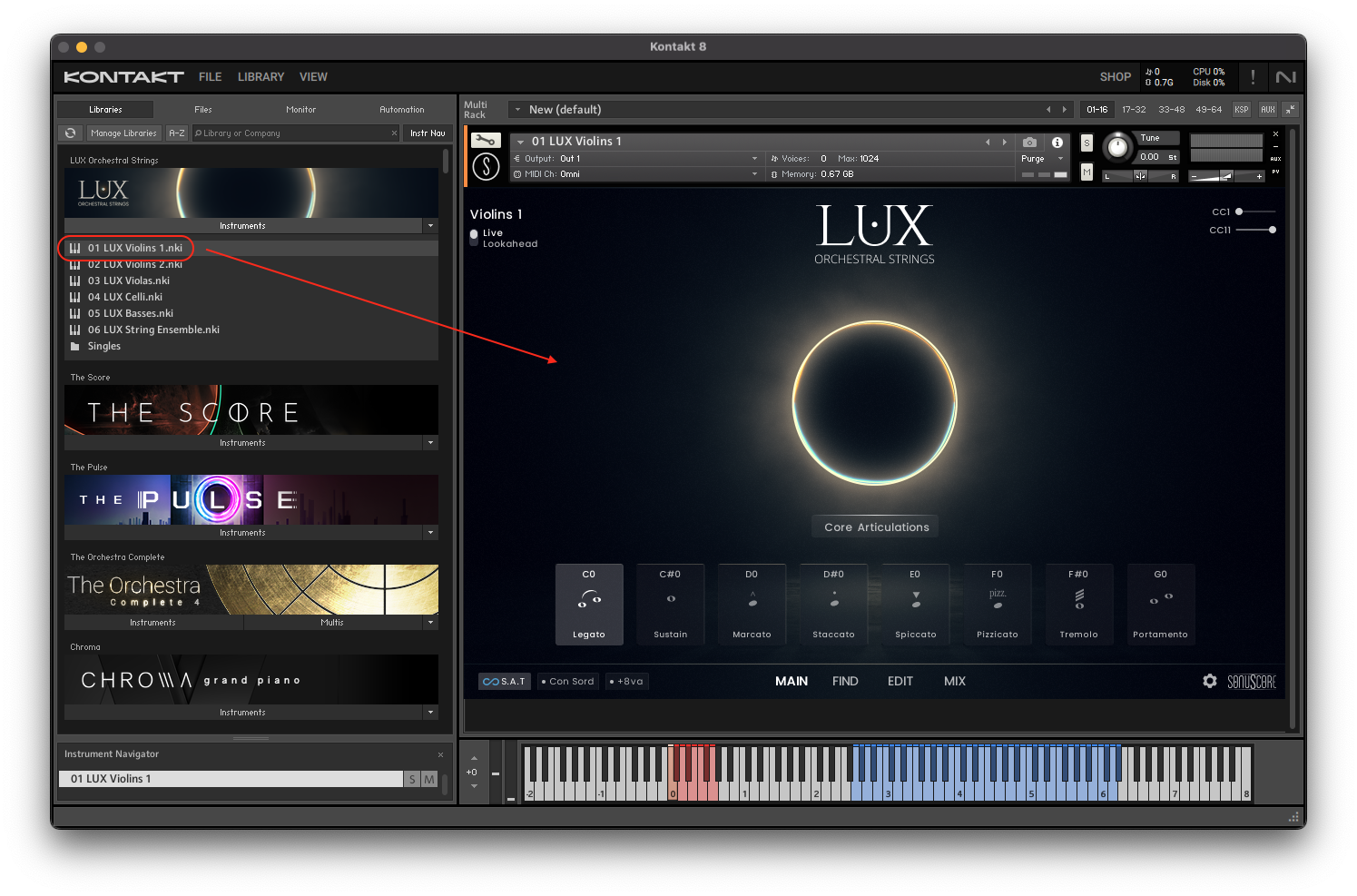
Loading LUX Orchestral Strings via KONTAKT
LUX Orchestral Strings is not an independent plug-in, so you will first need to open an instance of Native Instrument's free KONTAKT PLAYER before you can start playing.
- 1. Download and install Native Instrument’s FREE KONTAKT PLAYER.
- 2. Open KONTAKT PLAYER as a plug-in in your host software (DAW), or as a stand-alone application.
- 3. Click "Library" at the top.
 If you don't see the Libraries Browser to the left, click "view" and select "classic view".
 Locate LUX Orchestral Strings in the Browser, on the left side of the user interface.
 - 4. Click Instruments to open the product’s content.
- 5. Double-click for example the 01 LUX Violins 1.nki file, or drag the .nki to the open space to the right, to load the instrument.
INSTRUMENTS
INSTRUMENT & ARTICULATION LIST
Violins 1 (18 Players)
Classical Articulations
Legato
- Full Legato
- Whisper Legato
- Runs Legato
- Legato
- Adaptive Legato
- Legato Accent Marcato
- Portamento
- Whisper Portamento
- Harmonics Legato b2 - 2
Sustains
- Sustain
- Marcato
- Strong Sustain
- Sustain Extreme FFF
- Whisper Sustain
- Flautando
- Harmonics Sustain
- Pendulum HT Gliss Up
- Pendulum HT Gliss Dn
- Slow Bends
- Movement
Shorts
- Staccato
- Spiccato
- Soft Staccato
- Sforzando
- Pizzicato
- Bartok Pizzicato
Trills & Tremolos
- Tremolo
- Sul Ponticello Tremolo
- Harmonics Tremolo
- Soft Motion
- Trills
- Trill (b2)
- Trill (2)
- Soft Interval Trills
- Soft Interval Trill (b2)
- Soft Interval Trill (2)
- Soft Interval Trill (b3)
- Soft Interval Trill (3)
- Soft Interval Trill (4)
Runs & Figures
- Runs Up (min)
- Runs Up (maj)
- Runs Up/Down (min)
- Runs Up/Down (maj)
- Trill Figure Up
- Trill Figure Down
- Trill Figure Up (b2)
- Trill Figure Up (2)
- Trill Figure Down (b2)
- Trill Figure Down (2)
- Root Ostinato
- Interval Ostinato
Articulation Morphs
Short Morphs
- Staccato - Marcato
- Staccato - Spiccato
- Staccato - Bartok Pizzicato
- Staccato - Sforzando
- Spiccato - Bartok Pizzicato
- Pizzicato - Bartok Pizzicato
- Spiccato - Trill Figure Up
- Spiccato - Trill Figure Down
- Staccato - Trill Figure Up
- Staccato - Trill Figure Down
Long Morphs
- Sustain - Tremolo
- Sustain - Sul Ponticello Tremolo
- Sustain - Trills
- Sustain - Trills (b2)
- Sustain - Trills (2)
- Sustain - Interval Trills
- Sustain - Pendulum Up
- Sustain - Pendulum Dn
- Sustain - Flautando
- Sustain - Harmonics
- Sustain - Harm Tremolo
- Sustain - Soft Motion
- Whisper - Tremolo
- Whisper - Harm Sustain
- Whisper - Harm Trem
- Whisper - Sul Ponticello Tremolo
- Whisper - Soft Motion
- Whisper - Flautando
- Whisper - Pendulum Up
- Whisper - Pendulum Dn
- Flautando - Harm Sustain
- Flautando - Harm Trem
- Flautando - Soft Motion
- Flautando - Sul Ponticello Tremolo
- Flautando - Pendulum Up
- Flautando - Pendulum Dn
- Soft Motion - Tremolo
- Soft Motion - Harm Tremolo
- Soft Motion - Sul Ponticello Tremolo
- Tremolo - Sul Ponticello Tremolo
- Trill Figure Up - Spiccato
- Trill Figure Dn - Spiccato
Articulation Combis
Short Combis
- Staccato + Spiccato
- Staccato + Pizz
- Staccato + Bartok Pizz
- Staccato + Sforzando
- Spiccato + Pizz
- Spiccato + Bartok Pizz
- Spiccato + Sforzando
- Pizzicato + Bartok Pizz
Long Combis
- Sustain + Acc Stacc
- Sustain + StaccMarc
- Tremolo + Marcato
- Tremolo + Acc Stacc
- Tremolo + StaccMarc
- Sustain + Tremolo
- Sustain + Trills
- Sustain + Harmonics
- Sustain + Harm Tremolo
- Sustain + Interval Trills
- Whisper + Harmonics
- Whisper + Harm Trem
- Flautando + Harmonics
- Flautando + Harm Trem
- Flautando + Interval Trills
- Soft Motion + Harm Trem
- Soft Motion + SulP Trem
- Root Ostinato + Sustain
- Root Ostinato + SulP Trem
- Root Ostinato + Harmonics
- Interval Ostinato + Flautando
- Interval Ostinato + Sustain
- Interval Ostinato + SulP Trem
- Interval Ostinato + Harmonics
- Movement + SulTasto (Flautando)
- Movement + SulPont
- Movement + Tremolo
Violins 2 (16 Players)
Classical Articulations
Legato
- Full Legato
- Whisper Legato
- Legato
- Runs Legato
- Adaptive Legato
- Legato Accent Marcato
Sustains
- Sustain
- Marcato
- Strong Sustain
- Sustain Extreme FFF
- Whisper Sustain
- Flautando
- Movement
Shorts
- Staccato
- Spiccato
- Soft Staccato
- Sforzando
- Pizzicato
- Bartok Pizzicato
Trills & Tremolos
- Tremolo
- Sul Ponticello Tremolo
- Soft Motion
- Trills
- Trill (b2)
- Trill (2)
- Soft Interval Trills
- Soft Interval Trill (b2)
- Soft Interval Trill (2)
- Soft Interval Trill (b3)
- Soft Interval Trill (3)
- Soft Interval Trill (4)
Runs & Figures
- Trill Figure Up
- Trill Figure Down
- Trill Figure Up (b2)
- Trill Figure Up (2)
- Trill Figure Down (b2)
- Trill Figure Down (2)
- Root Ostinato
- Interval Ostinato
Articulation Morphs
Short Morphs
- Staccato - Marcato
- Staccato - Spiccato
- Staccato - Sforzando
- Staccato - Bartok Pizzicato
- Spiccato - Bartok Pizzicato
- Pizzicato - Bartok Pizzicato
- Spiccato - Trill Figure Up
- Spiccato - Trill Figure Down
- Staccato - Trill Figure Up
- Staccato - Trill Figure Down
- Trill Figure Up - Spiccato
- Trill Figure Dn - Spiccato
Long Morphs
- Sustain - Tremolo
- Sustain - Sul Ponticello Tremolo
- Sustain - Trills
- Sustain - Trills (b2)
- Sustain - Trills (2)
- Sustain - Interval Trills
- Sustain - Flautando
- Sustain - Soft Motion
- Whisper - Tremolo
- Whisper - Sul Ponticello Tremolo
- Whisper - Soft Motion
- Whisper - Flautando
- Flautando - Soft Motion
- Flautando - Sul Ponticello Tremolo
- Soft Motion - Tremolo
- Soft Motion - Sul Ponticello Tremolo
- Tremolo - Sul Ponticello Tremolo
Articulation Combis
Short Combis
- Staccato + Spiccato
- Staccato + Pizzicato
- Staccato + Bartok Pizzicato
- Staccato + Sforzando
- Spiccato + Pizzicato
- Spiccato + Bartok Pizzicato
- Spiccato + Sforzando
- Pizzicato + Bartok Pizzicato
Long Combis
- Sustain + Acc Stacc
- Sustain + StaccMarc
- Tremolo + Marcato
- Tremolo + StaccMarc
- Sustain + Tremolo
- Sustain + Trills
- Sustain + Interval Trills
- Flautando + Interval Trills
- Root Ostinato + Sustain
- Root Ostinato + Flautando
- Root Ostinato + SulP Tremolo
- Interval Ostinato + Flautando
- Interval Ostinato + SulP Tremolo
- Movement + SulP Tremolo
- Movement + Tremolo
Violas (14 Players)
Classical Articulations
Legato
- Legato
- Full Legato
- Runs Legato
- Adaptive Legato
- Legato Accent Marcato
- Whisper Legato
- Harmonics Legato b2 - 2
Sustains
- Sustain
- Strong Sustain
- Sustain Extreme FFF
- Whisper Sustain
- Flautando
- Harmonics Sustain
- Pendulum HT Gliss Up
- Pendulum HT Gliss Dn
- Slow Bends
- Movement
Shorts
- Staccato
- Spiccato
- Soft Staccato
- Sforzando
- Pizzicato
- Bartok Pizzicato
Trills & Tremolos
- Tremolo
- Sul Ponticello Tremolo
- Harmonics Slow Tremolo
- Harmonics Tremolo
- Soft Motion
- Trills
- Trill (b2)
- Trill (2)
- Soft Interval Trills
- Soft Interval Trill (b2)
- Soft Interval Trill (2)
- Soft Interval Trill (b3)
- Soft Interval Trill (3)
- Soft Interval Trill (4)
Runs & Figures
- Trill Figure Up
- Trill Figure Down
- Trill Figure Up (b2)
- Trill Figure Up (2)
- Trill Figure Down (b2)
- Trill Figure Down (2)
- Root Ostinato
- Ostinato Figure 1
- Ostinato Figure 2
Articulation Morphs
Short Morphs
- Staccato - Marcato
- Staccato - Spiccato
- Staccato - Sforzando
- Staccato - Bartok Pizzicato
- Spiccato - Bartok Pizzicato
- Pizzicato - Bartok Pizzicato
- Spiccato - Trill Figure Up
- Spiccato - Trill Figure Down
- Staccato - Trill Figure Up
- Staccato - Trill Figure Down
- Trill Figure Up - Spiccato
- Trill Figure Dn - Spiccato
Long Morphs
- Sustain - Tremolo
- Sustain - SulP Tremolo
- Sustain - Trills
- Sustain - Trills (b2)
- Sustain - Trills (2)
- Sustain - Interval Trills
- Sustain - Pendulum Up
- Sustain - Pendulum Dn
- Sustain - Flautando
- Sustain - Harmonics
- Sustain - Harm Tremolo
- Sustain - Soft Motion
- Whisper - Tremolo
- Whisper - Harm Sustain
- Whisper - Harm Trem
- Whisper - SulP Tremolo
- Whisper - Soft Motion
- Whisper - Flautando
- Whisper - Pendulum Up
- Whisper - Pendulum Dn
- Flautando - Harm Sustain
- Flautando - Harm Trem
- Flautando - Soft Motion
- Flautando - SulP Tremolo
- Flautando - Pendulum Up
- Flautando - Pendulum Dn
- Soft Motion - Tremolo
- Soft Motion - Harm Tremolo
- Soft Motion - SulP Tremolo
- Tremolo - SulP Tremolo
Articulation Combis
Short Combis
- Staccato + Spiccato
- Staccato + Pizz
- Staccato + Bartok Pizz
- Staccato + Sforzando
- Spiccato + Pizz
- Spiccato + Bartok Pizz
- Spiccato + Sforzando
- Pizzicato + Bartok Pizz
Long Combis
- Sustain + Acc Stacc
- Sustain + StaccMarc
- Tremolo + Marcato
- Tremolo + Acc Stacc
- Tremolo + StaccMarc
- Sustain + Tremolo
- Sustain + Trills
- Sustain + Harmonics
- Sustain + Harm Tremolo
- Sustain + Interval Trills
- Whisper + Harmonics
- Whisper + Harm Trem
- Flautando + Harmonics
- Flautando + Harm Trem
- Flautando + Interval Trills
- Soft Motion + Harm Trem
- Soft Motion + SulP Trem
- Root Ostinato + Sustain
- Root Ostinato + Flautando
- Root Ostinato + SulP Trem
- Root Ostinato + Harmonics
- Ostinato Fig 1 + Sustain
- Ostinato Fig 1 + Flautando
- Ostinato Fig 1 + Harmonics
- Ostinato Fig 1 + SulP Tremolo
- Ostinato Fig 2 + Sustain
- Ostinato Fig 2 + Flautando
- Ostinato Fig 2 + SulP Tremolo
- Ostinato Fig 2 + Harmonics
- Movement + SulTasto
- Movement + SulPont
- Movement + Tremolo
Celli (12 Players)
Classical Articulations
Legato
- Legato
- Full Legato
- Runs Legato
- Adaptive Legato
- Legato Accent Marcato
- Portamento
- Whisper Legato
- Whisper Portamento
- Harmonics Legato b2 - 2
Sustains
- Sustain
- Strong Sustain
- Sustain Extreme FFF
- Whisper Sustain
- Flautando
- Harmonics Sustain
- Pendulum HT Gliss Up
- Pendulum HT Gliss Dn
- Slow Bends
- Movement
Shorts
- Staccato
- Spiccato
- Soft Staccato
- Sforzando
- Pizzicato
- Bartok Pizzicato
Trills & Tremolos
- Tremolo
- Sul Ponticello Tremolo
- Harmonics Tremolo
- Soft Motion
- Trills
- Trill (b2)
- Trill (2)
- Soft Interval Trills
- Soft Interval Trill (b2)
- Soft Interval Trill (2)
- Soft Interval Trill (b3)
- Soft Interval Trill (3)
- Soft Interval Trill (4)
Runs & Figures
- Trill Figure Up
- Trill Figure Down
- Trill Figure Up (b2)
- Trill Figure Up (2)
- Trill Figure Down (b2)
- Trill Figure Down (2)
- Triplet Arp (maj)
- Triplet Arp (min)
- Root Ostinato
- Ostinato Figure 1
- Ostinato Figure 2
Articulation Morphs
Short Morphs
- Staccato - Marcato
- Staccato - Spiccato
- Staccato - Sforzando
- Spiccato - Bartok Pizzicato
- Pizzicato - Bartok Pizzicato
- Spiccato - Trill Figure Up
- Spiccato - Trill Figure Down
- Staccato - Trill Figure Up
- Staccato - Trill Figure Down
- Trill Figure Up - Spiccato
- Trill Figure Dn - Spiccato
Long Morphs
- Sustain - Tremolo
- Sustain - Sul Ponticello Tremolo
- Sustain - Trills
- Sustain - Trills (b2)
- Sustain - Trills (2)
- Sustain - Interval Trills
- Sustain - Pendulum Up
- Sustain - Pendulum Dn
- Sustain - Flautando
- Sustain - Harmonics
- Sustain - Harm Tremolo
- Sustain - Soft Motion
- Whisper - Tremolo
- Whisper - Harm Sustain
- Whisper - Harm Trem
- Whisper - Sul Ponticello Tremolo
- Whisper - Soft Motion
- Whisper - Flautando
- Whisper - Pendulum Up
- Whisper - Pendulum Dn
- Flautando - Harm Sustain
- Flautando - Harm Trem
- Flautando - Soft Motion
- Flautando - Sul Ponticello Tremolo
- Flautando - Pendulum Up
- Flautando - Pendulum Dn
- Soft Motion - Tremolo
- Soft Motion - Harm Tremolo
- Soft Motion - Sul Ponticello Tremolo
- Tremolo - Sul Ponticello Tremolo
Articulation Combis
Short Combis
- Staccato + Spiccato
- Staccato + Pizz
- Staccato + Bartok Pizz
- Staccato + Sforzando
- Spiccato + Pizz
- Spiccato + Bartok Pizz
- Spiccato + Sforzando
- Pizzicato + Bartok Pizz
Long Combis
- Sustain + Acc Stacc
- Sustain + StaccMarc
- Tremolo + Marcato
- Tremolo + Acc Stacc
- Tremolo + StaccMarc
- Sustain + Tremolo
- Sustain + Trills
- Sustain + Harmonics
- Sustain + Harm Tremolo
- Sustain + Interval Trills
- Whisper + Harmonics
- Whisper + Harm Trem
- Flautando + Harmonics
- Flautando + Harm Trem
- Flautando + Interval Trills
- Soft Motion + Harm Trem
- Soft Motion + SulP Trem
- Root Ostinato + Sustain
- Root Ostinato + Flautando
- Root Ostinato + SulP Tremolo
- Ostinato Fig 1 + Sustain
- Ostinato Fig 1 + Flautando
- Ostinato Fig 1 + SulP Tremolo
- Ostinato Fig 2 + Sustain
- Ostinato Fig 2 + Flautando
- Ostinato Fig 2 + SulP Tremolo
- Movement + SulPont
- Movement + SulTasto
- Movement + Tremolo
Basses (10 Players)
Classical Articulations
Legato
- Legato
- Full Legato
- Adaptive Legato
- Legato Accent Marcato
- Whisper Legato
Sustains
- Sustain
- Marcato
- Strong Sustain
- Sustain Extreme FFF
- Whisper Sustain
- Flautando
- Slow Bends
- Movement
Shorts
- Staccato
- Spiccato
- Soft Staccato
- Sforzando
- Pizzicato
- Bartok Pizzicato
Trills & Tremolos
- Tremolo
- Sul Ponticello Tremolo
- Soft Motion
- Trills
- Trill (b2)
- Trill (2)
- Soft Interval Trills
- Soft Interval Trill (b2)
- Soft Interval Trill (2)
- Soft Interval Trill (b3)
- Soft Interval Trill (3)
- Soft Interval Trill (4)
Runs & Figures
- Runs Up (min)
- Runs Up (maj)
- Runs Up/Down (min)
- Runs Up/Down (maj)
- Trill Figure Up
- Trill Figure Down
- Trill Figure Up (b2)
- Trill Figure Up (2)
- Trill Figure Down (b2)
- Trill Figure Down (2)
Articulation Morphs
Short Morphs
- Staccato - Marcato
- Staccato - Spiccato
- Staccato - Sforzando
- Staccato - Bartok Pizzicato
- Spiccato - Bartok Pizzicato
- Pizzicato - Bartok Pizzicato
Long Morphs
- Sustain - Tremolo
- Sustain - Sul Ponticello Tremolo
- Sustain - Trills
- Sustain - Trills (b2)
- Sustain - Trills (2)
- Sustain - Interval Trills
- Sustain - Flautando
- Sustain - Soft Motion
- Whisper - Tremolo
- Whisper - Sul Ponticello Tremolo
- Whisper - Soft Motion
- Whisper - Flautando
- Flautando - Soft Motion
- Flautando - Sul Ponticello Tremolo
- Soft Motion - Tremolo
- Soft Motion - Sul Ponticello Tremolo
- Tremolo - Sul Ponticello Tremolo
Articulation Combis
Short Combis
- Staccato + Spiccato
- Staccato + Pizz
- Staccato + Bartok Pizz
- Staccato + Sforzando
- Spiccato + Pizz
- Spiccato + Bartok Pizz
- Spiccato + Sforzando
- Pizzicato + Bartok Pizz
Long Combis
- Sustain + Acc Stacc
- Sustain + StaccMarc
- Tremolo + Marcato
- Tremolo + Acc Stacc
- Tremolo + StaccMarc
- Sustain + Tremolo
- Sustain + Trills
- Sustain + Interval Trills
- Soft Motion + SulP Trem
- Movement + SulPont
- Movement + SulTasto
KEY SWITCH INSTRUMENT
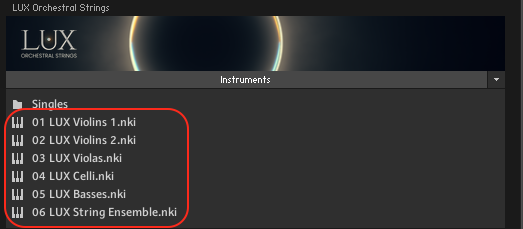
The key switch instruments are the main focus of LUX Orchestral Strings. Here you can find selected articulation sets for different genres giving you access to the essential articulation needed in that certain style, but you also have the possibility to create your own key switch articulations. There is a total of six key switch instruments. This chapter is in regard to the separate instrument sections: Violins 1, Violins 2, Violas, Celli and Basses.
LUX Orchestral Strings has two playing modes: Live Mode and Lookahead.
In Live Mode, all articulations play as they are, with the initial note of the legato having a delay of -150 ms and the rest of the legato reacting to a delay of -250 ms. Use this mode when finding melodies and playing live.
In the Lookahead Mode all sample starts are unified and optimized for a delay of -250ms. Set your track delay to this value and LUX will be perfectly in sync with your other instruments.
Please refer to the relevant documentation for the necessary steps to set a track delay in your digital audio workstation.
MAIN PAGE
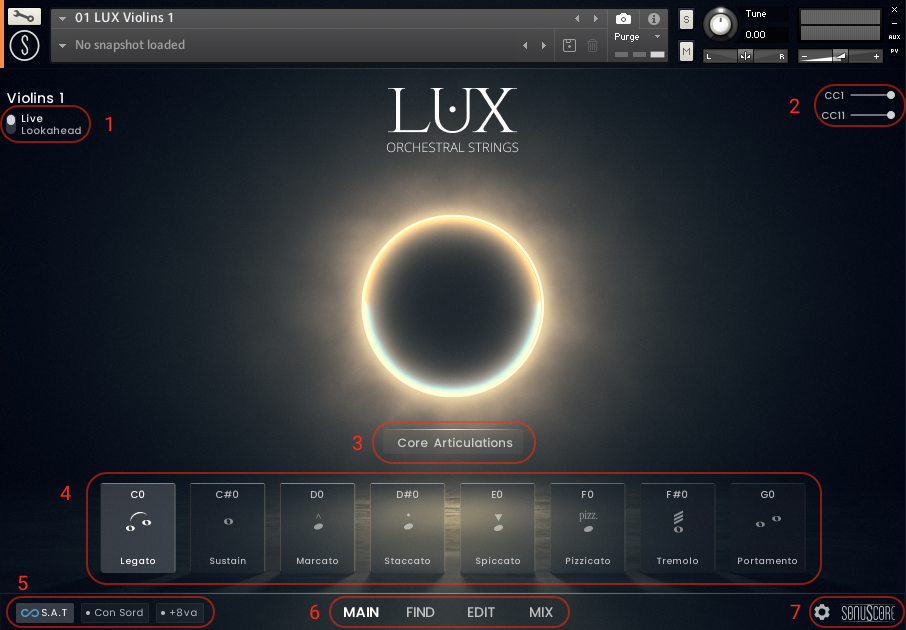
- LUX Orchestral Strings has two playing modes: Live Mode and Lookahead.
In Live Mode, all articulations play as they are, with the initial note of the legato having a delay of -150 ms and the rest of the legato reacting to a delay of -250 ms. Use this mode when finding melodies and playing live.
In the Lookahead Mode all sample starts are unified and optimized for a delay of -250ms. Set your track delay to this value and LUX will be perfectly in sync with your other instruments. - The mod wheel is mapped to CC01 and controls the dynamics.(see 4.4.2.)
Expression is mapped to CC11 and controls the volume. - Click the dropdown menu to select an Articulation Set. These are articulations bundled together to fit a specific scoring style.(see 4.1.1.)
- For each articulation set, there are a total of eight different articulations. These are mapped from C0 to G0.
Hovering over a key switch gives you two buttons:
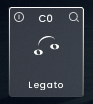
The On/Off button in the upper left corner turns the loaded articulation off and purges the samples. Turning it on again will reload the samples.
The inspector glass in the upper right corner will open the find page where you can excahnge the current key switch with other key switches.
The icon represents the articulation type and can be chosen individually for each articulation. (see 4.3.1.) - Turns the S.A.T. feature on/off.(see 4.1.2.)
Turns the Con Sordino feature on/off.(see 4.1.3.)
Turns the Add Octave feature on/off.(see 4.1.4.) - Page Selection.
- Settings page (see 4.2.) and Credits.
ARTICULATION SET OVERVIEW
| KS | Core Articulations | Short Articulations | Long Articulations | Special Textures | Intimate Scoring | Action Scoring | Tension Scoring | Mystic Scoring | Adaptive Trills | Morph Textures | Soft Morph Textures | Short Morphs | Motion Scoring | Virtuoso Runs |
|---|---|---|---|---|---|---|---|---|---|---|---|---|---|---|
| C0 | Legato | Staccato | Legato - Portamento | Soft Motion | Whisper Legato | Marcato | Tremolo | Whisper Sustain | Trill (B2) | Sustain – Tremolo | Whisper – SulP Tremolo | Staccato – Marcato | Root Ostinato | Runs Up (maj) |
| C#0 | Sustain | Spiccato | Sustain | SulP Tremolo | Whisper Sustain | Sforzando | SulP Tremolo | Soft Motion | Trill (2) | Sustain - SulP Tremolo | Whisper - Soft Motion | Staccato - Spiccato | Interval Ostinato | Runs Up (min) |
| D0 | Marcato | Pizzicato | Flautando | Movement | Soft Staccato | Staccato | Soft Motion | Flautando | Marcato | Sustain - Trills | Whisper - Flautando | Staccato - Bartok Pizz | Marcato | Runs UpDn (maj) |
| D#0 | Staccato | Bartok Pizz | Tremolo | Soft Interval Trills | Flautando | Spiccato | Harmonics Tremolo | Soft Interval Trills | Trill Figure Up | Sustain - Pendulum Up | Whisper - Pendulum Up | Spiccato - Bartok Pizz | Sustain | Runs UpDn (min) |
| E0 | Spiccato | Marcato | SulP Tremolo | Pendulum HT Gliss Up | Soft Motion | Tremolo | Trills | Harmonics Legato b2-2 | Trill Figure Dn | Sustain- Pendulum Dn | Whisper - Pendulum Dn | Staccato - Sforzando | Movement | Runs Legato |
| F0 | Pizzicato | Sforzando | Soft Motion | Pendulum HT Gliss Dn | Soft Interval Trills | Trills | Soft Interval Trills | Harmonics Sustain | Staccato | Tremolo - SulP Tremolo | Flautando - SulP Tremolo | Pizzicato - Bartok Pizz | Movement + SulPont | Marcato |
| F#0 | Tremolo | Trill Figure Up | Trills | Harmonics Tremolo | Movement | Trill Figure Up | Pendulum HT Gliss Up | Harmonics Tremolo | Soft Interval Trills | Sustain - Flautando | Whisper - Harmonics | Staccato - Trill Figure Up | Root Ostinato + SulP Trem | Stacc + Spicc |
| G0 | Portamento | Trill Figure Dn | Soft Interval Trills | Harmonics Sustain | Whisper Portamento | Trill Figure Dn | Pendulum HT Gliss Dn | Movement + Sul Pont | Runs Legato | Sustain - Harmonics | Whisper - Harm Trem | Staccato - Trill Figure Dn | Int Ostinato + SulP Trem | Trills |
| KS | Core Articulations | Short Articulations | Long Articulations | Special Textures | Intimate Scoring | Action Scoring | Tension Scoring | Mystic Scoring | Adaptive Trills | Morph Textures | Soft Morph Textures | Short Morphs | Motion Scoring |
|---|---|---|---|---|---|---|---|---|---|---|---|---|---|
| C0 | Legato | Staccato | Legato | Soft Motion | Whisper Legato | Marcato | Tremolo | Whisper Sustain | Trill (B2) | Sustain – Tremolo | Whisper – SulP Tremolo | Staccato – Marcato | Root Ostinato |
| C#0 | Sustain | Spiccato | Sustain | SulP Tremolo | Whisper Sustain | Sforzando | SulP Tremolo | Soft Motion | Trill (2) | Sustain - SulP Tremolo | Whisper - Soft Motion | Staccato - Spiccato | Interval Ostinato |
| D0 | Marcato | Pizzicato | Flautando | Movement | Soft Staccato | Staccato | Soft Motion | Flautando | Marcato | Sustain - Trills | Whisper - Flautando | Staccato - Bartok Pizz | Marcato |
| D#0 | Staccato | Bartok Pizz | Tremolo | Soft Interval Trills | Flautando | Spiccato | Sustain - SulP Tremolo | Soft Interval Trills | Trill Figure Up | Sustain - Flautando | Whisper - Tremolo | Spiccato - Bartok Pizz | Sustain |
| E0 | Spiccato | Marcato | SulP Tremolo | Whisper Sustain | Soft Motion | Tremolo | Trills | SulP Tremolo | Trill Figure Dn | Soft Motion - Tremolo | Flautando - Soft Motion | Staccato - Sforzando | Movement |
| F0 | Pizzicato | Sforzando | Soft Motion | Flautando | Soft Interval Trills | Trills | Soft Interval Trills | Whisper - SulP Tremolo | Staccato | Tremolo - SulP Tremolo | Flautando - SulP Tremolo | Pizzicato - Bartok Pizz | Movement SulPont |
| F#0 | Tremolo | Trill Figure Up | Trills | Sustain - Tremolo | Movement | Trill Figure Up | Movement Tremolo | Movement SulTasto | Soft Interval Trills | Flautando - Soft Motion | Soft Motion - Tremolo | Staccato - Trill Figure Up | Root Ostinato + SulP Trem |
| G0 | Trills | Trill Figure Dn | Soft Interval Trills | Sustain - SulP Tremolo | Whisper - Soft Motion | Trill Figure Dn | Movement SulPont | Movement SulPont | Runs Legato | Flautando - SulP Trem | Sustain - Flautando | Staccato - Trill Figure Dn | Int Ostinato + SulP Trem |
| KS | Core Articulations | Short Articulations | Long Articulations | Special Textures | Intimate Scoring | Action Scoring | Tension Scoring | Mystic Scoring | Adaptive Trills | Morph Textures | Soft Morph Textures | Short Morphs | Motion Scoring |
|---|---|---|---|---|---|---|---|---|---|---|---|---|---|
| C0 | Legato | Staccato | Legato | Soft Motion | Whisper Legato | Marcato | Tremolo | Whisper Sustain | Trill (b2) | Sustain – Tremolo | Whisper – SulP Tremolo | Staccato – Marcato | Root Ostinato |
| C#0 | Sustain | Spiccato | Sustain | SulP Tremolo | Whisper Sustain | Sforzando | SulP Tremolo | Soft Motion | Trill (2) | Sustain - SulP Tremolo | Whisper - Soft Motion | Staccato - Spiccato | Ostinato Figure 1 |
| D0 | Marcato | Pizzicato | Flautando | Movement | Soft Staccato | Staccato | Soft Motion | Flautando | Marcato | Sustain - Trills | Whisper - Flautando | Staccato - Bartok Pizz | Ostinato Figure 2 |
| D#0 | Staccato | Bartok Pizz | Tremolo | Soft Interval Trills | Flautando | Tremolo | Harmonics Tremolo | Soft Interval Trills | Trill Figure Up | Sustain - Pendulum Up | Whisper - Pendulum Up | Spiccato - Bartok Pizz | Marcato |
| E0 | Spiccato | Marcato | SulP Tremolo | Pendulum HT Gliss Up | Soft Motion | Spiccato | Trills | Harmonics Legato b2-2 | Trill Figure Dn | Sustain- Pendulum Dn | Whisper - Pendulum Dn | Staccato - Sforzando | Sustain |
| F0 | Pizzicato | Sforzando | Soft Motion | Pendulum HT Gliss Dn | Soft Interval Trills | Trills | Soft Interval Trills | Trills | Staccato | Tremolo - SulP Tremolo | Slow Bends | Pizzicato - Bartok Pizz | Root Ostinato + SulP Trem |
| F#0 | Tremolo | Trill Figure Up | Trills | Harmonics Tremolo | Movement | Trill Figure Up | Pendulum HT Gliss Up | Harmonics Tremolo | Soft Interval Trills | Sustain - Flautando | Whisper - Harmonics | Staccato - Trill Figure Up | Ostinato Fig 1 + SulP Trem |
| G0 | Trills | Trill Figure Dn | Soft Interval Trills | Harmonics Sustain | Whisper - Soft Motion | Trill Figure Dn | Pendulum HT Gliss Dn | Movement SulPont | Runs Legato | Sustain - Harmonics | Whisper - Harm Trem | Staccato - Trill Figure Dn | Ostinato Fig 2 + SulP Trem |
| KS | Core Articulations | Short Articulations | Long Articulations | Special Textures | Intimate Scoring | Action Scoring | Tension Scoring | Mystic Scoring | Adaptive Trills | Morph Textures | Soft Morph Textures | Short Morphs | Motion Scoring |
|---|---|---|---|---|---|---|---|---|---|---|---|---|---|
| C0 | Legato | Staccato | Legato - Portamento | Soft Motion | Whisper Legato | Marcato | Tremolo | Whisper Sustain | Trill (b2) | Sustain – Tremolo | Whisper – SulP Tremolo | Staccato – Marcato | Root Ostinato |
| C#0 | Sustain | Spiccato | Sustain | Movement | Whisper Sustain | Sforzando | SulP Tremolo | Soft Motion | Trill (2) | Sustain - SulP Tremolo | Whisper - Soft Motion | Staccato - Spiccato | Ostinato Figure 1 |
| D0 | Marcato | Pizzicato | Flautando | Slow Bends | Soft Staccato | Staccato | Soft Motion | Flautando | Marcato | Sustain - Trills | Whisper - Flautando | Staccato - Bartok Pizz | Ostinato Figure 2 |
| D#0 | Staccato | Bartok Pizz | Tremolo | Soft Interval Trills | Flautando | Spiccato | Harmonics Tremolo | Soft Interval Trills | Trill Figure Up | Sustain - Pendulum Up | Whisper - Pendulum Up | Spiccato - Bartok Pizz | Marcato |
| E0 | Spiccato | Marcato | SulP Tremolo | Pendulum HT Gliss Up | Soft Motion | Tremolo | Trills | Harmonics Legato b2-2 | Trill Figure Dn | Sustain- Pendulum Dn | Whisper - Pendulum Dn | Staccato - Sforzando | Sustain |
| F0 | Pizzicato | Sforzando | Soft Motion | Pendulum HT Gliss Dn | Soft Interval Trills | Trills | Soft Interval Trills | Harmonics Sustain | Staccato | Tremolo - SulP Tremolo | Slow Bends | Pizzicato - Bartok Pizz | Root Ostinato + SulP Trem |
| F#0 | Tremolo | Trill Figure Up | Trills | Triplet Arp (maj) | Movement | Trill Figure Up | Pendulum HT Gliss Up | Harmonics Tremolo | Soft Interval Trills | Sustain - Flautando | Whisper - Harmonics | Staccato - Trill Figure Up | Ostinato Fig 1 + SulP Trem |
| G0 | Portamento | Trill Figure Dn | Soft Interval Trills | Triplet Arp (min) | Whisper Portamento | Trill Figure Dn | Pendulum HT Gliss Dn | Movement SulPont | Runs Legato | Sustain - Harmonics | Whisper - Harm Trem | Staccato - Trill Figure Dn | Ostinato Fig 2 + SulP Trem |
| KS | Core Articulations | Short Articulations | Long Articulations | Special Textures | Intimate Scoring | Action Scoring | Tension Scoring | Mystic Scoring | Adaptive Trills | Morph Textures | Soft Morph Textures | Short Morphs |
|---|---|---|---|---|---|---|---|---|---|---|---|---|
| C0 | Legato | Staccato | Legato | Soft Motion | Whisper Legato | Marcato | Tremolo | Whisper Sustain | Trill (b2) | Sustain – Tremolo | Whisper – Soft Tremolo | Staccato – Marcato |
| C#0 | Sustain | Spiccato | Sustain | SulP Tremolo | Whisper Sustain | Sforzando | SulP Tremolo | Soft Motion | Trill (2) | Sustain - SulP Tremolo | Whisper - Soft Motion | Staccato - Spiccato |
| D0 | Marcato | Pizzicato | Flautando | Slow Bends | Soft Staccato | Staccato | Soft Motion | Flautando | Marcato | Sustain - Trills | Whisper - Flautando | Staccato - Bartok Pizz |
| D#0 | Staccato | Bartok Pizz | Tremolo | Soft Interval Trills | Flautando | Spiccato | Trills | Soft Interval Trills | Staccato | Sustain - Flautando | Flautando - SulP Tremolo | Spiccato - Bartok Pizz |
| E0 | Spiccato | Marcato | SulP Tremolo | Whisper Sustain | Soft Motion | Tremolo | Soft Interval Trills | SulP Tremolo | Soft Interval Trills | Soft Motion - Tremolo | Slow Bends | Staccato - Sforzando |
| F0 | Pizzicato | Sforzando | Soft Motion | Flautando | Soft Interval Trills | Trills | Marcato | Whisper - SulP Tremolo | Adaptive Legato | Tremolo - SulP Tremolo | Soft Motion - Tremolo | Pizzicato - Bartok Pizz |
| F#0 | Tremolo | Staccato + Spiccato | Trills | Sustain - Tremolo | Movement | Staccato + Spiccato | Tremolo - SulPTremolo | Empty | Empty | Empty | Whisper - Tremolo | Empty |
| G0 | Trills | Spiccato + Bartok Pizz | Soft Interval Trills | Sustain - SulP Tremolo | Whisper - Soft Motion | Spiccato + Bartok Pizz | Slow Bends | Empty | Empty | Empty | Flautando - Soft Motion | Empty |
S.A.T. - SEAMLESS ARTICULATION TRANSITIONING
Move between long articulations while holding a note. A key switch note with a lower velocity creates a gradual shift (4 seconds), a higher velocity will produce a quicker change (1.2 seconds). The feature is activated per default.
CON SORDINO
Applies a Con Sordino effect to the instrument.
+ 8va
The Add Octave feature adds an octave above the played note in any articulation.
Additional Articulation Pages
The Main Page view changes slightly when the additional Articulation Pages are activated via the Settings Page (see 4.2.).
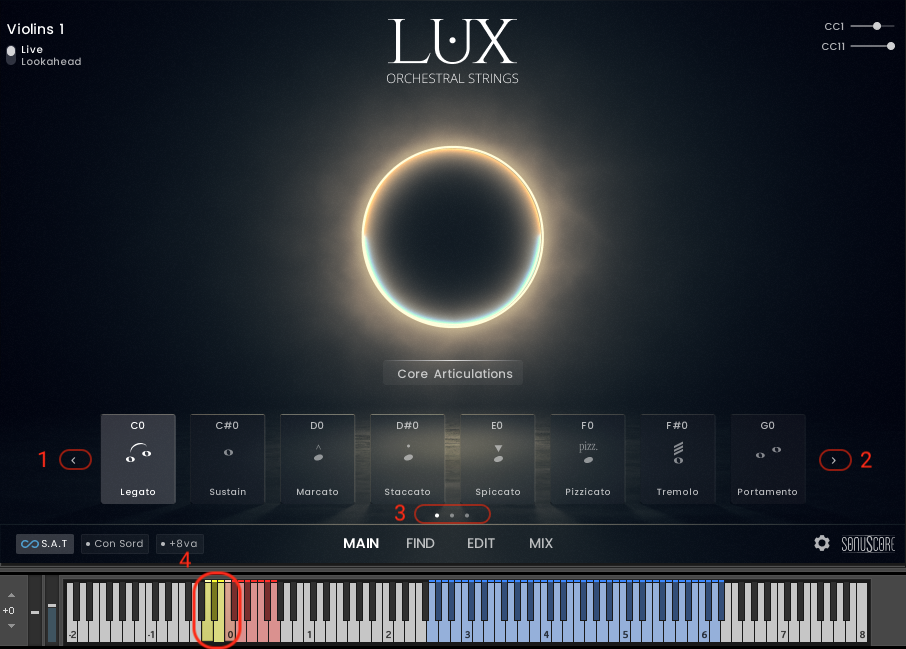
- Switch to the previous Articulation Page.
- Switch to the next Articulation Page.
- The white dot indicates the currently active Articulation Page. Clicking one of the grey dots will load up the chosen Articulation Page.
- Keyswitches A-1, Bb-1 and B-1 correspond with each of the Pages. If only two pages are activated in the Settings, only A-1 and Bb-1 will be active.
SETTINGS PAGE
Click the cogwheel at the bottom right of the instrument to access the Settings Page.
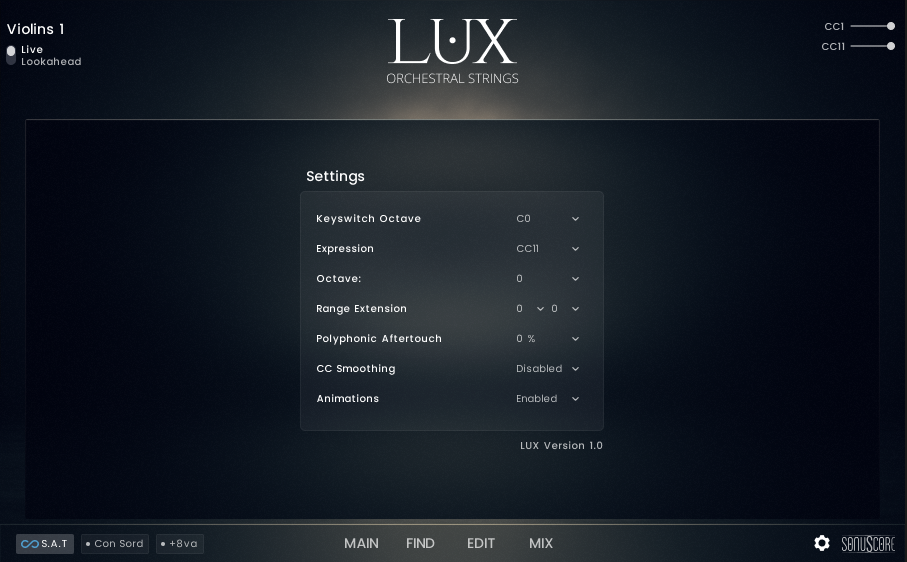
- Expression - Set to CC11. Can be switched off.
- Polyphonic Aftertouch - Set the percentage of how much the polyphonic aftertouch influences CC1 on specific notes.
- CC Smoothing - Off per default. Can be set to Low and High. Influences the behavior of how the instrumt handles sudden CC jumps.
- Keyswitch Octave - Move the key switch range up or down an octave.
- Articulation Pages: Set the number of Articulation Pages. Setting the pages to three gives you a total of 24 possible articulations at once. The KS A-1, Bb-1 an B-1 are available once there is more than one articualtion page activated. A-1 switches to the first page, Bb-1 switches to the second page and B-1 switches to the third page.
- Octave - Move the play range for the keyboard up or down.
- Range Extension - Extend the sonic range of the instrument.
- Animations - Switch background animations on or off. Turning animations off will save system resources.
This can be helpful for tracks with very delicate melodies in the softer dynamic range. It smoothes out the velocity changes leading to a very even performance without sudden velocity drops.
In traditional notation the Basses are notated one octave higher than they actually sound. In LUX Orchestral Strings they are mapped the same way. This means that you can copy and paste the cello part to the basses, creating an easy workflow for basic orchestration with the bass in octaves, while making minimal effort by simply copying the MIDI. In some cases it might be easier to have the Basses in their actual playing range. This can be set on the settings page by moving the playing range of the Basses down by one octave (along with the Keyswitch Octave).
It sometimes happens that during a composition you face a situation where you only would need a semitone more range to finish your melody line. The Range Extension at the settings page lets you easily adjust this range. The nearest base sample is pitched in this case. This means extension beyond a whole tone might start to sound distorted and unauthentic.
FIND PAGE
On the Find Page you can change the articulation for the currently selected key switch.

- Currently selected articulation and selected key switch.
- There are three different categories of articulations (see 4.3.1.). Use the different tags to find the needed articulation easier.
- Selecting an articulation will automatically load the articulation onto the selected key switch.
- Buttons to delete, save, edit and re-scan user presets.
- To easier find preferred articulations, click the star symbol in the upper right corner of each articulation. Clicking Favourits will only show those articulations.
User Presets are automatically tagged as such and can be filtered via the User Presets button. - The check button switches to the Main Page with the newly selected articulation. The cross button reloads the previously loaded articulation (preset or already edited) and then switches to the Main Page.
SAVING A USER PRESET

Save a User Preset by clicking the save button in the lower left corner. How to create custom articulations (see 4.4.) and the following options appear:
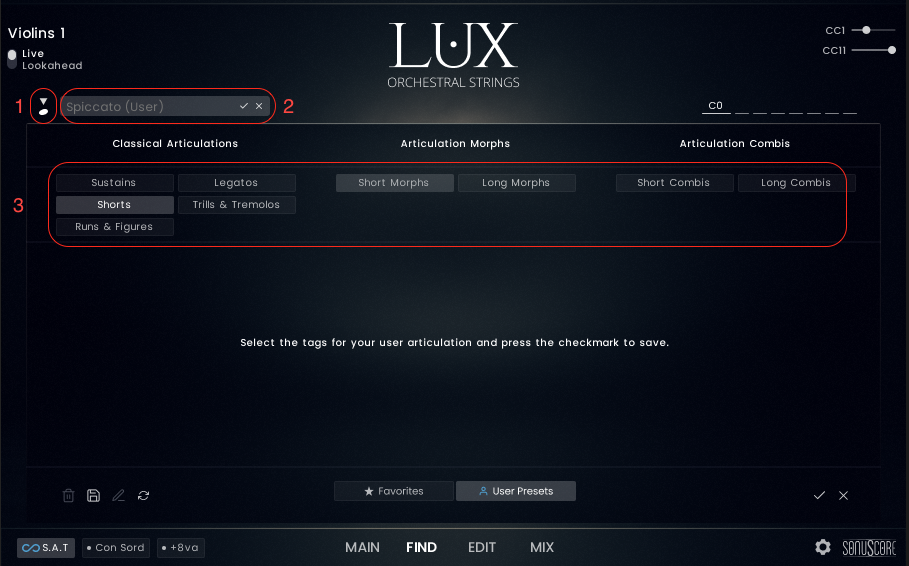
- Each User Preset can have one of the following icons:
- User
- Sustain
- Whisper Sus
- Flautando
- Harmonics
- Glissandi
- Legato
- Harmonics Legato
- Whisper Legato
- Portamento
- Marcato
- Staccato
- Spiccato
- Pizz
- Bartok
- Tremolo
- Sul Pont Trem
- Slow Trem
- Harmonic Trem
- Trill
- Interval Trill
- Doubles
- Trill Figure
- Ostinato
- Triplet Arp
- Runs
- Aleatoric
- Morph
- Combi
- Each User Preset can be individually named. The check symbol saves the current settings and the cross symbol closes the User Preset dialogue.
- All Articulations and User Presets are divided into three different articulation categories (see 4.3.2.). Choose one (or more) of the articulation tags to easier find your presets. They will appear right next to the other presets in that category.
ARTICULATION CATEGORIES
There are three Articulation Categories:
- Classical Articulations - traditional articulations can be found here.
- Articulation Morphs - more than one articulation mapped across the mod wheel. Morph between both articulations by moving the mod wheel up or down.
- Articulation Combis - more than one articulation is played at the same time. Layered combinations of different articulations.
SPECIAL ARTICULATIONS
Some of the Articulations available in LUX Orchestra Strings have a specific behavior, making it easier to use them efficiently:
Trill Figure Up/Down
The Trill Figures Up and Down are available as half tone and whole tone Trill Figures.
Press a half tone or whole tone interval on the keyboard to trigger the intended Trill Figure.
Trill Figure Up will start with the lower note of the pressed half tone or whole tone interval. Trill Figure Down will start with the higher note.
There is a Trill Figure (b2) and a Trill Figure (2) version of this articulation available, if you want the two intervals available on different key switches. For those articulations the single note will always trigger the corresponding Trill.
Trills
The Trills are available as half tone Trills and whole tone Trills.
Press a half tone or whole tone interval on the keyboard to trigger the intended Trill.
There is a Trill (b2) and a Trill (2) version of this articulation available, if you want the two intervals available on different key switches. For those articulations the single note will always trigger the corresponding Trill.
Soft Interval Trills
Soft Inteval Trills are available up to a perfect fourth.
Play any combination of intervals (chords) on the keyboard and the articulation will automatically choose all the available Trills.
There is a Soft Interval Trill (b2), a Soft Interval Trill (2), a Soft Interval Trill (b3), a Soft Interval Trill (3) and a Soft Interval Trill (4) version of this articulation available, if you want the five intervals available on different key switches. For those articulations the single note will always trigger the corresponding Soft Interval Trill.
For example: Press a C minor chord (C3 - Eb3 - G3 - C4). You will hear a Soft Interval Trill between C3- Eb3, between Eb3 - G3 and between G3 and C4.
There is a Soft Interval Trill (b2 -4) articulation for each interval separately.
Slow Bends
The Slow Bends are edited in a way that the bend down is triggered with releasing the note on the keyboard.
Hold the note down for a sustained note and release the note to trigger the bend down.
Legato - Portamento
Switch between legato and potamento transitions through note velocity. Notes with a velocity higher than 90 trigger a portamento transistion, everything else triggers the normal legato transition. (see 4.4.1.4. for more information regarding the range to velocity feature)
Movement
Movement fuctions as an additional layer to a sustain articulation. It triggers legato transitions between the played notes. With Tempo you can set the basic rhythm in which the transition are played. With Density you can set how often a transition is triggered. Volume balances the sub articulation against the other sustain layer. Very naturally moving textures are possible with this additional articulation layer.
Ostinatos
EDIT PAGE

Open the edit page to alter existing articulations or create new ones.
SUBARTICULATION OVERVIEW
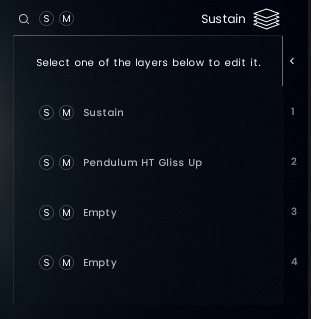
Each Articulation consists of up to four different layers of Subarticulations.
Subarticulations are the foundation of the library and can be edited, morphed or layed individually via the Subarticulation Editor and then saved as new Articulations to be available through the Find Page(see 4.4.1.1.).
In this overview you can see all the Subarticulations loaded in the selected Articulation and Solo/Mute individual slots.
SUBARTICULATION BROWSER
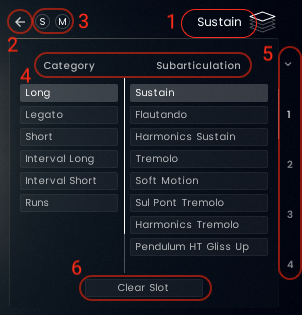
- Click on the Subarticulation name when the desired layer is selected to enter the Subarticulation Browser.
- Clicking the arrow will close the Subarticulation Browser.
- Solo/Mute the current Subarticulation slot.
- Choose a category and click on a Subarticulation to load it into the selected Subarticulation slot.
- The down arrow closes the Subarticulation Browser and changes to the Subarticulation Overview. Click on one of the four slots to change Subarticulations for that slot. Use the scroll bar to scroll through the available Subarticulations.
- Clicking "Clear Slot" will unload the currently loaded Subarticulation.
The Subarticulation Browser offers the following categories and articulations:
Violins 1
Long
- Sustain
- Flautando
- Harmonics Sustain
- Tremolo
- Soft Motion
- Sul Pont Tremolo
- Harmonics Tremolo
- Pedulum HT Gliss Up
- Pedulum HT Gliss Dn
- Slow Bends
Legato
- Legato
- Portamento
- Harmonics Legato b2-2
- Smart Overlay Marc
- Smart Overlay Stacc
- Movement
Short
- Marcato
- Sfordando
- Staccato
- Spiccato
- Pizzicato
- Bartok Pizz
Interval Long
- Trill (Full)
- Trill (b2)
- Trill (2)
- Soft Interval Trill (Full)
- Soft Interval Trill (b2)
- Soft Interval Trill (2)
- Soft Interval Trill (b3)
- Soft Interval Trill (3)
- Soft Interval Trill (4)
- 8th Ostinato Up (Full)
- 8th Ostinato (Root)
- 8th Ostinato Up (b2)
- 8th Ostinato Up (2)
- 8th Ostinato Up (b3)
- 8th Ostinato Up (3)
- 8th Ostinato Up (4)
Interval Short
- Trill Figure Up (Full)
- Trill Figure Up (b2)
- Trill Figure Up (2)
- Trill Figure Dn (Full)
- Trill Figure Dn (b2)
- Trill Figure Dn (2)
Runs
- Runs Up (min)
- Runs Up (maj)
- Runs UpDn (min)
- Runs UpDn (maj)
Violins 2
Long
- Sustain
- Flautando
- Tremolo
- Soft Motion
- Sul Pont Tremolo
Legato
- Legato
- Smart Overlay Marc
- Smart Overlay Stacc
- Movement
Short
- Marcato
- Sfordando
- Staccato
- Spiccato
- Pizzicato
- Bartok Pizz
Interval Long
- Trill (Full)
- Trill (b2)
- Trill (2)
- Soft Interval Trill (Full)
- Soft Interval Trill (b2)
- Soft Interval Trill (2)
- Soft Interval Trill (b3)
- Soft Interval Trill (3)
- Soft Interval Trill (4)
- 8th Ostinato Up (Full)
- 8th Ostinato (Root)
- 8th Ostinato Up (b2)
- 8th Ostinato Up (2)
- 8th Ostinato Up (b3)
- 8th Ostinato Up (3)
- 8th Ostinato Up (4)
Interval Short
- Trill Figure Up (Full)
- Trill Figure Up (b2)
- Trill Figure Up (2)
- Trill Figure Dn (Full)
- Trill Figure Dn (b2)
- Trill Figure Dn (2)
Violas
Long
- Sustain
- Flautando
- Harmonics Sustain
- Tremolo
- Soft Motion
- Sul Pont Tremolo
- Harmonics Tremolo
- Harmonics Motion
- Pedulum HT Gliss Up
- Pedulum HT Gliss Dn
- Slow Bends
Legato
- Legato
- Harmonics Legato b2-2
- Smart Overlay Marc
- Smart Overlay Stacc
- Movement
Short
- Marcato
- Sfordando
- Staccato
- Spiccato
- Pizzicato
- Bartok Pizz
Interval Long
- Trill (Full)
- Trill (b2)
- Trill (2)
- Soft Interval Trill (Full)
- Soft Interval Trill (b2)
- Soft Interval Trill (2)
- Soft Interval Trill (b3)
- Soft Interval Trill (3)
- Soft Interval Trill (4)
- 8th Ostinato (Root)
- 8th Ostinato Figure 1
- 8th Ostinato Figure 2
Interval Short
- Trill Figure Up (Full)
- Trill Figure Up (b2)
- Trill Figure Up (2)
- Trill Figure Dn (Full)
- Trill Figure Dn (b2)
- Trill Figure Dn (2)
Celli
Long
- Sustain
- Flautando
- Harmonics Sustain
- Tremolo
- Soft Motion
- Sul Pont Tremolo
- Harmonics Tremolo
- Harmonics Motion
- Pedulum HT Gliss Up
- Pedulum HT Gliss Dn
- Slow Bends
Legato
- Legato
- Portamento
- Harmonics Legato b2-2
- Smart Overlay Marc
- Smart Overlay Stacc
- Movement
Short
- Marcato
- Sfordando
- Staccato
- Spiccato
- Pizzicato
- Bartok Pizz
Interval Long
- Trill (Full)
- Trill (b2)
- Trill (2)
- Soft Interval Trill (Full)
- Soft Interval Trill (b2)
- Soft Interval Trill (2)
- Soft Interval Trill (b3)
- Soft Interval Trill (3)
- Soft Interval Trill (4)
- Triplet Arps (min)
- Triplet Arps (maj)
- 4th Ostinato (Root)
- 4th Ostinato Figure 1
- 4th Ostinato Figure 2
Interval Short
- Trill Figure Up (Full)
- Trill Figure Up (b2)
- Trill Figure Up (2)
- Trill Figure Dn (Full)
- Trill Figure Dn (b2)
- Trill Figure Dn (2)
Basses
Long
- Sustain
- Flautando
- Tremolo
- Soft Motion
- Sul Pont Tremolo
- Slow Bends
Legato
- Legato
- Smart Overlay Marc
- Smart Overlay Stacc
- Movement
Short
- Marcato
- Sfordando
- Staccato
- Spiccato
- Pizzicato
- Bartok Pizz
Interval Long
- Trill (Full)
- Trill (b2)
- Trill (2)
- Soft Interval Trill (Full)
- Soft Interval Trill (b2)
- Soft Interval Trill (2)
- Soft Interval Trill (b3)
- Soft Interval Trill (3)
- Soft Interval Trill (4)
SUBARTICULATION EDITOR
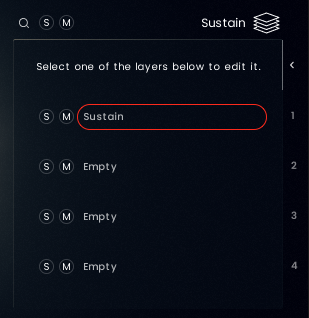
To enter the Subarticulation Editor click on the Subarticulation you want to edit.
Longs

- Enter the Subarticulation Browser and as Solo/Mute Buttons.
- Edit how the Subarticulation behaves when moving the mod wheel.(see 4.4.1.3.)
- Dynamic Layer Range - Move the slider to exclude dynamic layers from playing.
- Adjust the volume of the Subarticulation.
Legatos

- Enter the Subarticulation Browser and as Solo/Mute Buttons.
- Edit how the Subarticulation behaves when moving the mod wheel.(see 4.4.1.3.)
- Dynamic Layer Range - Move the slider to exclude dynamic layers from playing.
- Adjust the volume of the Subarticulation.
- Adjust the speed of the transition. Clicking the + symbol will adapt the transitions speed to your playing.
- Adjust the volume of the transition.
Shorts

- Enter the Subarticulation Browser and as Solo/Mute Buttons.
- Edit how the Subarticulation behaves when moving the mod wheel.(see 4.4.1.3.)
- Dynamic Layer Range - Move the slider to exclude dynamic layers from playing.
- Adjust the volume of the Subarticulation.
- Adjust the tightness of the subarticulation. Bringing up the slider will shorten the fade out previously pressed notes. This leads to a clearer sound when playing fast rhythms.
- Adjust the Round Robin order from ordered to random.
RANGE TO MODWHEEL
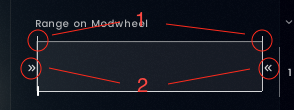
- Adjust the fade in/fade out for the Subarticulation.
- Adjust the starting and ending CC1 value for the Subarticulation.
RANGE TO VELOCITY
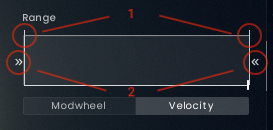
- Adjust the fade in/fade out for the Subarticulation based on note velocity.
- Adjust the starting and ending velocity value for the Subarticulation.
Take a look into the Legato/Portamento Articulation to learn more about the practical use of this option.
Examples
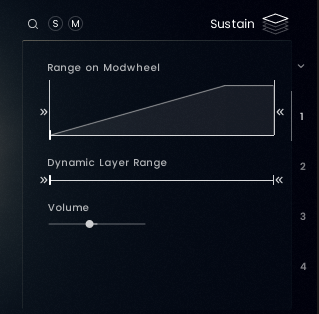
The Subarticulation is slowly fading in as the mod wheel moves up in relation the the volume curve set in the Articulation Settings until CC01 = 100. From this point on the Subarticulation behaves exactly as set in the Articulation Settings. (see 4.4.2.)
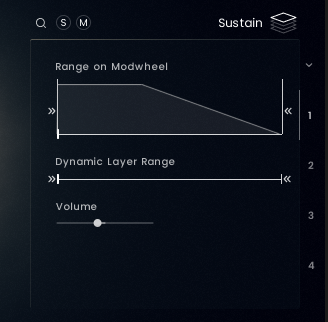
From CC01 = 50 the Subarticulation is slowly fading out as the mod wheel moves up in relation the the volume curve set in the Articulation Settings. (see 4.4.2.)
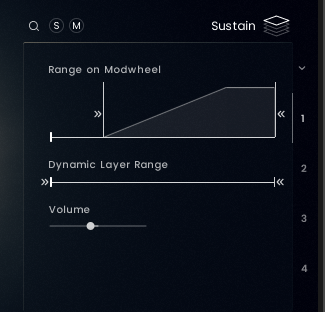
The Subarticulation is not playing from CC01 = 0 to CC01 = 30 and then slowly fading in as the mod wheel moves up in relation the the volume curve set in the Articulation Settings until CC01 = 100. From there the Subarticulation behaves exactly as set in the Articulation Settings. (see 4.4.2.)
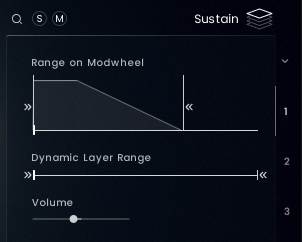
The Subarticulation is slowly fading out as the mod wheel moves up in relation the the volume curve set in the Articulation Settings until CC01 = 70. For CC01 values higher than 70 the Subarticulation is inaudible.
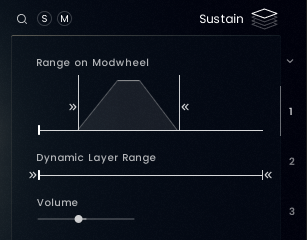
The Subarticulation is not playing from CC01 = 0 to CC01 = 20 and then fading in as the mod wheel moves up, but already fading out after CC01 =80 and remains inaudible for CC01 values higher than 80.
Study the Articulation Morphs and the Articulation Combis to explore the possibilities and then come up with your own ideas of morphs and combis using the shown setting combinations from above.
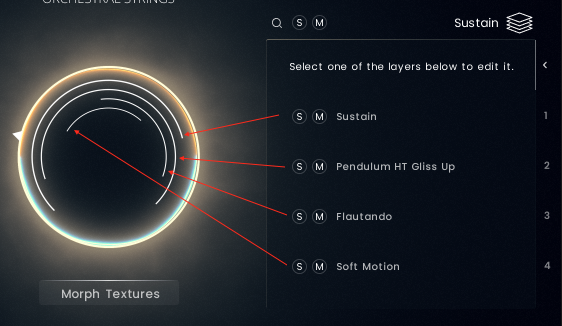
You can see and adjust the ranges of the Subarticulation Slots in the Orb in the middle of the GUI.
ARTICULATION SETTINGS
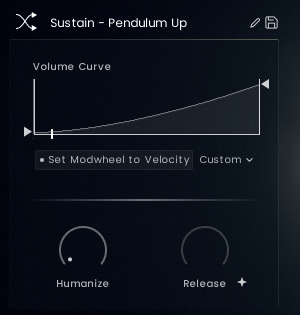
VOLUME CURVE SETTINGS
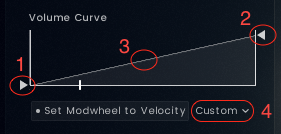
- Adjust the min volume.
- Adjust the max volume.
- Adjust the slope of the Volume Curve.
- Select one of the pre designed Volume Curve Presets.
VOLUME CURVE PRESETS

Full - Uses the full range with a slight slope. The Full (0) preset is the al niente variant.
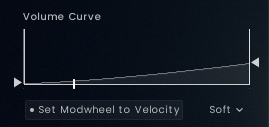
Soft - Uses a softer max velocity with a slight slope. The Soft (0) preset is the al niente variant.
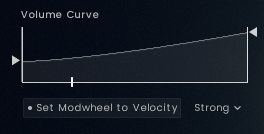
Strong - Uses a louder min velocity with a slight slope.
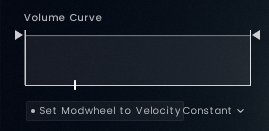
Constant - Uses a constant min and max velocity.
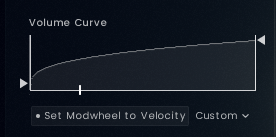
Custom - This is shown, when the initial preset was manually altered to a custom setting.
MIXER PAGE

On the Mixer Page you can adjust the sound by choosing different mic positions, applying EQ, compression and reverb.

- Shows the currently selected Mic Mix. (see 4.5.2.)
- Load and unload the Mic Position. The Bleed Mics can be switched from only Strings Bleed Mics to Orchestral Bleed Mics.
- Solo/Mute Buttons and a Pan Slilder to adjust the panorama for each Mic Position.
- Volume Slider - Adjust the volume of each Mic Position.
- Send - Adjust the level of the send into the Reverb Bus.
- Out - Each Mic Potition can be routed to a different output.
MICROPHONE POSITIONS
In LUX Orchestral Strings there are six different Mic Positions to choose from:
- Full Mix - This is the full mix by mixing engineer Peter Fuchs.
- Close Mics - placed directly near the player for a detailed and direct sound.
- Tree Mics - a special configuration of microphones over the conductors position. Great spacial imaging with a good balance of details and room sound.
- Far Mics - Wide stereo image capturing the natural reverb of the recording stage.
- Bleed Mics - Choose between the Strings Bleed Mics and the Orchestral Bleed Mics. During the recording the additional microphones normally used for the other Strings Sections and for the entire Orchestra where left open to capture the natural bleed you typically get when recording an entire Orchestra instead of recording in sections.
The Strings Bleed Mic only dials in the other microphones from the other Strings Sections.
Additionally the Orchestral Bleed Mics add the entire close mics for Woodwinds and Brass to the Strings Bleed Mics. The result is a wide yet defined stereo image without adding too much additional room information to the mix.
MIC MIXES
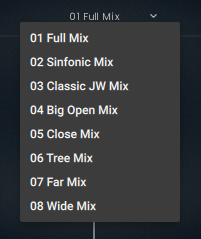
Choose the right mix for your project:
- Full Mix: Mixed by Peter Fuchs. (No use of the Bleed Mics).
- Sinfonic Mix: Full Mix + Bleed Orch Mics to give the Full Mix a wider image.
- Classic JW Mix: Classic wide Hollywood sound.
- Big Open Mix: Big Sound with a defined tail.
- Close Mix: Detailed sound with a bit of space through the Tree Mics.
- Tree Mix: Just the Tree Mics with a nuance of definition from the Close Mics.
- Far Mix: Very lush and reverbant mix.
- Wide Mix: Focus on a wide stereo image and a long defined reverb tail.
As the Full Mix contains the Tree, Close and Far Mics, activating these together can lead to phasing issues.
Either use the Full Mix or create your own mix using the Tree, Far and Close Mics. The String or Orch Bleed Mics can be used to your taste in both cases.
EQUALIZER

- Activate/de-activate the Equalizer.
- Adjust Low, Mid and High frequencies.
Add higher frequencies for more brilliance - 13kHz/wide Q.
Add upper mid frequencies for more presence - 2.5kHz/narrow Q.
Add lower mid and low frequencies for more warmth and impact - 527Hz/wide Q for VL1, VL2 and Violas. 250Hz/wide Q for Celli and Basses.
COMPRESSOR

- Activate/de-activate the Compressor.
- Compression: Determines the amount of compression applied to the input signal. The higher the value, the more compression is applied to the input signal.
Mix: Controls the dry/wet mix of the compressor. This can be used to create a parallel compression style routing, which increases the quieter signals rather than reducing the louder ones. When the Mix control is set to 0%, only the uncompressed (dry) signal will be heard, and at 100%, only the compressed signal will be heard. Settings between the 0% and 100% are a mix of both signals.
REVERB
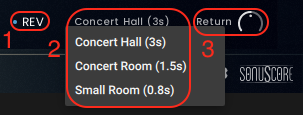
- Activate/de-activate the Reverb.
- Choose one of the three reverb settings with different decay times.
- Adjust the return volume.
ENSEMBLE INSTRUMENT
MAIN PAGE

- The Ensemble instrument like the key switch instrument has two playing modes: Live Mode and Lookahead. However the note selection adds an additional -30ms delay.
In Live Mode all articulations play as they are and the initial note of the legato has a -180ms delay, while the rest of the legato reacts to a -280ms delay. Use this mode when finding melodies and live playing.
In the Lookahead Mode all sample starts are unified and optimized for a delay of -280ms. Set your track delay to this value and LUX will be perfectly in sync with your other instruments. - The mod wheel is mapped to CC01 and controls the dynamics.
Expression is mapped to CC11 and controls the volume. - Click the dropdown menu to select an Articulation Set. These are articulations bundled together to fit a specific scoring style.(see 5.1.1.)
- Per Articulation Set there are a total of four different articulations mapped from C0 - D#0.
Hovering over a key switch present, two buttons appear:
The On/Off button in the upper left corner turns the loaded articulation off and purges the samples. Turning it on again will re-load the samples.
The inspector glass in the upper right corner will open the find page where you can exchange the current key switch with other key switches.
The icon represents the articulation type and can be chosen individually for each articulation. (see 4.3.1.) - Turns the S.A.T. Feature on/off.(see 4.1.2.)
Turns the Con Sordino feature on/off.(see 4.1.3.) - Page Selection.
- Settings page (see 4.2.) and Credits.
ARTICULATION SET OVERVIEW
| KS | Basic | Shorts | Longs | Intimate | Action | Tension | Mystic 1 | Mystic 2 | Trills | Morphs | Soft Morphs | Short Morphs | Motion | |
|---|---|---|---|---|---|---|---|---|---|---|---|---|---|---|
| 1. Violins | C0 | Legato | Sforzando | Sustain | Whisper Legato | Marcato | Tremolo | Whisper Sustain | Harmonics Tremolo | Trill (b2) | Sustain - Tremolo | Whisper - SulP Tremolo | Staccato - Marcato | Root Ostinato |
| 2. Violins | Legato | Sforzando | Sustain | Whisper Legato | Marcato | Tremolo | Whisper Sustain | Flautando | Trill (b2) | Sustain - Tremolo | Whisper - SulP Tremolo | Staccato - Marcato | Root Ostinato | |
| Violas | Legato | Sforzando | Sustain | Whisper Legato | Marcato | Tremolo | Harmonics Sustain | Harmonics Slow Trem | Trill (b2) | Sustain - Tremolo | Whisper - SulP Tremolo | Staccato - Marcato | Sustain | |
| Celli | Legato | Sforzando | Sustain | Whisper Legato | Marcato | Tremolo | Harmonics Sustain | Harmonics Slow Trem | Trill (b2) | Sustain - Tremolo | Whisper - SulP Tremolo | Staccato - Marcato | Root Ostinato | |
| Basses | Legato | Sforzando | Sustain | Whisper Legato | Marcato | Sustain | Whisper Sustain | Flautando | Trill (b2) | Sustain - Tremolo | Whisper - SulP Tremolo | Staccato - Marcato | Sustain | |
| 1. Violins | C#0 | Sustain | Staccato | Flautando | Whisper Sustain | Spiccato | SulP Tremolo | Pendulum HT Gliss Dn | SulP Tremolo | Trill (2) | Sustain - SulP Tremolo | Whisper - Soft Motion | Staccato - Spiccato | Interval Ostinato |
| 2. Violins | Sustain | Staccato | Flautando | Whisper Sustain | Spiccato | SulP Tremolo | Soft Motion | Soft Motion | Trill (2) | Sustain - SulP Tremolo | Whisper - Soft Motion | Staccato - Spiccato | Interval Ostinato | |
| Violas | Sustain | Staccato | Flautando | Whisper Sustain | Spiccato | SulP Tremolo | Soft Motion | Soft Motion | Trill (2) | Sustain - SulP Tremolo | Whisper - Soft Motion | Staccato - Spiccato | Flautando | |
| Celli | Sustain | Staccato | Flautando | Whisper Sustain | Spiccato | SulP Tremolo | Soft Motion | SulP Tremolo | Trill (2) | Sustain - SulP Tremolo | Whisper - Soft Motion | Staccato - Spiccato | Sustain | |
| Basses | Sustain | Staccato | Flautando | Whisper Sustain | Spiccato | SulP Tremolo | Soft Motion | Soft Motion | Trill (2) | Sustain - SulP Tremolo | Whisper - Soft Motion | Staccato - Spiccato | Sustain | |
| 1. Violins | D0 | Marcato | Spiccato | Soft Motion | Soft Motion | Tremolo | Soft Interval Trills | Soft Interval Trills | Soft Interval Trills | Soft Interval Trills | Sustain - Soft Motion | Whisper - Harmonics | Spiccato - Bartok Pizz | Sustain |
| 2. Violins | Marcato | Spiccato | Soft Motion | Soft Motion | Tremolo | Soft Interval Trills | Soft Interval Trills | Soft Interval Trills | Soft Interval Trills | Sustain - Soft Motion | Whisper Sustain | Spiccato - Bartok Pizz | Sustain | |
| Violas | Marcato | Spiccato | Soft Motion | Soft Motion | Tremolo | Soft Interval Trills | Soft Interval Trills | Harmonics Sustain | Soft Interval Trills | Sustain - Soft Motion | Whisper - Harmonics | Spiccato - Bartok Pizz | Ostinato Figure 1 | |
| Celli | Marcato | Spiccato | Soft Motion | Soft Motion | Tremolo | Flautando | Flautando | Soft Interval Trills | Soft Interval Trills | Sustain - Soft Motion | Whisper - Harmonics | Spiccato - Bartok Pizz | Sustain | |
| Basses | Marcato | Spiccato | Soft Motion | Flautando | Sustain | Flautando | Flautando | Flautando | Soft Interval Trills | Sustain - Soft Motion | Whisper Sustain | Spiccato - Bartok Pizz | Sustain | |
| 1. Violins | D#0 | Tremolo | Pizzicato | SulP Tremolo | Soft Interval Trills | Trills | Pendulum HT Gliss Up | Harmonics Tremolo | Pendulum HT Gliss Up | Tremolo | Sustain - Pendulum Up | Whisper - Harm Trem | Staccato - Sforzando | Sustain |
| 2. Violins | Tremolo | Pizzicato | SulP Tremolo | Soft Interval Trills | Trills | Sustain | Flautando | Flautando | Tremolo | Flautando | Whisper Sustain | Staccato - Sforzando | Sustain | |
| Violas | Tremolo | Pizzicato | SulP Tremolo | Soft Interval Trills | Trills | Pendulum HT Gliss Up | Harmonics Tremolo | Pendulum HT Gliss Up | Tremolo | Sustain - Pendulum Up | Whisper - Harm Trem | Staccato - Sforzando | Ostinato Figure 2 | |
| Celli | Tremolo | Pizzicato | SulP Tremolo | Flautando | Sustain | Pendulum HT Gliss Up | Flautando | Flautando | Tremolo | Sustain - Pendulum Up | Whisper - Harm Trem | Staccato - Sforzando | Ostinato Figure 1 | |
| Basses | Tremolo | Pizzicato | Sustain | Flautando | Sustain | Sustain | Sustain | Sustain | Flautando | Flautando | Whisper Sustain | Staccato - Sforzando | Sustain | |
VOICINGS
The Ensemble Instrument turns normal chords into professional String Arrangements. Each Instrument can be set to only react to a specific note of the pressed chord.
Select a voicing preset via the key switches C-1 - B-1 or via the drop down menu.

The following Voicings are available:
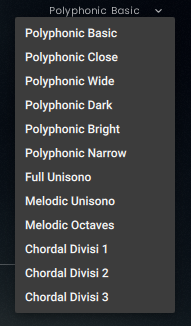
- Polyphonic Basic - A classic string ensemble voicing with a traditional chord tone distribution across the sections. Suitable for all articulations.
- Polyphonic Close - A close string ensemble voicing with minimal spacing between chord tones. Suitable for all articulations.
- Polyphonic Wide - A wide string ensemble voicing for an especially broad and spacious sound. Suitable for all articulations.
- Polyphonic Dark - A modern ensemble voicing with a dark and rich string tone. Suitable for all articulations.
- Polyphonic Narrow - A very tight voicing with an intriguing interlocking note distribution, creating an emotional and focused sound. Suitable for all articulations.
- Full Unisono - All sections play exactly the same chord tones in unison, resulting in a dense and powerful ensemble sound. Suitable for all articulations except legato.
- Melodic Unisono - A broad brush for single-line unison melodies. Suitable for all articulations — please play monophonically only.
- Melodic Octaves - A lush Hollywood-style octave unison for soaring single-line melodies with beautiful legato transitions. Suitable for all articulations — please play monophonically only.
- Chordal Divisi 1 - A finely spread ensemble voicing featuring divisi in some sections, ideal for dense, multi-voice chords. Due to the divisi note allocation, not suitable for legato.
- Chordal Divisi 2 - A finely spread ensemble voicing featuring divisi in some sections, ideal for dense, multi-voice chords. Due to the divisi note allocation, not suitable for legato.
- Chordal Divisi 3 - A finely spread ensemble voicing featuring divisi in some sections, ideal for dense, multi-voice chords. Due to the divisi note allocation, not suitable for legato.
To create custom voicings there are several options to choose from:

Each Instrument can be adjusted in their octave range. From -3 octaves to +3 octaves. -1 octaves for example means: Play a C2 note and the instrument set to -1 octaves will play a C1 note instead (if that is in its playing range).
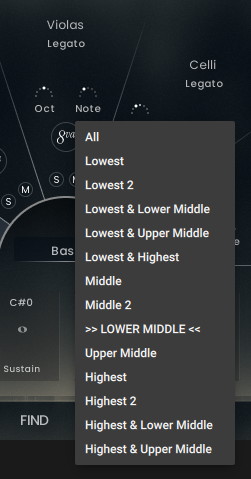
Each Instrument can be adjusted to only play specific notes. The note selection analyzes the pressed notes and distributes the midi signals to the instruments accordingly. The available options are:
- All
- Lowest
- Lowest 2
- Lowest & Lower Middle
- Lowest & Upper Middle
- Lowest & Highest
- Middle
- Middle 2
- Lower Middle
- Upper Middle
- Highest
- Highest 2
- Highest & Lower Middle
- Highest & Upper Middle

The Add 8va Button adds an octave above the played note to each section.
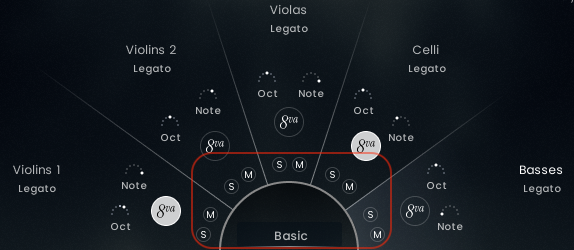
Each section can be soloed or muted.
FIND PAGE
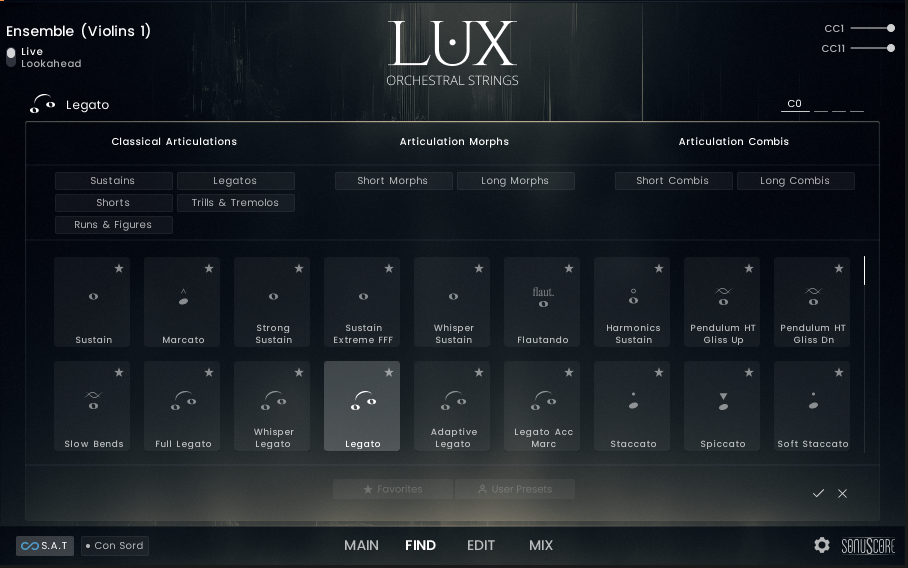
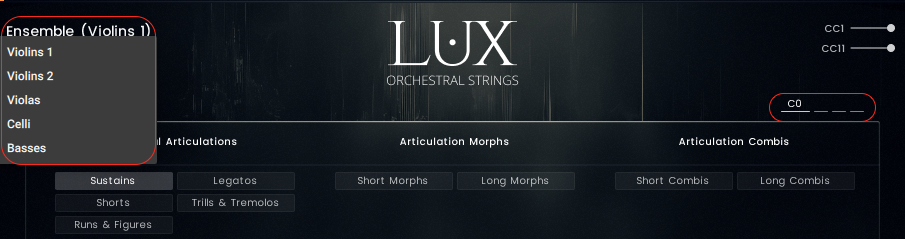
To find the correct articulation for the right section, select the correct instrument using the dropdown menu and choose the correct key switch.

Find articulations by using the different tags. The articulations are devided into three articulation catorgies.
- Classical Articulations - traditional articulations can be found here.
- Articulation Morphs - more than one articulation mapped across the mod wheel. Morph between both articulations by moving the mod wheel up or down.
- Articulation Combis- more than one articulation is played at the same time. Layered combinations of different articulations.
EDIT PAGE
For the edit options please refer to Chapter 4.4.
Please note, saving articulations is not possible in the ensemble instrument.
MIXER PAGE
 Adjust the balance between the sections using the volume slider on the mixer page.
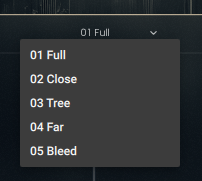
Besides the Full Mix you can choose the individual Mic Postitions.
Mic Mixes are not available for the ensemble instrument. To mix several mic positions please load the ensemble instrument to different tracks using the same midi data and mixing the mic positions per track.
SINGLE INSTRUMENTS
MAIN PAGE
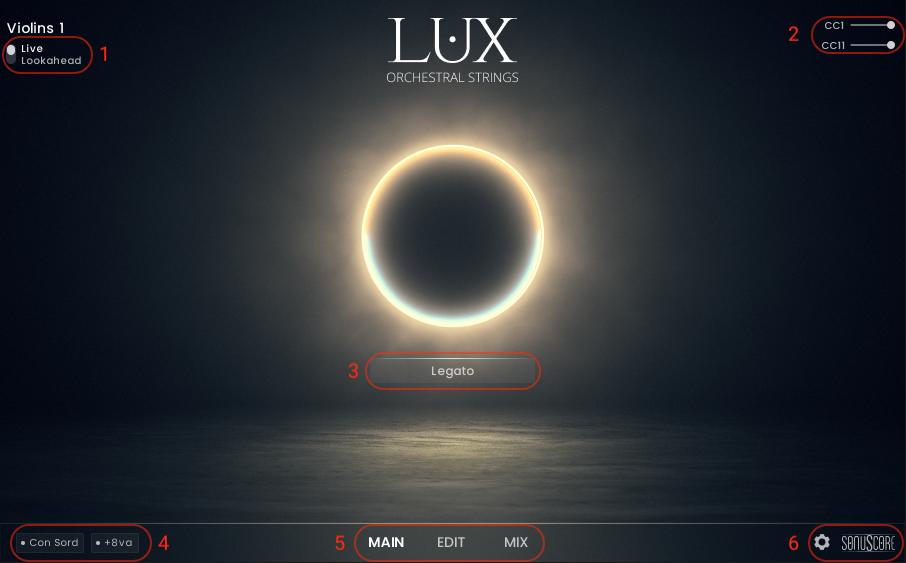
- The Ensemble instrument like the key switch instrument has two playing modes: Live Mode and Lookahead.
In Live Mode all articulations play as they are and the initial note of the legato has a -150ms delay, while the rest of the legato reacts to a -250ms delay. Use this mode when finding melodies and live playing.
In the Lookahead Mode all sample starts are unified and optimized for a delay of -250ms. Set your track delay to this value and LUX will be perfectly in sync with your other instruments. - The mod wheel is mapped to CC01 and controls the dynamics.
Expression is mapped to CC11 and controls the volume. - Shows the currently loaded single articulation.
- Turns the Con Sordino feature on/off.(see 4.1.3.)
Turns the add octave feature on/off.(see 4.1.4.) - Page Selection.
- Settings page (see 4.2.) and Credits.
EDIT PAGE

SUBARTICULATION EDITOR
Longs
- Enter the Subarticulation Browser and as Solo/Mute Buttons.
- Edit how the Subarticulation behaves when moving the mod wheel.(see 4.4.2.)
- Dynamic Layer Range - Move the slider to exclude dynamic layers from playing.
- Adjust the volume of the Subarticulation.
Legatos
- Enter the Subarticulation Browser and as Solo/Mute Buttons.
- Edit how the Subarticulation behaves when moving the mod wheel.(see 4.4.2.)
- Dynamic Layer Range - Move the slider to exclude dynamic layers from playing.
- Adjust the volume of the Subarticulation.
- Adjust the speed of the transition. Clicking the + symbol will adapt the transitions speed to your playing.
- Adjust the volume of the transition.
Shorts
- Solo/Mute Button.
- Edit how the Subarticulation behaves when moving the mod wheel.(see 4.4.2.)
- Dynamic Layer Range - Move the slider to exclude dynamic layers from playing.
- Adjust the volume of the Subarticulation.
- Adjust the tightness of the subarticulation. Bringing up the slider will shift the sample start more into the sample.
- Adjust the Round Robin order from ordered to random.
ARTICULATION SETTINGS
VOLUME CURVE SETTINGS
- Adjust the min volume.
- Adjust the max volume.
- Adjust the slope of the Volume Curve.
- Select one of the pre designed Volume Curve Presets.
VOLUME CURVE PRESETS
Full - Uses the full range with a slight slope. The Full (0) preset is the al niente variant.
Soft - Uses a softer max velocity with a slight slope. The Soft (0) preset is the al niente variant.
Strong - Uses a louder min velocity with a slight slope.
Constant - Uses a constant min and max velocity.
Custom - This is shown, when the initial preset was manually altered to a custom setting.
MIXER PAGE
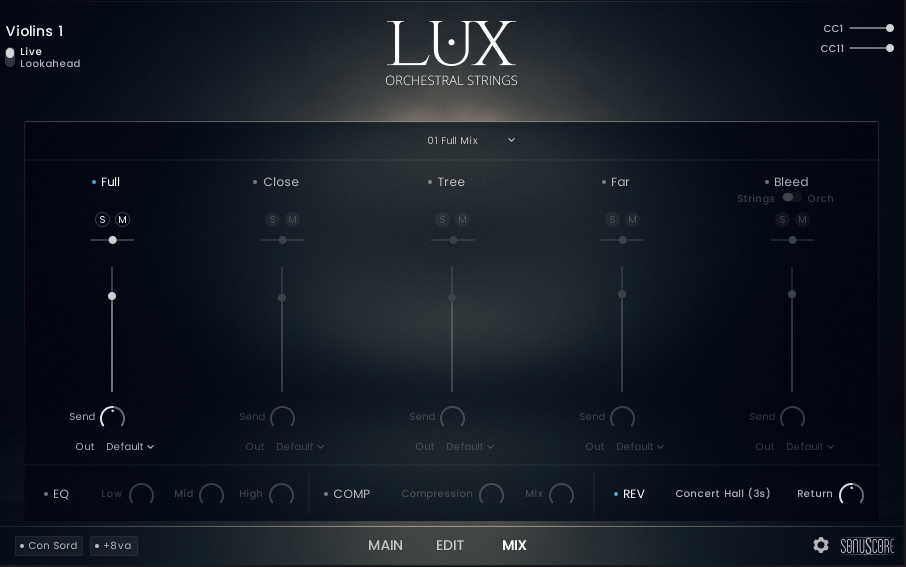
Please see 4.5.
CREDITS
Product Concept and Design: SONUSCORE: Tilman Sillescu, Jonas Meyer, Simon Schrenk, Luka Swoboda
Project Lead: Tilman Sillescu, Jonas Meyer
Orchestra: Czech Stellar Ensemble
Recording: StarRecrdings Production in Brno Besední dům
Orchestrator, Session Manager, Production: David Christiansen
Recording Manager, Postpro: Christian Wirtz
Mixing: Peter Fuchs
Sample Editing: Matthias Meeh, Luka Swoboda, Jonas Hausotter, Steffen Luetke, Nicolai Patricio, Jonas Oehlenschlaeger, Gregor Schmitz, Martin Hopfengart, Marit Schmitt, Jonas Schüsselin, Stefan Kemler
Reaper Scripting: Nico Dilz, Joshua Hank
Kontakt Scripting: Jonas Meyer, Mathias Vatter (Built with cksp)
NKS Implementation: Stefan Kemler
User Interface Design: Benedikt Huster, Jannic Böhme, Jonas Hausotter (Figma's Simple Design System UI Kit)
Artwork: Jannic Böhme, Benedikt Huster
Marketing: Benedikt Huster, Tobias Kunz, Jannic Böhme, Felix Möbius, Louisa Wolf, Zoé Friedbacher, Russ Hughes
Web Programming: Lukas Ruschitzka, Benedikt Huster
Videos: Nadja Demmler, Jannic Böhme, Russ Hughes, Benedikt Huster, Luka Swoboda, Trent Martin
Quality Assurance: Tilman Sillescu, Simon Schrenk, Luka Swoboda, Lukas Ruschitzka
Manual: Simon Schrenk
Special Thanks
Bleed Mic Idea: Russ Hughes
Consulting, Sourcing: Robin Hoffmann, Steffen Brinkmann
Changelog
V1.1
[NEW] Expanded Content: Added Ostinato and Movement articulations as well as Motion articulation set for Violins, Violas, and Celli.
[NEW] Velocity Range Mode: New editor functionality allowing subarticulation selection via input velocity.
[NEW] Portamento Control: Integrated a dedicated Legato-Portamento keyswitch using the Velocity Range Mode.
[NEW] Extended Keyswitch Selection: New articulation pages supporting up to 24 keyswitches in one patch.
[UPDATED] Parameter Refining: Increased resolution for Volume parameters and optimized Transition Volume resolution.
[UPDATED] Voice Management: Implemented a limit of five concurrent release samples per subarticulation to reduce noise.
[UPDATED] Ensemble Patch: Improved the playability of the ensemble instrument.
[FIXED] Editor Memory: The Editor now persists and recalls the last edited subarticulation slot.
[FIXED] Round Robin Logic: Enhanced "Ordered" mode behavior to better handle note next to one another.
V1.0.1
[UPDATED] Legato delay timings have been significantly improved, reducing overall latency and enhancing the latency reducing effect of the "Transition Speed" parameter.
[UPDATED] Improved Subarticulation Browser behavior on edit page.
[UPDATED] Category names in Subarticulation Browser now match conventions established in Articulation Browser.
[FIXED] Wrong mapping in one patch in one dynamic layer.
[FIXED] Behavior of some slow bend patches.
[FIXED] Volume curve preset menu now correctly displays "Custom" on user changes.
[FIXED] 8va button for Celli in the Ensemble instrument is not blocked anymore.
[FIXED] Fixed hanging notes issue using the sustain pedal in the ensemble nki.
[FIXED] Other small GUI fixes for overlapping controls.
[FIXED] Removed deprecated entry from Ensemble mic position menu